
3-Axis CNC Router Table Guide: Work Surface, Workholding, and Setup Fundamentals
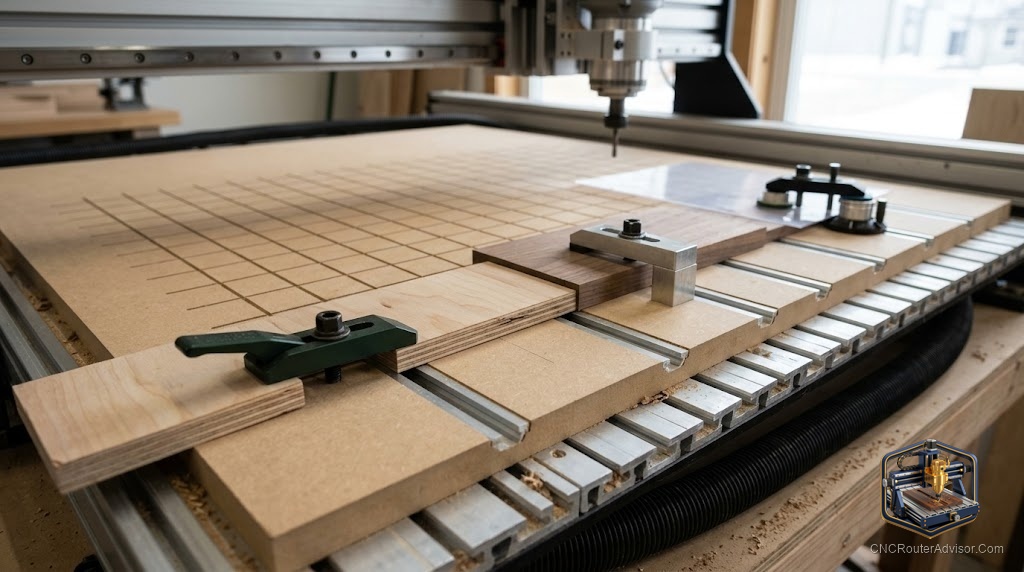
Every cut a CNC router makes starts with the table - not with the toolpath, not with the spindle, not with the software, but with the table. If the material is not flat, is not held rigidly, or does not sit at a consistent Z height relative to the machine’s coordinate system, the program cannot compensate. The software and the machine will faithfully execute the programmed toolpath; what they cut will be as accurate as the workpiece positioning allows. Getting the table right is the foundational setup work that determines whether the machine’s precision is realized in the finished parts.
A 3-axis CNC router table is the work surface system that supports the material being cut, provides a consistent Z-height reference for the machine’s coordinate system, and holds the material immovably during cutting operations. It includes the machine’s primary table structure (T-slot aluminum, welded steel, or vacuum-zoned surface), the sacrificial spoilboard mounted on top of it, and the workholding system (mechanical clamps, vacuum, tape, or tabs) that secures the material through the cutting program.
The short guide: three things make a CNC table work correctly - spoilboard flatness (surface variation under 0.5mm across the full area), workholding reliability (the material does not move during any phase of the cut), and Z-zero consistency (the machine knows exactly where the material surface is). Set these three up correctly and the table becomes invisible, doing its job without being the source of any problem.
Understanding the machine table structure
The underlying table structure varies by machine type:
T-slot aluminum table. Standard on most prosumer machines (Onefinity, Avid CNC, Shapeoko). The T-slots accept T-bolt hold-down hardware in any position along the slot. Flexible for varied workpiece sizes and shapes. The spoilboard mounts on top and is replaced as it wears.
Vacuum table (zoned). Standard on most commercial production machines (1325 and above). Vacuum is applied through grooves in the table surface; material sitting over an active zone is held flat and immovable without mechanical clamps. Multiple zones allow holding partial sheets (deactivate the zone under the already-cut area while holding the remaining sheet under other zones).
Open-frame/flat surface (common on desktop hobby machines). The machine’s gantry moves over a flat table surface. The spoilboard is secured to this surface by screws or clamping.
Spoilboard installation and surfacing
The spoilboard is the single most critical table component for cut quality. Any deviation in the spoilboard surface from a perfectly flat plane relative to the machine’s XY travel produces a corresponding Z-depth error in the cut. A spoilboard with 0.5mm crown at its center runs parts 0.5mm shallower at that point than at the edges - visible in through-cuts and pocket depth variation.
Installation: Fasten the MDF spoilboard firmly and evenly to the machine table. Do not allow it to bow or flex when fastened.
Surfacing: Run a wide spoilboard surfacing bit (Genmitsu spoilboard surfacing bit) across the full table area in overlapping passes at low depth (0.5 - 1mm). The goal is for the machine’s spindle path to touch every point on the spoilboard surface, effectively mapping the spoilboard to the machine’s XY plane. Any area that the bit does not touch after a full-coverage pass indicates that point is lower than the surrounding area - a surface imperfection that needs addressing.
Maintenance: Resurface when through-cut depth consistency deteriorates, when the surface has accumulated significant routing damage, or on a scheduled interval for production shops. Replace when resurfacing has reduced the spoilboard below approximately 15mm.
Workholding for 3-axis CNC routing
Mechanical hold-down clamps. Hold-down clamps (toggle clamps, step clamps, cam clamps) seated in T-slots or dog holes provide reliable hold-down for rectangular workpieces. Position clamps to avoid toolpath conflicts.
Program tabs. For through-cuts, tabs (small uncut bridges programmed in CAM) hold parts to the surrounding material through the program. Cut with a flush-cut saw or chisel after the program. Tabs do not work for single-pocket operations but are the standard solution for through-cut part profiling.
Double-sided tape. Adequate for small, light parts on a flat spoilboard. Carpet tape provides the best hold for CNC work. Not adequate for large parts or heavy through-cut loads.
Vacuum hold-down. From a simple shop vacuum connected to a vacuum fixture, to a multi-zone dedicated vacuum pump with a grooved table, vacuum hold-down distributes holding force across the material surface. The most consistent and fastest workholding method for production sheet work.
For the full machine and workshop setup framework, our guide on how to choose a CNC router covers everything from table choice to dust collection.
The takeaway: a 3-axis CNC router table’s performance is determined by spoilboard flatness, workholding reliability, and Z-reference consistency. Surface the spoilboard correctly after installation, choose workholding appropriate to your work type and volume, and the table stops being a variable in your cut quality equation.
Frequently asked questions
How do I surface a CNC router spoilboard? Run a wide spoilboard surfacing bit across the full table area in overlapping passes at 0.5 - 1mm depth until the spindle path has touched every point on the surface.
What spoilboard material is best? 3/4 inch (18mm) MDF for most applications. Consistent density, machines cleanly, and resurfaces predictably.
What is T-slot on a CNC router table? A slotted aluminum profile integrated into the table surface that accepts T-bolts for hold-down hardware in any position along the slot.
How do I prevent through-cuts from moving the part? Program tabs in the toolpath to leave small uncut bridges holding the part to the surrounding material. Cut tabs manually after the program completes.
What vacuum pump size do I need for vacuum workholding? For small to medium machines (up to 24×48), a 1.0 - 1.5kW vacuum pump is adequate. For commercial machines (1325 and above), 2.2kW to 5.5kW pumps are standard.
How often should I replace the spoilboard? When resurfacing has reduced it below approximately 15mm. For production shops, track cumulative resurfacing depth from installation.
References
- Vectric, workholding and tab strategies in VCarve — https://www.vectric.com/
- CNC Router Info, table setup and spoilboard guide — https://cncrouterinfo.com/guides/how-to-choose-a-cnc-router/
- Onefinity CNC, T-slot table setup documentation — https://www.onefinitycnc.com/