
Industrial CNC Router Machine Guide: Compatibility, Setup, and Upgrade Options
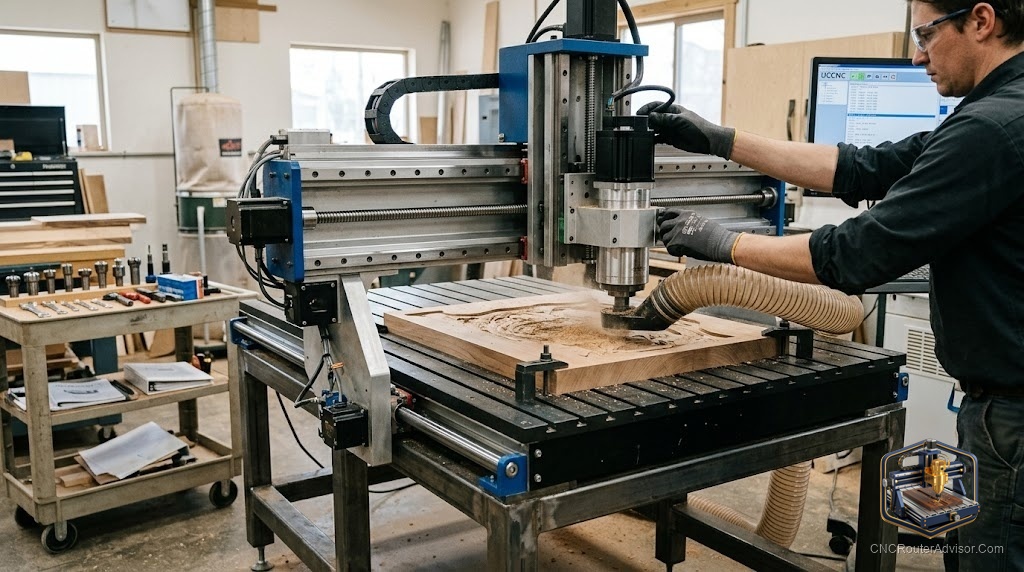
The gap between a hobby CNC router and an industrial one is not really about size, it is about how many hours a day the machine can run without complaining. A hobby machine cuts a sign on Saturday. An industrial CNC router cuts sheet after sheet, all shift, for years, and the whole design exists to make that boring and reliable. If you are moving from a garage machine to a production one, the mental shift is from “can it cut this?” to “can it cut this a thousand times and stay accurate?”
An industrial CNC router machine is a heavy, high-rigidity cutting system built for continuous production, typically with a welded or cast frame, a powerful spindle, and a dust and chip management system that lets it run all day. It is engineered for throughput and repeatability in shops making cabinets, signage, furniture parts, and composites, not for occasional hobby use.
The short version of what separates industrial from commercial or hobby machines: mass and rigidity to resist cutting force, a spindle and drive system rated for constant duty, and the support systems (dust extraction, workholding, chip evacuation) that keep it cutting cleanly for hours. Those support systems are also where most of your setup effort and upgrade budget will go, and they matter far more than beginners expect.
What makes a machine “industrial” rather than just big
A machine earns the industrial label through duty cycle and rigidity, not footprint. Industrial builders lean on heavy frames, sometimes cast, to damp vibration and hold tolerance under load. They run spindles sized for all-day cutting and drive systems (ball screws or rack and pinion) chosen for wear life, not just accuracy on day one. As one industrial manufacturer puts it, the real difference from commercial and hobby machines is continuous, high-precision performance under production demands. In plain terms: a hobby machine survives light use, an industrial one is designed for abuse.
That design shows up in the price and the floor space, so the honest question before buying is whether your volume justifies it. If you cut occasionally, an industrial machine is expensive rigidity you will not use. If you cut to make a living, the reliability pays for itself in parts you did not have to recut.
Setup: the part that decides whether it runs clean
Getting an industrial router cutting well is mostly about the systems around the spindle. Three deserve real attention.
Dust and chip management. At production feed rates, a machine makes dust faster than you would believe, and dust that stays on the cut ruins finish and packs into slots. A proper dust collector paired with a dust shoe on the spindle keeps the cut clear and the air breathable. A STARVAST 100mm dust shoe brush or the similar Acrux7 100mm dust shoe brush is the kind of low-cost consumable that quietly makes every cut better, and both are sized to common spindle diameters. Chip evacuation on deeper cuts sometimes needs an air blast or a cold air gun to clear the slot so the bit is not recutting its own waste.
Workholding. Production means holding material fast and flat, over and over. Industrial shops lean on vacuum tables for sheet goods, but a solid clamping kit and a flat spoilboard cover most other work. A warped or poorly held workpiece is the most common cause of ruined production parts.
Spoilboard prep. A freshly surfaced spoilboard is what makes shallow cuts and tabs behave. A spoilboard surfacing bit flattens the bed so your material sits dead level, which matters more the larger the sheet.
Upgrades worth the money
Once the machine runs, the upgrades that pay back fastest are the unglamorous ones. Better dust extraction protects your lungs and your finish. A touch probe or Z-probe speeds up tool setup and reduces scrapped parts from bad zeroing. Upgraded workholding shaves minutes off every setup, and minutes add up across a production run. Flashy upgrades like automatic tool changers matter only once your volume is high enough that manual tool swaps are the bottleneck. Buy upgrades in the order your actual downtime demands them, not in the order the catalog lists them.
Safety upgrades belong on that list too. Production cutting means more hours near a spinning tool and more dust in the air, so safety glasses, ear protection, and respiratory protection are not accessories, they are part of running the machine responsibly.
Who should buy industrial, and who should not
Buy an industrial CNC router if you are running parts for a business, need all-day reliability, and cannot afford to recut work because a light machine drifted. Skip it if you are a hobbyist or a maker doing occasional projects, because you will pay for rigidity and duty cycle you will never load, and a good prosumer machine will serve you better for less. The dividing line is volume and downtime cost, not ambition.
If you are still deciding where your work falls, our guide on how to choose a CNC router helps match a machine class to your real output.
The honest takeaway: an industrial CNC router is a promise about uptime, not a bigger toy. The frame and spindle get the attention, but the dust management, workholding, and setup discipline are what actually keep it earning. Spend there, and the machine does what industrial means, it just keeps going.
Frequently asked questions
What is the difference between an industrial and a hobby CNC router? Duty cycle and rigidity. Industrial machines are built for continuous, high-precision production with heavy frames and constant-duty spindles, while hobby machines are built for light, occasional use.
Do I need a dust collector for an industrial router? Yes. At production feed rates, dust ruins finish, packs into cuts, and fouls the air. A collector plus a dust shoe on the spindle is essential, not optional.
What is a spoilboard and why surface it? A spoilboard is the sacrificial layer under your material. Surfacing it flat with a surfacing bit ensures your workpiece sits level, which is critical for shallow cuts and clean tabs.
Is an automatic tool changer worth it? Only at higher volumes where manual tool swaps become the bottleneck. For most shops starting out, manual changes and a good touch probe are enough.
Can an industrial CNC router cut metal? It can cut soft metals like aluminum and brass well with the right tooling and speeds. Hard steel is the domain of a CNC mill, not a router.
What safety gear do I need for production cutting? Safety glasses, hearing protection, and respiratory protection, plus good dust extraction. More hours near the tool means more exposure to manage.
References
- C.R. Onsrud, “Industrial CNC Machines: The Difference Between Industrial and Commercial or Hobby Machines” - https://cronsrud.com/industrial-cnc-machines/
- Industrial CNC, “CNC Routers | Best Selling CNC Router Tables” - https://www.industrialcnc.com/CNC-Routers.html
- Daltons Wadkin, “Ultimate Buyer’s Guide to CNC Routers” - https://www.daltonsmachines.com/buyers-guides/ultimate-buyers-guide-to-cnc-routers