
CNC Router Dust Boot Guide: Compatibility, Setup, and Upgrade Options
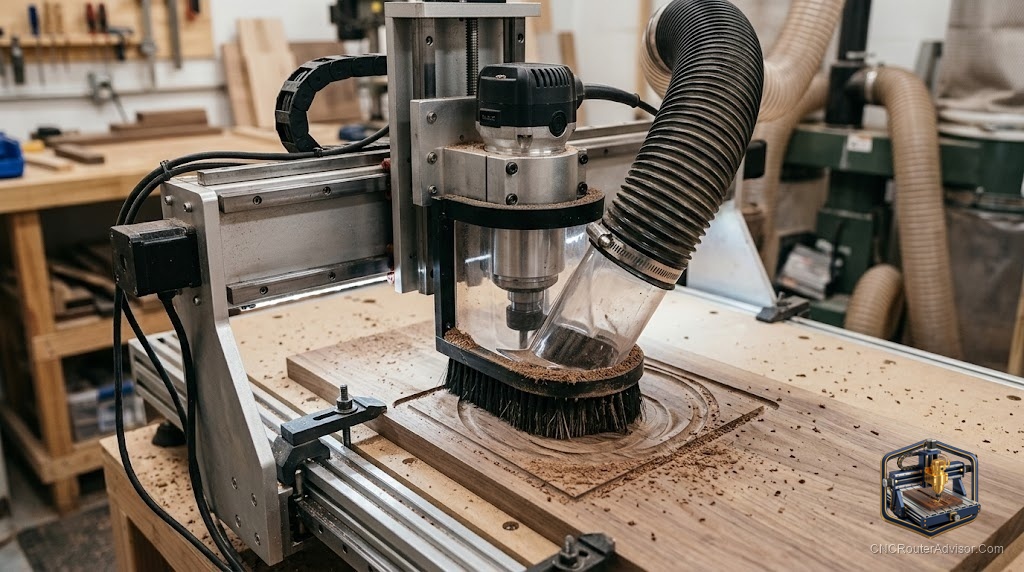
Dust is the most predictable problem in CNC routing and the one people manage worst. A machine running MDF or hardwood generates a genuinely impressive volume of fine particles that get into every bearing, every lead screw, every crevice. A dust boot, the shroud that surrounds the spindle and directs chips and dust into a collector, is not a luxury upgrade. It is one of the first practical additions to any CNC that is actually being used.
A CNC router dust boot is a shroud that attaches near the spindle and uses a combination of bristles, a flexible skirt, and a vacuum port to capture chips and dust at the point where they are created. The vacuum draws debris into a collector instead of letting it settle across the machine and the shop.
Short answer for anyone shopping: a universal adjustable dust boot that mounts to your machine’s Z-plate and accommodates your spindle diameter is the most practical starting point. Pair it with a proper shop vacuum or dust collector, because a boot is only as good as the suction behind it.
What a dust boot actually does
The key is source capture. Pulling dust out before it disperses is vastly more effective than filtering the air after it has spread. A dust boot positioned a few millimetres above the workpiece, with bristles or a skirt sealing around the cut zone, creates a low-pressure area that pulls chips and dust straight into the vacuum hose. Done right, you come back to a machine that needs a quick wipe rather than a full clean.
Without it, fine MDF dust and wood chips coat the rails, lead screws, and electronics over time, which shortens machine life and is a genuine respiratory hazard.
Types of dust boots
Fixed-height boots mount at a set distance from the workpiece. Simple and robust, but you need to re-set the height when switching between material thicknesses. Good for shops that run similar material consistently.
Adjustable or floating boots ride against the workpiece surface through a spring or gravity mechanism, keeping the seal consistent regardless of variation in material height. The most popular choice for general use because they adapt without manual adjustment.
Magnetic or quick-release boots prioritise fast removal for bit changes, which matters on a machine that sees frequent tooling swaps.
Compatibility: what to check before buying
Three things before you commit. First, spindle diameter: the boot must fit around your spindle or trim router. Second, Z-plate mounting: most boots attach to the Z-axis plate; confirm the mounting pattern or use a universal clamp design. Third, clearance: the boot must leave enough room for the bit length and your deepest cut depth without bottoming out. A boot that sits too high loses its seal; one that is too long crashes into clamps.
Pairing with the right dust collection
A dust boot with weak suction barely performs. At minimum, a decent shop vacuum with a cyclone pre-separator keeps the filter from clogging constantly. For a machine that runs for hours, a proper dust collector is the right partner. The boot creates the seal; the collector provides the draw.
Upgrade options
Many CNC manufacturers sell boots for their specific machines, and third-party printed designs exist for almost every popular model. For an upgrade, look for a floating design with replaceable bristles. Bristles wear down and get cut by the bit over time; replaceable ones let you maintain the seal without replacing the whole boot. Some premium boots add an integrated view window to watch the cut without removing the shroud.
The verdict
A dust boot is one of the best return-on-investment additions to a working CNC router: it protects the machine, extends component life, and makes the workspace genuinely safer. Buy for your spindle diameter, confirm Z-plate compatibility, and pair it with real dust collection. Floating designs with replaceable bristles are the most practical for mixed work.
Three things to remember:
- Source capture at the cut point is far more effective than filtering dispersed dust.
- Check spindle diameter, Z-plate mounting, and clearance for your bit length before buying.
- A dust boot is only as good as the suction behind it; pair it with a proper shop vacuum or dust collector.
FAQ
What is a CNC router dust boot? A shroud that surrounds the spindle area, using bristles or a skirt plus a vacuum port to capture chips and dust at the source and direct them into a collector.
Do I really need a dust boot? For any regular use, yes. Fine CNC dust, especially MDF dust, is a respiratory hazard, and particles that settle in rails and lead screws shorten machine life significantly.
Fixed or floating dust boot: which is better? Floating boots maintain their seal across varying material thicknesses without manual re-adjustment, making them more practical for general use.
What vacuum do I need with a dust boot? At minimum, a shop vacuum with a pre-separator to protect the filter. A dedicated dust collector is better for long sessions.
How do I know if a dust boot is compatible with my router? Check spindle diameter, Z-plate mounting pattern, and clearance for your typical bit length and cut depth.
How long do the bristles last? Bristles wear and can be cut by bits on shallow passes. Boots with replaceable bristle strips let you maintain the seal cheaply.
Can I 3D-print a dust boot? Yes. Most popular CNC models have community-designed printable dust boots with replaceable brush strip inserts.
References
- Avid CNC, Dust Boot and Dust Foot Options for CNC Routers: https://www.avidcnc.com/accessories/dust-collection/
- CNC Router Info, How to Choose a CNC Router: https://cncrouterinfo.com/guides/how-to-choose-a-cnc-router/