
Laguna CNC Router Dust Boot Upgrade: Compatibility, Setup, and Options
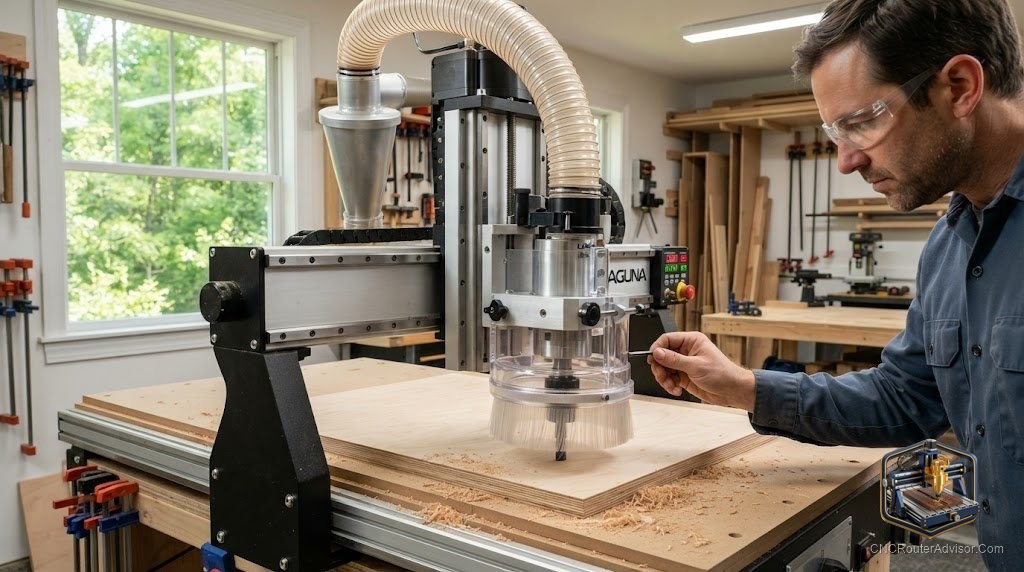
The dust boot is the accessory that owners underestimate right up until the moment they are vacuuming a quarter-inch of MDF dust off every surface in the shop for the third time in a week. Laguna’s CNC routers are capable machines, and the stock dust collection on most of them works, but works and works well are different standards. The gap between them is exactly why the aftermarket dust boot upgrade exists and why it is one of the most common first upgrades Laguna owners make.
This guide covers the practical reality of upgrading the dust boot across Laguna’s router lineup: which machines the upgrades fit, what the stock boots do and do not do, what the aftermarket options improve, and how to set one up so it actually captures chips instead of just looking like it should.
A dust boot (also called a dust shoe) is a brush-rimmed shroud that surrounds the router bit and connects to your dust collection, capturing chips and dust at the moment of cutting before they escape into the shop air. On a Laguna CNC router, a dust boot upgrade replaces or improves the stock shoe to increase airflow capture, improve brush contact with the workpiece, and often add tool-free height adjustment or quick-release brush swapping.
For most Laguna owners, the upgrade is worth it: better chip capture means cleaner air, less cleanup, longer tool life from better chip evacuation, and clearer visibility of the cut. The right upgrade depends on which Laguna machine you own, so identifying your exact model is the first step.
Identifying your Laguna machine first
Laguna’s router line spans several very different machines, and dust boot compatibility is model-specific:
- Desktop machines: IQ, IQ Pro, Creator, Creator Pro. These are the small-format machines. Laguna sells an OEM dust shoe for the Creator and Creator Pro. The IQ and IQ Pro have a more limited OEM accessory situation, which is why owners frequently look to aftermarket or DIY solutions, especially for the IQ Pro ATC configuration where clearance around the tool changer complicates fitment.
- Industrial machines: SmartShop 1, SmartShop 2, SmartShop 3, Swift. These are the large-format production machines. Laguna sells the KX24DS1 dust shoe for the SmartShop II and III router systems. Aftermarket upgrade boots (such as those from PDX CNC) target the SmartShop 2 specifically.
Before buying any upgrade, confirm the exact model and, for ATC machines, whether the tool-change mechanism affects clearance around the spindle. An upgrade sized for a standard spindle configuration may not clear an ATC setup.
What the stock dust boot does and does not do
The stock Laguna dust boots capture the bulk of chips under normal cutting, and for many users they are adequate. Where they fall short, in owner reports, is in three areas: airflow volume (the shroud geometry does not focus enough of the vacuum’s airflow at the cutting point), brush flexibility and replacement (worn or melted brushes are not always easy to swap), and height adjustment (getting the brush to ride correctly on varying material thicknesses).
The most common specific complaint is brush contact. If the brush does not maintain light contact with the workpiece surface, the vacuum loses its seal and chips escape. On uneven or thin stock, or when the boot height is not adjustable enough, this is where dust escapes into the shop.
What aftermarket upgrade boots improve
The main aftermarket option for Laguna machines comes from PDX CNC, which makes upgrade dust boots engineered specifically for Laguna router spindle dust collection. The improvements these target are:
- Focused airflow. The upgrade shroud geometry concentrates the vacuum airflow closer to the cutting action, improving capture at the source.
- Flexible brush options. Different brush lengths and densities for different materials and cutting situations, with easier swapping when brushes wear.
- Better height management. Improved adjustment so the brush rides correctly on varying material thickness, maintaining the vacuum seal.
For an owner who cuts a lot of MDF, plywood, or other high-dust materials, or who runs the machine in a shared or enclosed space where air quality matters, the airflow and brush improvements are the reason to upgrade.
Setup for actual dust capture
A dust boot only performs if the rest of the system supports it. Setting one up for real capture involves more than bolting it on:
- Match your vacuum or dust collector to the boot. A dust boot focuses airflow, but it cannot create airflow that the vacuum does not supply. A shop vacuum with adequate sealed suction or a proper dust collector with the right CFM at the boot is required. An undersized vacuum makes even the best boot underperform.
- Set brush height for light contact. The brush should just kiss the workpiece surface, maintaining the vacuum seal without dragging so hard it deflects the cut or wears prematurely. Re-check this whenever material thickness changes.
- Keep the hose run short and smooth. Long, kinked, or small-diameter hose runs kill airflow. Route the collection hose as directly as possible with the largest diameter the boot accepts.
- Replace worn brushes promptly. Once brushes wear short or melt (from heat on aggressive cuts), the seal is lost. Keep spare brush material on hand; this is exactly why quick-swap brush designs are a selling point of the upgrades.
Compatibility quick reference
- Creator / Creator Pro: Laguna OEM dust shoe available; aftermarket options more limited.
- IQ / IQ Pro: OEM options limited; aftermarket and DIY common. Confirm ATC clearance on IQ Pro ATC before buying.
- SmartShop 2: Laguna KX24DS1 (II/III) OEM shoe; PDX CNC upgrade boot targets this machine.
- SmartShop 3: Laguna KX24DS1 OEM shoe fits II and III.
- Swift: Laguna OEM dust boot; confirm exact fitment and brush sizing for your configuration.
Always confirm current fitment with the supplier against your exact model and spindle configuration before ordering, since Laguna’s lineup and accessory catalog change over time.
The verdict
A dust boot upgrade is one of the highest-value quality-of-life improvements a Laguna owner can make, but only if you match it to your exact machine and pair it with adequate suction. Identify your model precisely, confirm ATC clearance if applicable, choose the OEM or PDX CNC upgrade that fits, and set the brush height and hose run correctly. Done right, it is the difference between a shop that stays clean and one that does not.
Three things to take with you:
- Dust boot compatibility is model-specific; identify your exact Laguna machine and spindle configuration before buying, especially on IQ Pro ATC machines where clearance is tight.
- The most common capture failure is lost brush-to-workpiece contact; adjustable height and prompt brush replacement matter more than most owners expect.
- The best boot underperforms with an undersized vacuum; match your suction and keep the hose run short and large-diameter.
FAQ
What is a dust boot on a CNC router? A brush-rimmed shroud that surrounds the router bit and connects to dust collection, capturing chips and dust at the point of cutting before they escape into the shop. It is also called a dust shoe.
Does Laguna make a dust shoe for its CNC routers? Yes. Laguna offers OEM dust shoes including one for the Creator and Creator Pro desktop machines and the KX24DS1 for SmartShop II and III router systems. Availability varies by model and over time.
What aftermarket dust boot fits a Laguna CNC router? PDX CNC manufactures upgrade dust boots engineered specifically for Laguna router spindle dust collection, with the SmartShop 2 being a specific target. Confirm fitment against your exact model before ordering.
Will a dust boot fit a Laguna IQ Pro with ATC? Clearance around the automatic tool changer on the IQ Pro ATC complicates dust boot fitment, and owners report difficulty finding a perfect fit. Confirm ATC clearance specifically with any supplier before buying, and expect that some DIY adaptation may be required.
Why is my dust boot not capturing chips well? The most common causes are inadequate vacuum suction, the brush not maintaining light contact with the workpiece (lost seal), worn or melted brushes, or a long, kinked, or undersized collection hose. Address suction, brush height, brush condition, and hose routing.
Does a dust boot upgrade improve tool life? Indirectly, yes. Better chip evacuation from the cut reduces recutting of chips and heat buildup, which can extend bit life and improve cut quality, in addition to keeping the shop cleaner.
References
- Laguna Tools, CNC dust shoe accessories: https://lagunatools.com/product-category/accessories/industrial-accessories/
- PDX CNC, Dust Boot for Laguna CNC Router: https://pdxcnc.com/products/dust-boot-laguna