
How to Set Up a Safe CNC Router Work Area: Guidelines and Safety Measures
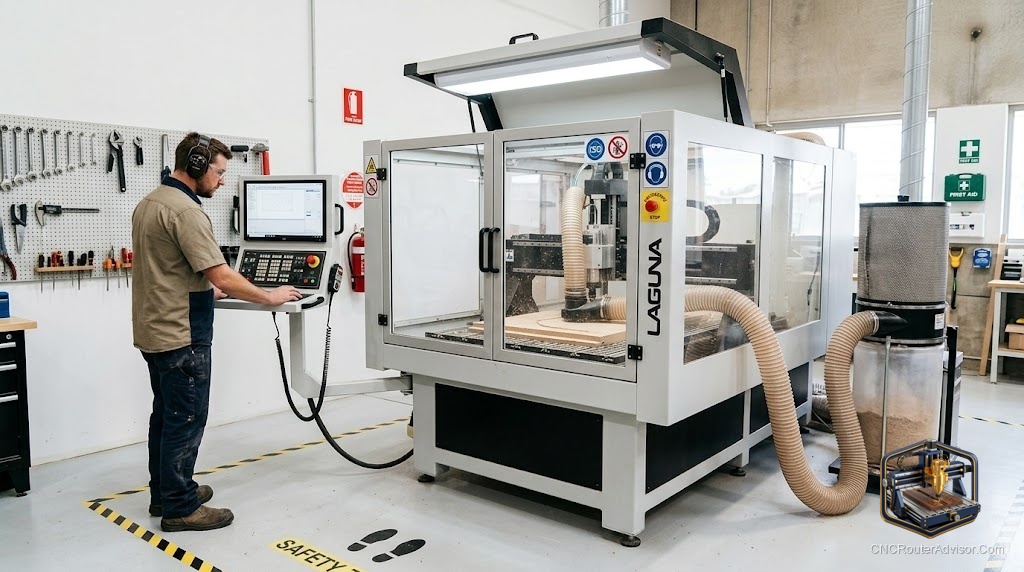
A CNC router is a powerful machine with a spinning cutter, flying chips, fine dust, and automated motion, and a safe work area is what stands between routine operation and a serious injury or health problem. The good news is that CNC router safety is largely about setup and habits: a well-arranged work area, the right protective equipment, proper dust collection, and consistent operating practices dramatically reduce the real risks. This guide covers how to set up a safe CNC router work area and the workshop safety measures that keep every job incident-free.
A safe CNC router work area is a workspace arranged and equipped to minimize the machine’s hazards, flying chips and debris, fine wood dust, spinning tooling, electrical risk, and moving parts, through proper layout, protective equipment, dust collection, and safe operating practices. Setting one up correctly is the foundation of safe CNC operation.
The short answer on a safe work area: give the machine a stable, well-lit, well-ventilated space with clearance around it, add effective dust collection, keep eye and hearing protection and a fire extinguisher at hand, secure workpieces and keep hands clear of the cutting area, and never leave a running job unattended. Setup plus habits prevent the overwhelming majority of incidents.
Setting up the work area
1. Stable, level placement. Mount the machine on a sturdy, level bench or stand that handles its weight and resists vibration. A wobbly base hurts both safety and cut quality.
2. Adequate clearance. Leave space around the machine for the full travel of the gantry, for loading material, and for you to move safely. Keep the area uncluttered, no tools or offcuts in the work zone.
3. Good lighting. Bright, shadow-free lighting lets you see the cut, the tool, and any problems clearly.
4. Ventilation. Ensure airflow to manage dust and any fumes (especially if you also run a laser or cut plastics). Position the machine where you can ventilate or extract effectively.
5. Electrical safety. Use proper, grounded electrical connections rated for the machine. Keep cords clear of the cutting area and away from dust accumulation and moisture. In humid climates, protect electronics from moisture.
6. Dust collection. Fit a dust shoe/boot connected to a shop vac or dust collector. Fine wood dust is both a respiratory hazard and a fire/explosion risk in accumulation, controlling it at the source is essential.
7. Fire safety. Keep a suitable fire extinguisher nearby (essential if you run a laser). Friction and lasers can ignite dust and material, never leave running jobs unattended.
Personal protective equipment
- Eye protection: safety glasses at all times, chips and broken bits fly.
- Hearing protection: routers and spindles are loud; use ear protection on long jobs.
- Respiratory protection: a dust mask/respirator for fine dust, especially with MDF and hardwoods, alongside dust collection.
- No loose items: no loose clothing, jewelry, gloves, or long hair near the moving/spinning parts, they can catch. (Notably, gloves are discouraged near rotating tooling.)
Safe operating practices
- Secure the workpiece firmly (clamps, tape/glue, vacuum, fixtures). A workpiece that shifts or lifts is a major hazard.
- Keep hands clear of the cutting area while the machine runs, use the software/controls, not your hands, to interact.
- Check before starting: correct bit installed and tight, correct zero/origin, toolpath and material set up right, and clamps clear of the toolpath.
- Know the emergency stop and keep it accessible, test that you can hit it instantly.
- Never leave a running job unattended, stay present to stop it if something goes wrong (broken bit, loose workpiece, fire).
- Let the spindle stop before reaching in, and power down/unplug for bit changes and maintenance.
- Do a dry run or air pass for new programs to catch errors before cutting.
- Keep the area clean: clear chips and dust between jobs to reduce fire risk and maintain visibility.
The verdict
Setting up a safe CNC router work area comes down to a good environment plus consistent habits. Give the machine a stable, level, well-lit, and ventilated space with clearance and proper grounded power; fit effective dust collection to control the respiratory and fire hazards of fine dust; and keep eye, hearing, and respiratory protection plus a fire extinguisher on hand. Then operate safely: secure workpieces, keep hands clear, check the setup before every job, know the emergency stop, and never leave a running job unattended. Setup and habits together prevent the overwhelming majority of CNC incidents, making safe operation simply routine.
Three takeaways: set up the environment for safety, stable and level placement, clearance, lighting, ventilation, grounded power, dust collection, and a fire extinguisher; wear eye, hearing, and respiratory protection and avoid loose clothing, jewelry, gloves, and long hair near moving parts; and operate safely, secure workpieces, keep hands clear, check before starting, know the emergency stop, and never leave a running job unattended.
FAQ
How do I set up a safe CNC router work area? Place the machine on a stable, level base with clearance around it, provide bright lighting and ventilation, use grounded power, fit dust collection, and keep protective equipment and a fire extinguisher nearby. Then follow safe operating habits for every job.
What safety equipment do I need for a CNC router? Safety glasses at all times, hearing protection for long jobs, a dust mask/respirator for fine dust, and a fire extinguisher nearby. Avoid loose clothing, jewelry, gloves, and long hair near the spinning tool and moving parts.
Why is dust collection a safety issue? Fine wood dust is a respiratory hazard and, when it accumulates, a fire and even explosion risk. A dust shoe connected to a shop vac or dust collector controls it at the source, protecting your health and reducing fire danger.
Should I wear gloves when operating a CNC router? No, gloves are discouraged near rotating tooling because they can catch and pull your hand in. Keep hands clear of the cutting area entirely while the machine runs, and use the controls rather than your hands.
Can I leave a CNC router running unattended? No. Always stay present while a job runs so you can hit the emergency stop if a bit breaks, a workpiece comes loose, or a fire starts (especially with a laser). Unattended machines are a serious safety risk.
How do I secure a workpiece safely? Use clamps, painter’s tape and CA glue, a vacuum table, or fixtures so the workpiece cannot shift or lift during cutting, and ensure clamps are clear of the toolpath. A workpiece that moves is one of the biggest CNC hazards.
What should I check before starting a CNC job? Confirm the correct bit is installed and tight, the zero/origin is set, the toolpath and material are correct, and clamps are clear of the toolpath. A dry run or air pass for new programs catches errors before cutting.
References
- OSHA, Woodworking and Machine Safety Guidance: https://www.osha.gov/woodworking
- Carbide 3D, Shapeoko Safety and Setup: https://carbide3d.com/support/
- CNCRouterInfo, CNC Safety and Dust Collection: https://cncrouterinfo.com/
- Sawstop / Woodworking Network, Dust Collection and Fire Safety: https://www.woodworkingnetwork.com/
- Onefinity CNC, Setup and Safe Operation Resources: https://www.onefinitycnc.com/