
CNC Router Dust Boot HSD 3D Model: What You Are Looking For and How to Use It
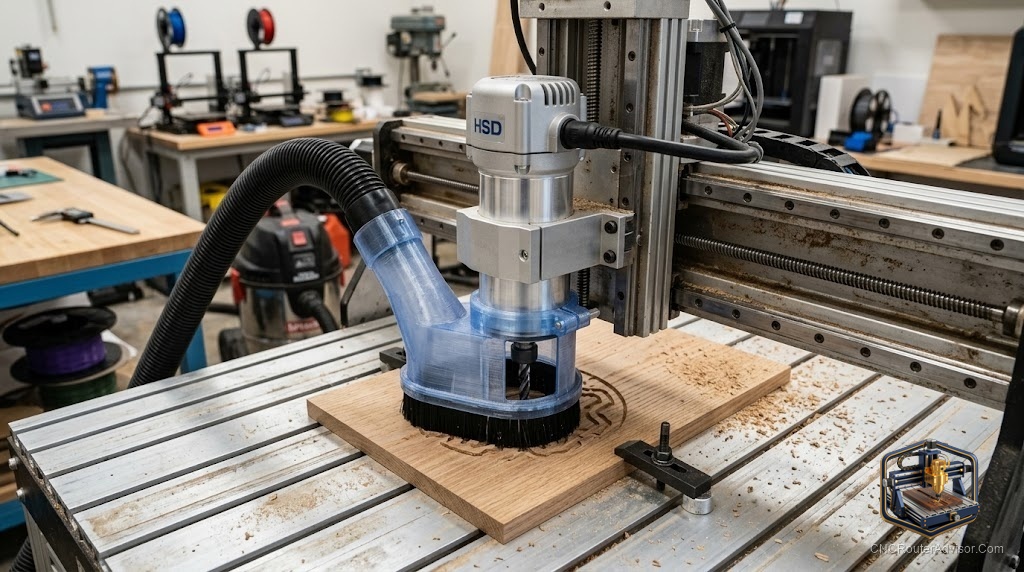
If you own an HSD spindle, you already know the problem: most off-the-shelf dust boots are built for trim routers or generic 52mm to 69mm spindles, not for the larger, differently shaped HSD housing. That is why so many HSD owners go looking for a 3D model instead of a product, a printable file sized to fit their exact spindle. Finding and using the right one is straightforward once you know what actually matters, and it can be a far better fit than anything generic.
A CNC router dust boot HSD 3D model is a digital 3D file, typically an STL or STEP, designed to be 3D printed into a dust boot (dust shoe) that fits an HSD spindle, capturing debris at the cutting point and channeling it to a vacuum hose. The appeal is fit: a model made for HSD dimensions seals around the spindle far better than a universal boot.
The direct answer before the detail: to use an HSD dust boot 3D model well, confirm it matches your specific HSD spindle diameter and nose geometry, check the vacuum hose port size, and make sure the design suits your Z travel and brush length. Then print it in a suitable material and add a brush skirt. If a model does not list the spindle model it fits or its hose size, treat it as a starting point to modify, not a guaranteed fit. The sections below cover what to verify and how to get a clean print that actually seals.
Why HSD spindles need a specific model
HSD spindles are larger and shaped differently from the trim routers and small spindles that most commercial dust boots target. A generic boot either will not clamp securely or will sit at the wrong height, leaving a gap that leaks dust exactly where you do not want it. A model designed around HSD dimensions clamps or mounts correctly and positions the brush skirt at the right height, which is what makes dust collection actually work. Fit is the whole reason to choose a model over a universal product.
What to verify before you print
Check three things first. Confirm the model states the HSD spindle it fits, matching your spindle’s diameter and nose shape. Confirm the vacuum port matches your hose size, or that it can be adapted. Confirm the design suits your machine’s Z travel and the brush length you want, since a boot that hangs too low limits plunge depth. Also look for whether the model is split or has a removable base, which makes bit changes far easier. Verifying these avoids printing a boot that looks right and seals wrong.
Getting a print that seals and lasts
Print the boot in a material that tolerates shop conditions and light impacts. Add a brush skirt (strip brush or a printed brush channel) so the boot sweeps the surface while letting the bit work, and make sure the skirt height leaves enough plunge depth. A transparent or split design helps you see the cut and swap bits. Test fit around the spindle before a full job, and adjust the model or add a gasket if the seal is not snug. A good print plus a proper brush is what turns a model into effective dust control.
If a printed HSD-specific boot is more project than you want, our guide to CNC router dust collection covers ready-made dust shoes and the wider collection setup.
Who should skip the 3D-model route
Skip printing a model if you do not have reliable access to a 3D printer, or if a commercial dust shoe already fits your spindle. The model route is for owners of larger or non-standard spindles like HSD, where off-the-shelf boots simply do not fit. For common trim routers and 52mm to 69mm spindles, a ready-made boot is easier and just as effective.
Final verdict
A CNC router dust boot HSD 3D model solves a real fit problem that generic boots cannot, giving HSD spindle owners a dust shoe made for their exact spindle. The keys are verification and printing: confirm the model matches your spindle diameter, nose shape, and hose size, make sure it suits your Z travel and brush height, and print it in a durable material with a proper brush skirt. Do that and you get better dust capture than any universal boot. Grab a random file without checking fit, and you will print a boot that leaks exactly where it counts.
FAQ
What is a CNC router dust boot HSD 3D model? It is a digital file, usually STL or STEP, designed to be 3D printed into a dust boot that fits an HSD spindle, capturing debris and channeling it to a vacuum hose.
Why not just buy a dust shoe for an HSD spindle? Most commercial boots target trim routers or 52mm to 69mm spindles. HSD spindles are larger and shaped differently, so a model made for HSD dimensions seals far better.
What should I check before printing? That the model fits your specific HSD spindle diameter and nose shape, that the vacuum port matches your hose, and that the design suits your Z travel and brush length.
What material should I print it in? A material that tolerates shop conditions and light impacts. Many owners use tougher filaments for durability, and a split or transparent design helps with visibility and bit changes.
Do I need a brush skirt? Yes. A brush skirt lets the boot sweep the surface while the bit works, improving dust capture. Make sure its height still leaves you enough plunge depth.
Will a generic dust boot model fit my HSD spindle? Not reliably. If a model does not state the HSD spindle it fits or its hose size, treat it as a starting point to modify rather than a guaranteed fit.
References
- HSD, spindle dimensions and specifications reference: https://www.hsdusa.com
- V1 Engineering, dust collection and printed accessory guidance: https://docs.v1e.com
- Autodesk, STL and STEP file format overview: https://www.autodesk.com