
CNC Router Clamps: The Cheap Upgrade That Saves Expensive Mistakes
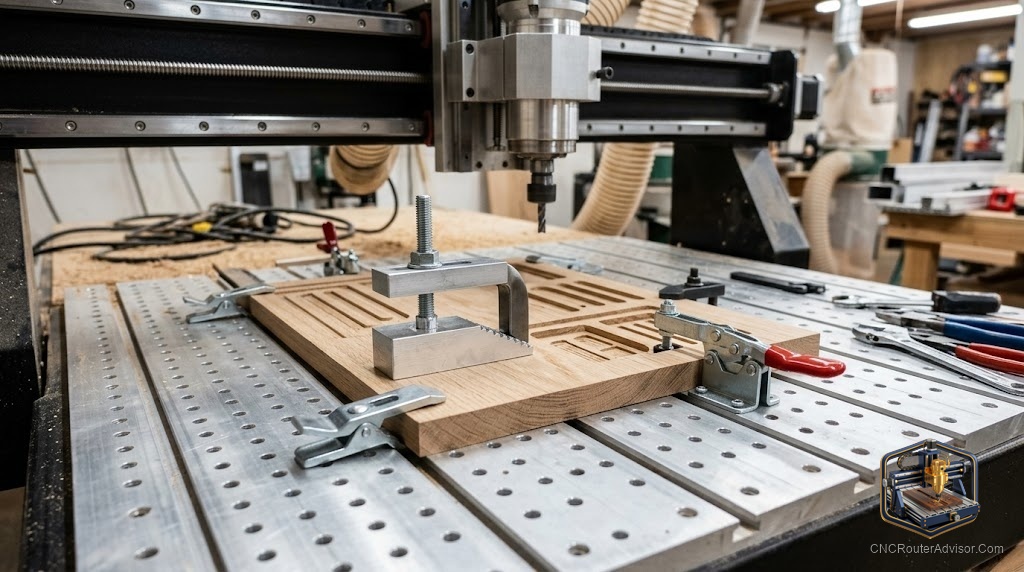
Every CNC owner learns the same lesson eventually, usually at speed: a workpiece that shifts mid-cut ruins the part, can break the bit, and occasionally launches something across the shop. Workholding is the unglamorous foundation of good CNC work, and clamps are where most people start. Good CNC router clamps are cheap insurance against expensive mistakes, and choosing the right ones for your spoilboard is one of the easiest wins in the hobby.
CNC router clamps are workholding devices that secure material to the machine bed during cutting, most commonly hold-down clamps that anchor into a T-track or T-slot spoilboard and press down on the workpiece. Their job is simple but critical: keep the material from moving so the cut stays accurate and safe.
The direct answer before the detail: for most CNC routers, a set of T-track hold-down clamps sized to your spoilboard is the right starting point, and a small kit covers the vast majority of jobs. Verified options are below. Match the clamp length and thickness capacity to your material, keep clamps clear of the toolpath, and add specialized workholding only when a job demands it. The sections below cover the clamp types, verified kits, and how to use them well.
How CNC clamps actually hold work
Most hobby clamps work with a T-track or T-slot spoilboard: a bolt drops into the track, and a stepped clamp presses the workpiece down while the far end rests on a support. Because the track runs the length of the bed, you can position clamps almost anywhere around a part, which is what makes them so flexible. The keys to holding well are enough clamping force, contact near the cutting area, and clamps positioned so the tool never runs into them.
Verified clamp kits worth owning
For a reliable general set, the Genmitsu 4-pack hold-down clamp kit works with T-slot spoilboards and holds material up to about 35 mm thick, a sensible default for most hobby machines. For heavier-duty holding, the Genmitsu 2-piece upgraded T-track hold-down clamp kit offers a sturdier design for the 3040 and 4030 series. If you want more clamps and reach, the UTOOL 4-pack T-track hold-down clamps with longer bolts suit larger work, and the O’SKOOL positionable T-track hold-down clamp kit handles thicker stock up to around 3 inches. The honest caveat on all of them: confirm your spoilboard’s track or slot size and your material thickness before buying, since a clamp that does not fit your track or reach your material is useless.
Using clamps well, and their limits
Good clamping is about placement as much as force. Keep clamps near the cut where movement matters most, plan the toolpath so the tool never hits a clamp, and use enough of them to resist the cutting forces. Clamps do have limits: they hold the edges, so they can get in the way of full-surface jobs, and thin or oddly shaped parts sometimes need other methods. For those, painter’s tape and CA glue, a vacuum table, or low-profile cam clamps fill the gaps. Start with hold-down clamps and add specialized workholding as your jobs demand.
For keeping the shop clean while you cut, pair good clamping with our guide to CNC router dust collection.
Who should look beyond basic clamps
If you run production, full-surface jobs, or many small parts, edge clamps alone will frustrate you, and a vacuum table or tape-and-glue workflow will serve better. Clamps remain the flexible, affordable foundation, but they are not the only tool. Match the workholding to the job rather than forcing every part into the same clamps.
Final verdict
CNC router clamps are the cheapest meaningful upgrade in workholding, and a set of T-track hold-down clamps sized to your spoilboard handles most jobs a hobby machine will see. Choose a kit that matches your track and your material thickness, place clamps near the cut and clear of the toolpath, and add vacuum or tape-and-glue methods only when full-surface or awkward parts demand them. Get workholding right and every other part of the cut gets easier. Skimp on it, and you will meet the expensive lessons that good clamps are designed to prevent.
FAQ
What clamps do I need for a CNC router? For most machines, a set of T-track hold-down clamps sized to your spoilboard is the right start. A small kit covers the majority of jobs; add specialized workholding as needed.
How do CNC hold-down clamps work? A bolt drops into a T-track or T-slot in the spoilboard, and a stepped clamp presses the workpiece down. The track lets you position clamps almost anywhere around the part.
How thick a workpiece can clamps hold? It depends on the kit. Common hold-down clamps handle material up to about 35 mm, while positionable kits can reach around 3 inches. Check the specification against your stock.
How do I keep the tool from hitting a clamp? Plan the toolpath around clamp positions and place clamps clear of the cut. Many CAM programs let you mark clamp locations as avoid zones.
Are clamps enough for all jobs? No. Clamps hold the edges, so full-surface jobs, thin sheets, and many small parts often need a vacuum table or a tape-and-CA-glue method instead.
Will any clamp fit my spoilboard? Not necessarily. Confirm the T-track or T-slot size your spoilboard uses and match the clamp bolts to it, or the clamps will not seat correctly.
References
- SainSmart Genmitsu, T-track hold-down clamp specifications: https://www.sainsmart.com
- V1 Engineering, workholding guidance for CNC routers: https://docs.v1e.com
- Carbide 3D, workholding and clamping reference: https://carbide3d.com