
CNC Table Router: Sizes, Workholding, Dust, and What to Buy
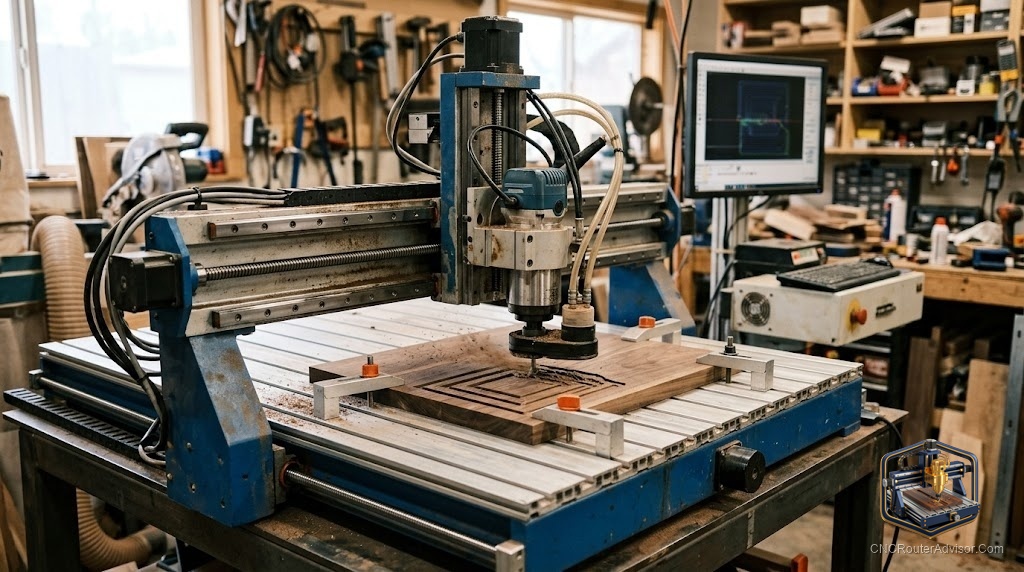
The table is the part of a CNC router that beginners overlook and experienced users obsess over. Everyone shops for spindle power and work area, then discovers that how you hold the work down, capture the dust, and support the material decides whether the machine is a joy or a mess. The table is where cutting actually happens, and getting it right transforms the whole experience.
This guide covers what a CNC router table is, how the sizes differ, and the workholding and dust setup that separate a clean shop from a frustrating one.
What a CNC router table is
A CNC router table is a flat-bed CNC machine where the material lies on a horizontal table and a gantry carries the spinning cutter across it on the X, Y, and Z axes. Guided by G-code, it carves wood, plastics, and soft metals. The table itself is the working surface, and it usually carries a sacrificial layer called a wasteboard or spoilboard that you can cut into and resurface without harming the machine.
These machines range from compact desktop tables to full four-by-eight foot beds that swallow a full sheet of plywood, up to heavy industrial tables. The bigger the table, the larger the parts you can cut, but also the more space, rigidity, and dust control the machine demands. The right table size is the one that matches your typical material sheet, not the largest one you can picture.
The short answer
Choose a CNC router table by the largest material you regularly cut, then invest as much attention in workholding and dust control as in the machine itself. Desktop tables suit small parts and learning, mid-size tables handle furniture components, and four-by-eight tables handle full sheet goods for cabinets and production. Industrial tables from brands like Laguna serve high-volume shops.
For most home users, a mid-size table with solid workholding and real dust extraction is the sweet spot. A rigid desktop machine such as the Genmitsu 4040-PRO MAX is a strong entry that leaves budget for the accessories that make a table usable: Check on Amazon . The machine is only half the setup. The other half is how you hold and clean.
The wasteboard and why it matters
The wasteboard, also called a spoilboard, is a sacrificial layer of MDF or similar material fixed to the table. It protects the machine bed when your cut passes fully through the material, gives you a surface to screw and clamp into, and can be surfaced flat by the machine itself so it is perfectly parallel to the spindle.
A flat, true wasteboard is quietly essential. If it is uneven, your cut depths vary across the table and thin parts cut through in one spot and not another. Plan to resurface the wasteboard periodically, and treat it as a consumable rather than a permanent fixture. Many owners drill a grid of holes or add threaded inserts to make clamping fast and repeatable.
Workholding that keeps parts still
A part that shifts mid-cut ruins the part and often the bit, so workholding deserves real thought. The common methods each have a place. Low-profile clamps around the edges are strong and reusable but must sit clear of the toolpath. Screws driven into the wasteboard hold sheet goods rock-solid for through cuts. Double-sided tape suits thin flat parts. A vacuum table, common on industrial machines, holds full sheets flat without any clamps at all.
Match the method to the part. Heavy hardwood and aggressive cuts want screws or clamps. Delicate or thin material wants tape or vacuum. The goal never changes: the material must not move a hair while the cutter is working, because the machine assumes it is exactly where you left it.
Dust control is not optional
| Tool | What it does |
| Dust shoe | Surrounds the bit to capture chips at the source |
| Shop vac | Handles a desktop machine's dust load |
| Dust collector | Manages the volume from larger tables |
| PPE | Protects you from the fine dust that escapes |
A CNC router table produces enormous amounts of fine dust, and cutting MDF and plywood makes the worst of it. A dust shoe fitted around the bit captures most chips at the source, connected to a shop vac for a desktop machine or a proper dust collector for a large table. Even with good extraction, fine dust escapes, so eye protection and a respirator are basic safety gear, not optional extras. Set up dust control from day one rather than after your shop is coated in a fine layer of it.
Do not forget the Z-probe
A touch probe or Z-probe is a small tool that lets the machine find the exact top of your material and set the Z zero automatically. It is inexpensive, it saves time, and it removes one of the most common sources of ruined first cuts, a Z zero set by eye. On a table where material thickness varies from sheet to sheet, a probe pays for itself almost immediately.
Who should skip a large table
Skip a four-by-eight table if you cut mostly small parts, since it will dominate your shop and demand dust control and rigidity you do not need. Skip the industrial tables entirely unless you run production volumes that justify them. And if you cannot commit to real dust extraction and workholding, do not size up the table, because a large machine multiplies the mess and the risk of shifting parts. Buy the table your material and your shop can actually support.
The verdict
A CNC router table is only as good as the setup around it. Size the table to the largest material you regularly cut, keep a flat and true wasteboard, choose workholding that suits each part, and treat dust control and a Z-probe as core equipment rather than afterthoughts. A rigid mid-size table with those pieces in place outperforms a bigger machine run carelessly. Get the table, the hold-down, and the dust right, and the cutting takes care of itself.
The spindle gets the attention, but the table earns its keep every single cut.
Frequently asked questions
What is a wasteboard on a CNC router table? It is a sacrificial layer, usually MDF, fixed to the table. It protects the bed during through cuts, gives you a surface to clamp and screw into, and can be surfaced flat by the machine.
What size CNC router table do I need? Match it to the largest material you cut regularly. Desktop tables suit small parts, mid-size tables handle furniture components, and four-by-eight tables handle full sheets.
How do I hold material down on the table? Use clamps, screws into the wasteboard, double-sided tape, or a vacuum table depending on the part. The material must not move at all while cutting.
Do I really need dust collection? Yes. Router tables produce large amounts of fine, unhealthy dust. A dust shoe with a shop vac or dust collector plus eye and respiratory protection is essential.
What is a Z-probe and do I need one? A Z-probe lets the machine find the exact top of your material and set Z zero automatically. It is inexpensive and prevents a common cause of ruined cuts.
Can a desktop table cut a full sheet of plywood? Not in one pass. Full sheets need a four-by-eight table, though smaller tables can tile large parts in sections with careful alignment.
References
- CNCRouterInfo, how to choose a CNC router: https://cncrouterinfo.com/guides/how-to-choose-a-cnc-router/
- Laguna Tools CNC machines: https://lagunatools.com/cnc/
- CNC Dad, best CNC router for beginners: https://www.cnc-dad.com/blog/best-cnc-router-for-beginners/