
9060 Mini CNC Router with Rotary 4 Axis: Work Area, Capabilities, and Buying Factors
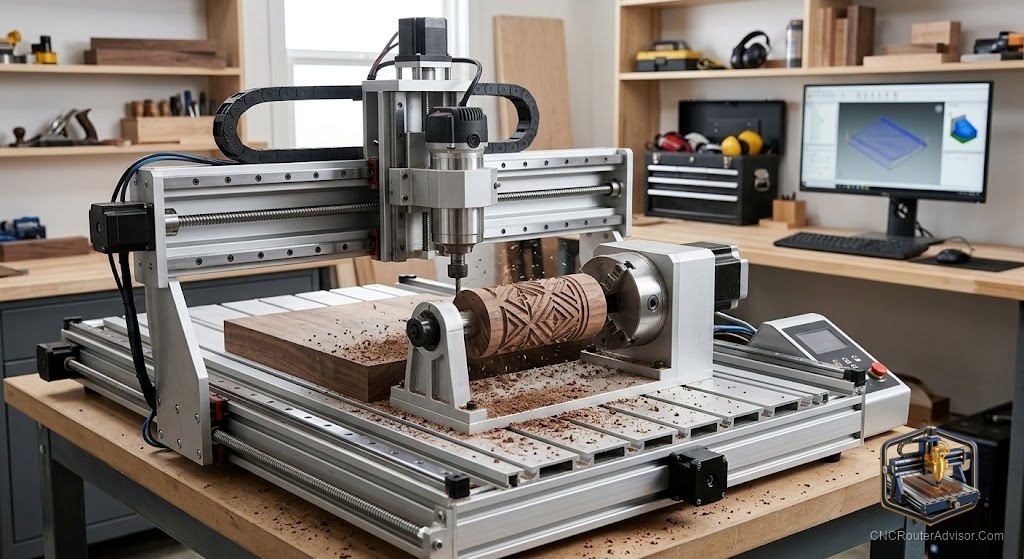
You have a lathe-turned blank sitting on your bench: a cedar post, maybe 60mm across and 400mm long, with a simple twist you want to carve into the surface. The lathe got it round. Now you want to add the flute detail that a hand gouge would take an hour to clean up. The 4th axis on a 9060 CNC router spins that blank under the cutter while the X axis travels along it, and the machine carves the twist in one uninterrupted pass.
A 9060 mini CNC router with a rotary 4th axis is a machine with roughly a 900mm by 600mm work area that adds a rotating chuck assembly along the X axis. The 4th axis lets the machine spin a cylindrical or square blank on its centerline while the spindle cuts, turning round posts, table legs, handles, and rolling pins into fully carved pieces in a single setup.
Here is the short answer on whether you need one: if your work is cylindrical (legs, spindles, columns, pens, carved posts), a 4th axis changes what you can make in one setup. If your work is flat (signs, panels, inlays), a 4th axis adds complexity and cost with no benefit. Buy the rotary only if the cylinder work is real and recurring.
What the 4th axis actually adds
A standard 3-axis CNC router moves in X (left to right), Y (front to back), and Z (up and down). Those three movements handle flat cutting and 2.5D relief work completely.
The rotary 4th axis adds a fourth degree of motion: rotation around the X centerline (the A axis). The blank rotates while the spindle moves along X, so a single pass spirals around the full circumference of the part.
This changes two things. First, you can carve all the way around a cylinder in one setup rather than cutting, repositioning, and trying to align seams. Second, the machine can do indexing: rotate the blank to a specific angle, lock it, cut one face, rotate again, and cut the next face. This lets you cut hexagonal or octagonal shapes precisely.
What the 4th axis does not do: tilt the spindle. A rotary A-axis is not the same as a 5-axis machine where the cutter can approach from any angle. The spindle always points straight down, and the part rotates to present different surfaces to it.
Work area and physical setup
The 9060 base machine gives you roughly 900mm along the X axis and 600mm along Y, with Z travel typically around 140mm. When the 4th axis is installed, the rotary chuck and tailstock both sit on the bed, which costs you some Y travel and some Z clearance.
Plan for these constraints:
- The chuck and tailstock take up some of the 600mm Y width. Measure the exact footprint of the specific rotary unit against your machine’s T-slot spacing.
- The chuck raises the center of the workpiece off the bed. Z clearance shrinks by the distance from the bed to the part center.
- The maximum part length is roughly the X travel (900mm). In practice, with the chuck body and tailstock taking up some of that, plan for parts up to about 750mm to 800mm on a 9060 base.
- The maximum part diameter is set by the chuck jaw range and Z clearance. A 100mm three-jaw chuck on a 65mm center height lets you run round stock up to about 130mm in diameter.
Materials the machine handles
Plywood, MDF, hardwood, softwood, acrylic, HDPE, Delrin, ABS, foam: the full range of common materials for this class of machine. The rotary 4th axis does not change what the spindle can cut; it only changes how the workpiece is oriented.
For cylindrical work in wood (the most common use), the rotary cuts exactly like a round-over bit on a router table, except it follows a programmed path rather than a bearing profile. Carving flutes, twists, and relief into a turned blank in hardwood is well within the 2.2kW water-cooled spindle’s capability.
Light aluminum cylinders are achievable with the right bits, conservative chip load, and compressed air for clearing chips.
Foam and soft materials work easily and are often used for prototype or modeling cylinder work.
The two verified rotary 4th axis options
For full 9060 work area and larger stock: CNCTOPBAOS K11-100mm rotary axis
This is the rotary unit sized for mid-size CNC machines. It includes a NEMA 23 stepper, a 100mm three-jaw self-centering chuck, an MT2 tailstock, and a 6:1 belt-drive reduction. Center height is 65mm, and the external jaw range handles table leg and post diameters.
Honest flaws: it is heavy (roughly 17 lbs for the chuck assembly), takes up meaningful bed space, and ships with no printed manual or brand support. You wire it yourself to a spare axis driver and set steps per unit from scratch. For builders comfortable with controller configuration, this is the right match for a 9060.
For smaller stock and lighter machines: Genmitsu 4th Axis Rotary Module
A polished, well-documented kit built around a NEMA 17 motor with a 10:1 planetary gear reduction, 4-jaw chuck, and a center height matched to Genmitsu’s 4040 and 3030 machines. It is not designed for the 9060 frame; the chuck diameter tops out around 50mm, which rules out larger columns and posts.
Honest flaws: the 50mm clamping limit makes it unsuitable for most woodturning stock. The NEMA 17 motor is underpowered for hardwood at a 9060 spindle’s feed rates. The fit is designed for smaller Genmitsu machines, not this class.
The Genmitsu module is the better choice if you have a smaller desktop machine and work on smaller-diameter stock like pens, bangles, and chess pieces.
CAM software for 4th axis work
Flat 3-axis work runs in any standard CAM tool (Vectric, Fusion, Carbide Create). Adding the 4th axis requires CAM software that generates rotary toolpaths.
Vectric’s VCarve Pro and Aspire both support rotary axis machining. Fusion 360 handles rotary work in its Manufacturing module. Both output the G-code that a GRBL or Mach3 controller can execute with the 4th axis driver active.
The controller side requires configuring the rotary as the A axis: steps per degree of rotation (which comes from the motor steps, the gear ratio, and the chuck), home position, and soft limits.
Setting steps per unit for the rotary axis
Steps per degree = (Motor steps per revolution x microstepping) / (Gear ratio x 360)
For the CNCTOPBAOS K11-100 with a NEMA 23 (200 steps/rev), 16x microstepping, and 6:1 reduction: 200 x 16 / (6 x 360) = 1.48 steps per degree
Set this value in your controller, jog the axis 360 degrees, and confirm the chuck has returned to exactly its start position. If not, adjust the steps per degree until it does.
Projects the rotary enables
- Table legs with fluted or twisted profiles
- Newel posts and balusters with relief-carved details
- Cylindrical signs and name plates with text wrapped around the diameter
- Chess pieces and decorative turnings with CNC-precise details
- Rolling pins with embossed patterns for baking
- Pen blanks and bracelet forms
- Carved handles with multiple flat faces
Conclusion
A 9060 mini CNC router with a rotary 4th axis is the right machine for a shop that regularly works with cylindrical stock and wants to add CNC-precision detail to turned work. It does not replace a lathe, but it complements one: the lathe makes things round, the CNC carves the detail.
Four takeaways:
- Buy the 4th axis only if cylindrical work is real and recurring. For flat panel work, it adds cost and complexity with no cutting benefit.
- Match the rotary chuck to your stock size. The CNCTOPBAOS K11-100 is the right fit for 9060-scale work. The Genmitsu module is for smaller machines and smaller stock.
- Use CAM software that supports rotary toolpaths. Not every CAM tool does, and the cost of upgrading should be in your budget before you buy the hardware.
- Configure steps per degree carefully before your first 4th-axis cut. A wrong step rate means the spiral does not close and your twist does not line up.
FAQ
What is the 4th axis on a 9060 CNC router? A rotary attachment (chuck and tailstock) that spins the workpiece on its centerline while the spindle cuts. It adds the ability to carve all the way around a cylinder in one setup.
Can I add a rotary axis to a 9060 I already own? Yes, if your controller has a spare driver channel for the A axis and you can configure steps per degree in the firmware.
What is the difference between a 4-axis and 5-axis CNC router? A 4-axis rotary setup spins the workpiece; the spindle stays vertical. A 5-axis machine also tilts the spindle, allowing approach from any angle. 5-axis is an industrial-grade capability used for turbine blades and aerospace parts, not the machine class discussed here.
What diameter stock can the CNCTOPBAOS K11-100 hold? The 100mm three-jaw chuck handles round stock up to about 130mm in diameter on its external jaws, subject to Z clearance on the specific machine it is mounted to.
Do I need special software for the 4th axis? Yes. You need CAM software that generates rotary toolpaths, such as Vectric VCarve Pro or Fusion 360 Manufacturing.
What materials can I carve with the rotary axis? Wood, MDF, acrylic, HDPE, foam, and light aluminum. The rotary does not change what the spindle can cut, only how the part is presented to it.
References
- cncrouterinfo.com, “How to Choose a CNC Router”: https://cncrouterinfo.com/guides/how-to-choose-a-cnc-router/
- BubbleRelief, “CNC Router Projects for Beginners”: https://bubblerelief.com/cnc-router-projects-for-beginners/
- Vectric, Rotary Axis Machining documentation: https://www.vectric.com/support/tutorials