
CNC Router Wood Projects: Beginner Ideas That Actually Turn Out (and a Few That Sell)
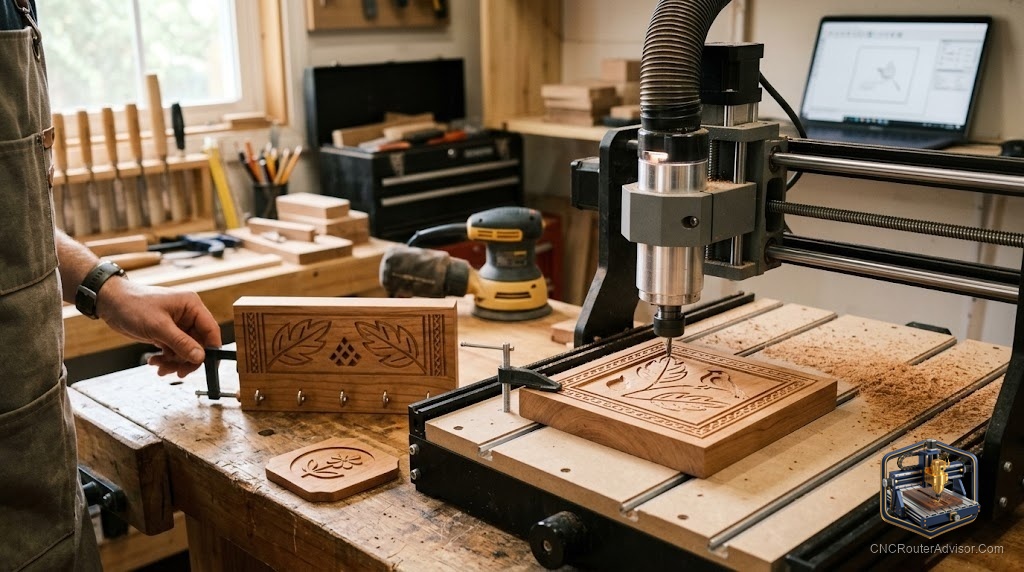
The trap with a new CNC router is the 3D dragon. You see someone carve a jaw-dropping relief online, you try it on day two, and you end up with a burned, fuzzy mess and a broken bit. The people who stick with the hobby start smaller and smarter. The best CNC router wood projects for a beginner are the ones that teach a real skill, finish in an hour or two, and look good enough that you actually want to make the next one.
CNC router wood projects are designs you cut, carve, or engrave from wood on a computer-controlled router, ranging from a flat engraved coaster to a full 3D-carved sign. The good beginner projects share three traits: forgiving material, a single main skill to learn, and a short run time so a mistake costs minutes, not an afternoon.
Where should you start? Cut a simple V-carved sign or a set of coasters first. Both use cheap, flat stock, teach you the core toolpaths (profiling, pocketing, and V-carving), and produce something worth keeping. Save 3D reliefs and inlays for after your machine and your nerves are dialed in.
Start here: five projects that build real skill
Each of these teaches something specific, in a sensible order.
- A V-carved sign. The single best first project. You learn V-carving, text layout, and how your bit handles fine detail. A name sign or a short quote on a planed board is hard to mess up and easy to love.
- Coasters. Small, fast, and repeatable. They teach pocketing and profiling, and a set of four is a natural first gift.
- A simple tray or catch-all. One deep pocket plus a profile cut. You learn depth-of-cut settings and workholding on something useful.
- Ornaments and keychains. Tiny profile cuts with light engraving. Great for practicing small-detail work and tabs that keep parts from flying.
- A cutting or charcuterie board. Once profiling and pocketing feel easy, a shaped board with a juice groove is a satisfying step up and a reliable seller.
Notice the progression: flat engraving, then pockets, then shaped profiles, then combined operations. Each project leans on the last.
Choosing wood that forgives beginners
Material choice quietly decides how your first cuts look. Soft, even-grained woods machine cleanly and hide small mistakes. Poplar, pine, and basswood are gentle and cheap, which makes them ideal for learning. MDF is dead flat and consistent, perfect for test cuts and painted signs, though the dust is fine and demands good collection. Once you are confident, hardwoods like maple, walnut, and cherry reward you with edges and color that make a project look professional. Start soft and cheap, then graduate to the good stuff when your settings are proven.
Bits, feeds, and the settings that matter most
You do not need a huge bit collection to start. A single-flute or two-flute upcut end mill (commonly 1/8 inch or 1/4 inch) handles most profiling and pocketing, and a 60- or 90-degree V-bit covers text and detail. The most common beginner mistake is feeding too slowly for the spindle speed, which burns the wood instead of cutting it, so if you see scorching, speed up the feed or slow the RPM. Take shallow passes, keep the bit sharp, and let chip evacuation and dust collection do their job. Clean chips mean a clean cut.
Where to get project files
You do not have to design everything yourself while you learn. Vectric’s free project library offers hundreds of downloadable designs complete with tutorial videos, which is a superb way to see how experienced designers build a toolpath. Marketplaces like Etsy and Design and Make sell ready-to-cut files, and communities post free SVGs and DXFs you can import into your CAM software. Cutting someone else’s proven file first, then modifying it, then designing your own is a faster path than staring at a blank canvas on day one.
The projects that actually sell
If you want the hobby to pay for itself, a few categories consistently move. Personalized wooden signs (names, addresses, weddings, business logos) are the workhorse of CNC side income because customization commands a premium. Custom cutting and charcuterie boards sell well, especially engraved or with monograms. Coasters, ornaments, and desk organizers move in volume, particularly seasonally. The common thread is personalization: a generic sign competes on price, but a customer’s name on it competes on meaning. Start with signs and boards, price for your time, and let repeat customers tell you what to make next.
The verdict
The best CNC router wood projects for a beginner are the boring-sounding ones: a V-carved sign, a set of coasters, a simple tray. They teach the toolpaths you will use forever, they finish fast, and they build the confidence you need before attempting inlays and 3D reliefs. Cut soft, cheap wood while you learn, keep a small set of good bits, and start from proven files before designing your own. When you are ready to sell, lean into personalization, because that is where the money and the repeat customers are.
Three takeaways: match your first project to one skill you want to learn, let cheap softwood absorb your early mistakes, and reach for personalized signs and boards when it is time to sell.
FAQ
What is a good first CNC router project? A V-carved sign or a set of coasters. Both use cheap flat stock, teach the core toolpaths, run quickly, and produce something worth keeping.
What wood is best for beginner CNC projects? Soft, even-grained woods like poplar, pine, and basswood, plus MDF for flat painted signs and test cuts. Move to maple, walnut, and cherry once your settings are dialed in.
What bits do I need to start? A single- or two-flute upcut end mill (1/8 or 1/4 inch) for profiling and pocketing, plus a 60- or 90-degree V-bit for text and detail. That covers most beginner projects.
Why is my wood burning instead of cutting? Usually the feed rate is too slow for the spindle speed, so the bit rubs and scorches. Increase the feed rate or lower the RPM, and keep the bit sharp.
Where can I download CNC wood project files? Vectric’s free project library has hundreds of designs with tutorials, and marketplaces like Etsy and Design and Make sell ready-to-cut files you can import into your CAM software.
Which CNC wood projects sell best? Personalized signs, custom cutting and charcuterie boards, coasters, and ornaments. Personalization is what lets these command a premium over generic products.
How long does a beginner CNC project take? Simple engraved coasters or a small sign often run in under an hour of machine time, not counting design and finishing. Shorter projects mean cheaper mistakes while you learn.
References
- Vectric, Free CNC Projects: https://www.vectric.com/vectric-community/free-projects/
- CNC Cookbook, CNC Router Projects: https://www.cnccookbook.com/cnc-router-projects/
- Elephant CNC, Best CNC Router Projects for Beginners: https://www.elephant-cnc.com/blog/cnc-router-projects-for-beginners/
- Instructables, Making a Simple CNC Sign (CNC Project for Beginners): https://www.instructables.com/Making-a-Simple-CNC-Sign-CNC-Project-for-Beginners/
- TechPro-CNC, 15 Easy CNC Wood Projects for Beginners: https://www.techpro-cnc.com/blog/cnc-wood-projects.html