
DIY CNC Wood Router Kit: Design Choices, Parts List, Cost, and Build Steps
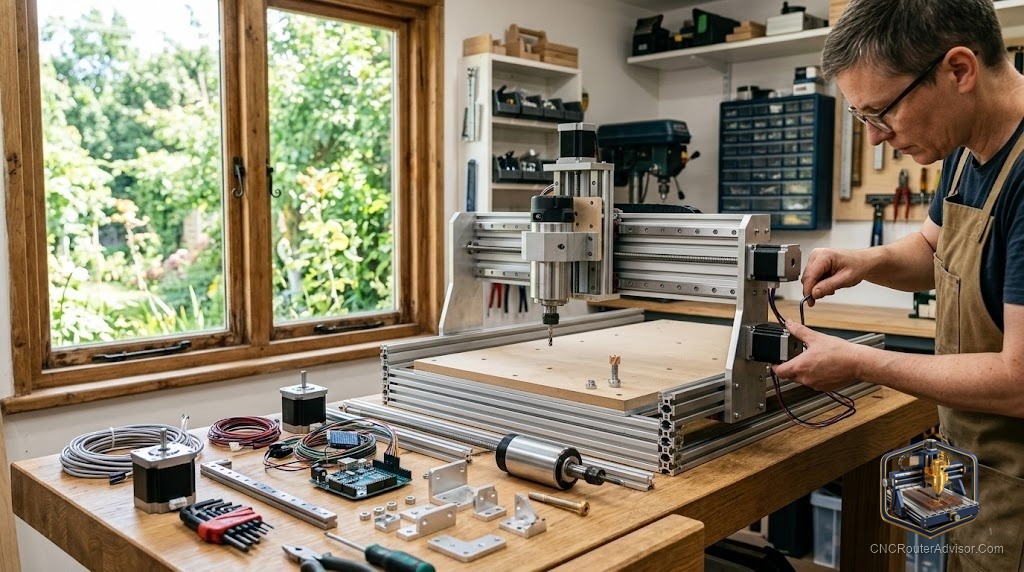
There is a sweet spot between buying a finished CNC router and building one from raw extrusion and a wiring diagram, and that sweet spot is the kit. A DIY CNC wood router kit hands you the parts that matter, engineered to fit together, and lets you do the assembly yourself. You save money, you learn every system of the machine, and you skip the hardest part of a scratch build: sourcing compatible components and hoping they play nicely. For a lot of woodworkers, it is the smartest way in.
A DIY CNC wood router kit is a package of parts, frame, motion system, drive, electronics, and often a router mount, that you assemble yourself into a working CNC for cutting wood. It sits between a fully assembled machine and a scratch build, offering lower cost and a deep understanding of the machine while removing the guesswork of sourcing compatible parts. Choosing well means matching the kit’s work area and rigidity to your wood projects, then following the build steps carefully for a square, accurate machine.
Short answer: a DIY CNC wood router kit gives you engineered, compatible parts to assemble into a working machine, cheaper than a finished router and far easier than sourcing a scratch build. Choose a kit whose work area, rigidity, and drive suit your wood projects, confirm what is and is not included (spindle, controller, software), and budget for extras like dust collection and bits. Success depends on careful, square assembly.
Why choose a kit over building or buying
A kit balances three things:
- Versus a finished machine: lower cost and a real understanding of how the machine works, which makes repairs and upgrades easy.
- Versus a scratch build: no hunting for compatible motors, screws, and electronics, since the kit’s parts are engineered to fit.
- The trade: you invest assembly time and accept a learning curve, in exchange for savings and knowledge.
If you enjoy building and want to know your machine intimately, a kit is ideal. If you only want to start cutting immediately, a finished machine may suit you better.
What is in a kit (and what may not be)
Kits vary widely, so confirm exactly what is included:
- Frame, usually aluminum extrusion or steel.
- Motion system, linear rails or wheels and bearings.
- Drive, lead screws, ball screws, or belts, with stepper motors.
- Gantry and mounts.
- Electronics, a control board (often GRBL-based), drivers, and wiring, though some kits omit these.
- Router mount, though the router or spindle itself is often not included.
The common surprises are a router or spindle sold separately, software not included, and dust collection and bits always extra. Read the kit contents closely before buying.
Choosing the right kit for wood
Match the kit to your woodworking:
- Work area sized to your typical projects, from signs to larger panels. Remember the footprint exceeds the cutting area.
- Rigidity, favoring a stouter frame and quality motion, since flex is the most common regret.
- Drive system, weighing belts (budget, fine for light wood) against lead or ball screws (more precision).
- Z clearance for the wood thickness and fixtures you use.
- Documentation and community, a proven kit with strong support solves problems fast.
Rough cost picture
Without naming figures, budget in layers: the kit itself, then a router or spindle if not included, then a controller and software if the kit omits them, and finally the wood-shop extras, dust collection, bits, and workholding. A kit is generally cheaper than an equivalent finished machine, but the true cost is the sum of these parts, so add them up before comparing.
Build steps in outline
Most kit builds follow the same arc:
- Assemble the frame, squaring it carefully, since errors here compound into inaccurate cuts.
- Install the motion system, rails or wheels, checking smooth, even travel.
- Fit the drive, screws or belts and stepper motors, setting proper tension or preload.
- Mount the gantry and router/spindle.
- Wire the electronics, board, drivers, motors, and power, following the diagram closely.
- Configure the controller and software, setting steps, limits, and homing.
- Square, calibrate, and test cut, tramming the machine and dialing in accuracy on scrap.
Work patiently and check squareness at every stage.
The bottom line
A DIY CNC wood router kit is the practical middle path: cheaper than a finished machine, far easier than a scratch build, and a genuine education in how your machine works. Choose a kit whose work area, rigidity, and drive fit your wood projects, confirm exactly what is included so a missing spindle or controller does not surprise you, and budget the wood-shop extras. Then build patiently and square, and you end up with a capable machine and the knowledge to keep it running for years.
FAQ
What is a DIY CNC wood router kit? A package of engineered, compatible parts, frame, motion, drive, electronics, and mounts, that you assemble yourself into a working CNC for cutting wood.
Is a kit cheaper than a finished machine? Usually yes, since you supply the assembly labor. The true cost is the kit plus any router, controller, software, and shop extras not included.
Does a kit include the router or spindle? Often not. Many kits include a router mount but sell the router or spindle separately, so confirm the contents before buying.
Is a kit good for beginners? Yes, if you enjoy building and want to understand your machine. If you only want to start cutting right away, a finished machine may suit you better.
What should I look for in a wood router kit? A work area sized to your projects, good rigidity, a suitable drive system, enough Z clearance, and strong documentation and community support.
How hard is it to build a kit? Manageable with patience. The parts are made to fit, so the main challenges are careful, square assembly, correct wiring, and calibration.
What extras will I still need? Commonly a router or spindle, software, dust collection, bits, and workholding, since kits rarely include all of these.
References
- CNCRouterInfo, how to choose a CNC router: https://cncrouterinfo.com/guides/how-to-choose-a-cnc-router/
- BubbleRelief, CNC router projects for beginners: https://bubblerelief.com/cnc-router-projects-for-beginners/