
4-Axis CNC Router Wood Guide: Capabilities, Applications, and Buying Factors
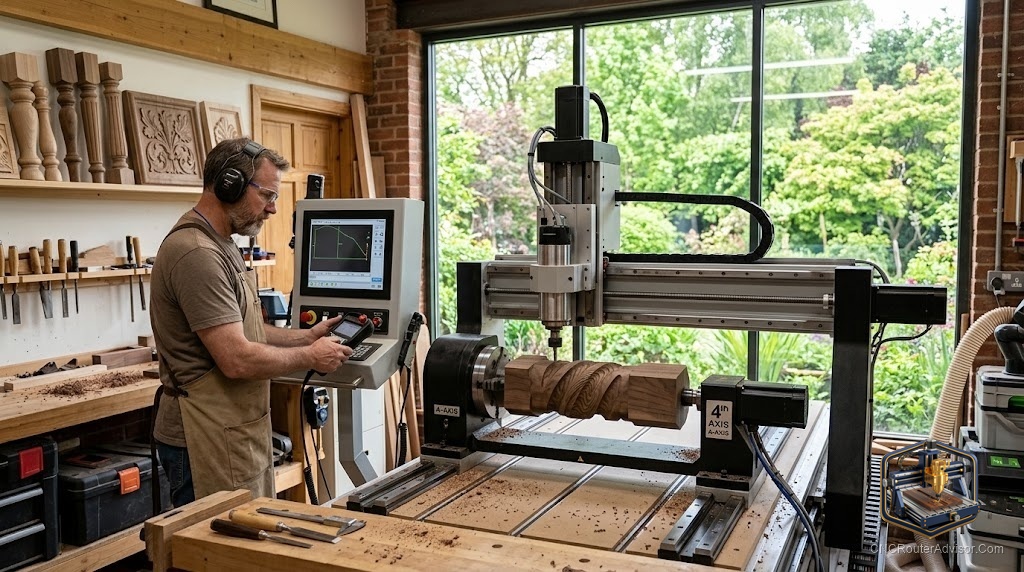
The first three axes of a CNC router move a bit around a flat piece of wood: left and right, front and back, up and down. That covers signs, panels, and flat relief carving beautifully. But it hits a wall the moment you want to carve something round, like a table leg, a baluster, or a decorative column. To carve all the way around a workpiece, you need a fourth axis, and that single addition changes what a wood router can make.
A 4-axis CNC router for wood is a machine with the usual X, Y, and Z linear axes plus a rotary axis, usually called the A axis, that spins the workpiece. Most often this is a rotary attachment: a chuck and tailstock that hold a wood blank horizontally and rotate it under the spindle, letting the machine carve around the full circumference. It turns a flat-cutting machine into one that produces cylindrical and sculpted round work.
Short answer: add or buy a fourth axis if you want to carve table legs, spindles, balusters, columns, statues, and other round or wrapped designs that flat cutting cannot produce. If all your work is flat panels, signs, and relief, you do not need it. Confirm your machine, controller, and software support a rotary axis before buying an attachment.
What the fourth axis adds
With three axes, the bit approaches a fixed workpiece from above. The rotary axis lets the machine turn the piece so the spindle can reach every side. There are two common ways it works:
- Indexed (3+1) machining. The rotary turns the piece to a set angle, the machine carves that face in three axes, then rotates to the next position. Good for carving several flats or faces around a piece.
- Continuous 4-axis machining. The rotary turns steadily while the other axes move, wrapping a design smoothly around the full surface. This is how you get flowing spiral columns and fully sculpted round forms.
For wood, the rotary attachment style is by far the most common, mounting on the machine bed to hold and spin a blank between a chuck and tailstock.
Applications in wood
- Turned and carved legs, spindles, and balusters for furniture and railings, with details a lathe cannot cut.
- Decorative columns and posts with fluting, spirals, and reliefs wrapped around them.
- Statues and sculptures carved fully in the round from a blank.
- Barley-twist and rope designs that wrap continuously along a length.
- Cylindrical signs, rolling pins, and bat- or handle-style turnings with engraving around the surface.
Buying and setup factors
Machine and controller support. Not every router supports a rotary axis. The controller must drive an additional axis, and many entry controllers do not. Confirm 4-axis capability before buying an attachment.
Software (CAM). You need CAM software that can generate rotary toolpaths, either indexed or continuous. Flat-only CAM will not produce true wrapped carving. Check that your software supports the rotary workflow you want.
Rotary capacity. Check the maximum blank diameter and length the attachment accepts, and the swing clearance under the gantry. A long table leg needs both length between chuck and tailstock and enough Z clearance for the diameter.
Rigidity and holding. A spinning blank must be held firmly between a solid chuck and a supporting tailstock so it does not deflect or slip under the cutting load. Long, thin blanks can whip, so support matters.
Tooling. Ball-nose bits handle the sculpted surfaces, while tapered ball-nose bits reach into detail and add strength for deep wrapped work.
The bottom line
A fourth axis is the upgrade that lets a wood router carve in the round. If your ambitions include table legs, columns, balusters, and sculpted cylindrical pieces, a rotary attachment opens work that flat cutting simply cannot touch. The keys are confirming your machine and controller support a rotary axis, using CAM that generates rotary toolpaths, and matching the attachment’s capacity to the size of pieces you plan to make. For flat-only work, save your money.
FAQ
What is the fourth axis on a CNC router? A rotary axis, usually called A, that spins the workpiece so the spindle can carve around its full circumference, typically via a chuck-and-tailstock rotary attachment.
What can a 4-axis wood router make? Table legs, spindles, balusters, columns, statues, barley-twist designs, and other round or wrapped pieces that flat cutting cannot produce.
Can I add a fourth axis to my existing machine? Only if the controller supports an extra axis and your CAM software generates rotary toolpaths. Confirm both before buying an attachment.
What is the difference between indexed and continuous 4-axis? Indexed rotates to set positions and carves each face in three axes. Continuous rotates steadily while cutting, wrapping designs smoothly around the piece.
Do I need special software? Yes, CAM software that supports rotary or 4-axis toolpaths. Flat-only CAM cannot produce true wrapped carving.
How big a piece can it hold? It depends on the attachment’s maximum diameter and length and the machine’s Z clearance. Check these against the pieces you plan to make.
What bits work best? Ball-nose bits for the sculpted surfaces and tapered ball-nose bits for detail and reach on deep wrapped work.
References
- CNCRouterInfo, how to choose a CNC router: https://cncrouterinfo.com/guides/how-to-choose-a-cnc-router/
- BubbleRelief, CNC router projects for beginners: https://bubblerelief.com/cnc-router-projects-for-beginners/