
CNC Routing Software Guide: Features, Compatibility, Setup, and Pricing
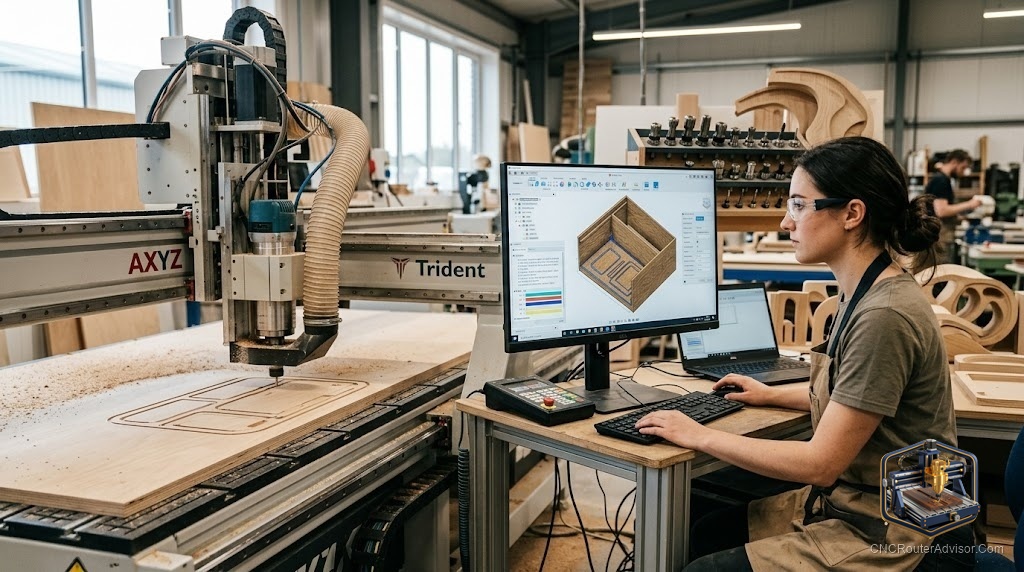
The machine is the obvious purchase. You research the work area, compare the spindle, read the reviews. Then the machine arrives, you plug it in, and you realize the software was the actual decision. The CAM program is where your design becomes a toolpath, and the controller is where that toolpath becomes machine motion. Get the software right and the machine runs what you intended. Get it wrong and the machine runs perfectly, straight into a problem you created in the CAD.
CNC routing software is not one thing. It is a stack: a design and toolpath tool (CAD/CAM), a controller or sender that talks to the machine, and sometimes a firmware layer the controller uses to interpret G-code. Each layer matters, and each has options suited to different machines, different skill levels, and different budgets. This guide maps the landscape clearly enough that you can make a decision and start cutting.
CNC routing software falls into two main categories. CAM software takes a design file and generates the toolpath instructions (G-code) the machine follows. Controller software runs on a computer or onboard the machine and feeds that G-code to the motors. A complete software setup needs both, though some tools combine them.
The short answer for someone starting out: if your machine includes a software recommendation, start there. Easel pairs with Inventables machines, Carbide Create pairs with Carbide 3D, VCarve is the community standard for mid-range wood and sign work, and Fusion 360 covers everything from 2D cuts to 5-axis machining at a professional level. None of those choices is wrong for the right machine and use case.
CAM software: where design becomes toolpath
VCarve Desktop and VCarve Pro (Vectric)
VCarve is what most serious hobbyists and small production shops settle on after their first year of CNC routing. The interface is clear, the documentation is excellent, and the output is reliable. Desktop handles a work area up to 25 by 25 inches and is the entry point for woodworking and sign routing. Pro removes the size limit and adds a few production features, making it the right choice for anyone cutting full sheets.
VCarve handles 2D profiling, pocketing, V-carving, engraving, and basic 3D relief work well. It does not compete with full engineering CAM for complex 3D machining, but for wood, foam, and sign work it is the clear benchmark. The post-processor library is large, which means it talks to most machines without custom configuration.
The flaw worth naming: VCarve is a one-time purchase with an annual upgrade fee for new versions, and the full Pro version is a meaningful investment for a hobbyist. If your budget is tight, Desktop covers most projects.
Aspire (Vectric)
Aspire sits above VCarve Pro in the Vectric lineup and adds serious 3D design and sculpting tools, not just the ability to run a 3D relief file someone else created. It is for woodworkers who design their own 3D carvings and need the full creation workflow inside one program. If you are buying files from elsewhere and just cutting them, Aspire’s additional cost is not justified. If you are designing the 3D work yourself, it is the right tool.
Carbide Create
Carbide Create is the free CAM tool made for Carbide 3D machines (Nomad, Shapeoko) and runs on Mac or Windows. It is friendly enough for a first-week user and capable enough for most 2D and shallow 3D work. The free version covers most needs; Carbide Create Pro adds advanced toolpath options for a subscription. The flaw is that it is optimized for Carbide machines and the post-processor options are narrower for machines from other brands.
Fusion 360 (Autodesk)
Fusion 360 is a full professional CAD/CAM environment with a free tier for personal use. Its CAM module handles 2D through 5-axis toolpaths, making it the most powerful free option for serious work. The flaw is the learning curve, which is steep compared to VCarve, and the subscription required for commercial use and advanced features. If your work bridges engineering design and CNC routing, Fusion is the right tool. If you just want to cut signs and furniture panels, the learning investment outweighs the capability benefit.
Easel (Inventables)
Easel is the browser-based CAM and controller designed for Inventables X-Carve machines, though it works with other GRBL machines. It is the most beginner-friendly option on the market: the interface is as simple as a drawing app, file setup to cutting takes minutes, and the community around it is large. The flaw is the ceiling: Easel handles 2D work and shallow pockets well, but advanced toolpaths, 3D carving, and complex multi-step jobs are outside its scope. Easel Pro adds features for a monthly fee. For beginners on a GRBL machine, it is the right start. For experienced machinists who want full control, it is too limited.
Controller software: talking to the machine
The controller takes your G-code file and sends motion commands to the machine’s motors. For GRBL-based hobby machines (which describes most desktop CNC routers), the common senders are:
- Candle (GRBL-Panel): A free, open-source GRBL sender that is straightforward for simple jobs. No frills, works well for small machines.
- Universal Gcode Sender (UGS): More configurable than Candle and widely used. Handles jogging, zeroing, and running files cleanly on most GRBL machines.
- Easel: Functions as both CAM and controller for GRBL machines, useful if you want one unified interface.
For production or industrial-class machines, dedicated controllers are common:
- Mach3 / Mach4: Windows-based controller software long used on router tables and plasma tables. Mach4 is the current version with better real-time performance. These pair with motion controller hardware (like a Smoothstepper) for reliable step generation separate from the PC.
- LinuxCNC: Free, open-source, runs on dedicated Linux hardware. Highly capable and configurable, with a real-time kernel for precise step generation. Steeper setup than Mach, but no license cost and strong community support.
Compatibility: the thing to confirm before you buy
Software and machine compatibility depends on the post-processor and the communication protocol. GRBL machines are common and supported by almost every CAM package. Proprietary controllers (some Haas-style or legacy machines) need specific post-processors that may not ship with general-purpose CAM. Before purchasing any CAM software, confirm that a working post-processor exists for your machine’s controller, and if possible, test-run a sample file before committing.
The verdict
For most wood and sign work on a desktop or mid-range router: VCarve Desktop or Pro is the clear recommendation, with Easel as the right starting point for Inventables machines. Fusion 360 earns its place when design and engineering live in the same workflow. Carbide Create is the right free tool for Carbide 3D machines. And on the controller side, UGS or Candle handle GRBL machines cleanly, while Mach4 and LinuxCNC serve the production tier.
Three things to take with you:
- Confirm a working post-processor exists for your machine before buying any CAM software.
- Start with VCarve Desktop if you are doing woodworking and sign work and want a proven, well-documented tool.
- Fusion 360 is the right upgrade path when your work grows to involve complex 3D machining or engineering CAD.
FAQ
What software do I need for a CNC router? You need a CAM program to generate toolpaths from your design, and a controller or sender to run those toolpaths on the machine. Many hobby machines ship with a recommended combination; start there before exploring alternatives.
What is the best CAM software for CNC routing beginners? Easel is the most approachable for Inventables machines. Carbide Create is excellent for Carbide 3D machines. VCarve Desktop is the step up for anyone doing serious woodworking or sign work. All three have strong documentation and community support.
Is VCarve worth the cost for a hobbyist? For woodworking and sign routing, yes. VCarve’s documentation, community, and post-processor library make it a significantly better investment than fighting a less-supported tool. The Desktop version covers most hobbyist projects without the Pro price tag.
What is the difference between CAM software and controller software? CAM software takes your design and generates G-code toolpath instructions. Controller software (or a sender) runs those instructions on the machine by talking to the motors. Some tools like Easel combine both functions.
Can I use Fusion 360 for free? Fusion 360 offers a free personal use license with access to basic CAM features. Commercial use and advanced CAM toolpaths require a paid subscription. For hobbyists, the free tier covers a surprising amount.
What is GRBL? GRBL is an open-source motion control firmware that runs on an Arduino microcontroller and interprets G-code into step signals for stepper motors. It is the standard controller on most hobby CNC routers, and virtually all CAM software supports it via a GRBL post-processor.
What is a post-processor? A post-processor translates your CAM program’s generic toolpath instructions into the specific G-code dialect and formatting that your machine’s controller understands. Without the right post-processor, the output file may not run correctly or at all.
References
- Vectric, VCarve software: https://www.vectric.com/products/vcarve-desktop
- Autodesk, Fusion 360 CAM: https://www.autodesk.com/products/fusion-360/overview
- Carbide 3D, Carbide Create: https://carbide3d.com/carbidecreate/