
CNC Router Controller Guide: Features, Specifications, and Buying Considerations
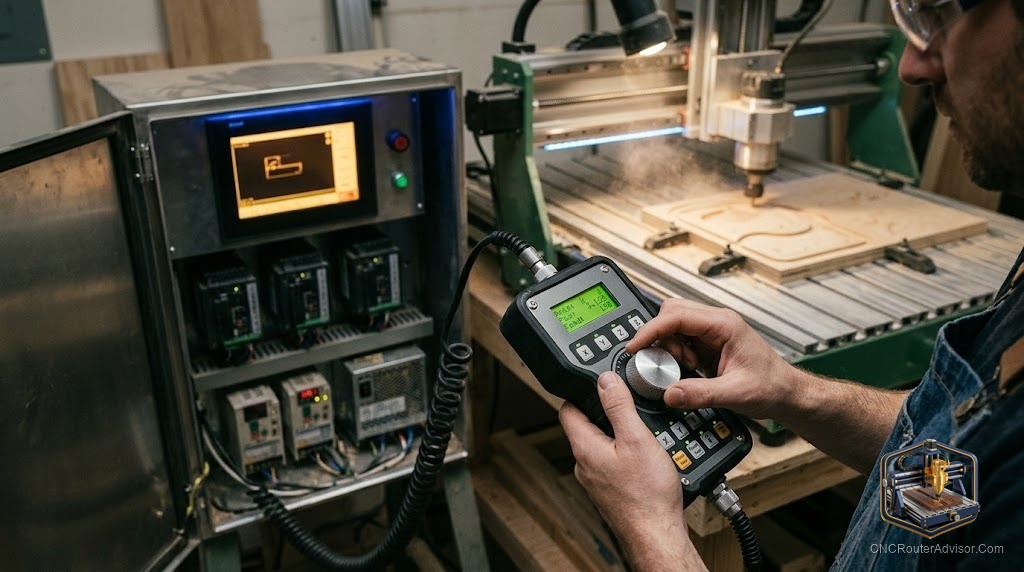
Buyers obsess over frames, spindles, and work area, and then discover that the thing which actually shapes their day-to-day experience is the controller and the software that talks to it. The controller is the brain that turns your design into motion, and the software is how you tell it what to make. Get this part wrong and even a great machine feels clunky; get it right and cutting becomes almost effortless.
A CNC router controller is the hardware and software system that interprets your design, generates toolpaths, and drives the machine’s motors to cut the part. In practice it spans two linked things: the physical controller or control board that runs the motors, and the CAD/CAM and control software that designs the part, creates the G-code, and sends it to the machine. Understanding both is essential to buying and running a router well.
Short answer: when evaluating a controller, look at what control board and firmware the machine uses, whether it runs standalone or from a computer, and above all what CAD/CAM software it supports. Confirm the whole chain, design to toolpath to G-code to motion, fits your skills and projects. A friendly, well-documented software ecosystem matters more than any single spec.
The two halves: hardware and software
It helps to separate the controller into its parts.
The control hardware is the board and electronics that receive G-code and drive the stepper or servo motors. Common approaches include:
- GRBL-based boards, the popular open-source standard on hobby and desktop machines, running from a connected computer. Widely supported and beginner-friendly.
- Standalone controllers and DSP pendants, which run jobs from a handheld or panel without a tethered computer, common on larger and professional machines.
- PC-based control using software like Mach-style controllers over a dedicated interface, common on some larger builds.
The software is the chain that gets you from idea to motion:
- CAD to design the part or import artwork.
- CAM to generate toolpaths and output G-code.
- Control/sender software to stream that G-code to the machine.
Some tools combine these steps; others are separate programs you link together.
The software ecosystem
This is where most of your experience lives. The market spans free and paid options at every skill level:
- Easel and Carbide Create are beginner-friendly, combining design and toolpaths in one simple flow.
- Vectric Cut2D, VCarve, and Aspire are woodworking and sign-making favorites, from 2D and 2.5D up to full 3D relief in Aspire.
- Fusion 360 and Carveco offer powerful CAD/CAM for more advanced 2.5D and 3D work.
- Mastercam is high-end professional CAM.
- Machine-specific software such as Onefinity’s control interface ties neatly to particular machines.
Match the software to your work: simple signs and cutouts are well served by Easel or Carbide Create, while detailed 3D relief needs VCarve, Aspire, Fusion 360, or Carveco.
Features and specifications to compare
- Firmware and board. Know whether it is GRBL-based, a DSP standalone, or PC-based, and how well documented it is.
- Standalone vs computer-tethered. Standalone pendants free you from a dedicated PC; tethered setups can be simpler and cheaper.
- Supported file types and post-processors. Confirm it accepts G-code from your chosen CAM, with a correct post-processor.
- Number of axes. Ensure the controller supports the axes you need, including a fourth rotary axis if planned.
- Toolpath features. Check that your software supports 2.5D pocketing, V-carving, and 3D relief if your projects need them.
- Simulation. Toolpath simulation before cutting catches mistakes and saves material.
- Connectivity. USB, Wi-Fi, or SD card transfer, and how you load jobs.
- Community and documentation. A well-supported controller and software stack means faster answers when you get stuck.
Buying considerations
When choosing a machine, evaluate its controller and software as seriously as its frame. Confirm the software runs on your computer and fits your skill level, that it supports the toolpaths your projects need, and that a strong community backs it. If you value freedom from a tethered PC, favor a standalone or pendant controller. If you want the simplest start, a GRBL machine with Easel or Carbide Create is hard to beat.
The bottom line
The controller and its software are the brain and voice of your CNC router, and they shape your experience more than any headline spec. Understand the two halves, the control hardware and the CAD/CAM chain, and choose a machine whose ecosystem fits your projects and skills. Prioritize good documentation, the right toolpath features, and a strong community. A modest machine with a friendly, capable control setup will outperform a fancy one you cannot easily drive.
FAQ
What is a CNC router controller? The hardware and software system that interprets your design, generates toolpaths, and drives the machine’s motors, spanning the control board and the CAD/CAM software.
What is GRBL? A popular open-source firmware standard used on many hobby and desktop control boards, run from a connected computer and known for being beginner-friendly.
Do I need a computer to run my router? It depends. GRBL and PC-based setups run from a tethered computer, while standalone controllers and DSP pendants run jobs without one.
What software should a beginner use? Easel or Carbide Create combine design and toolpaths in a simple flow. Step up to VCarve, Aspire, Fusion 360, or Carveco for detailed 3D work.
What is the difference between CAD and CAM? CAD designs the part or imports artwork; CAM generates the toolpaths and outputs the G-code that drives the machine.
Is free CNC software any good? Yes. Options like Easel and Fusion 360’s hobby tier handle real work, especially for 2D and 2.5D projects, before you need paid 3D tools.
What should I check about a controller before buying? Its firmware and board, whether it runs standalone or tethered, supported file types and axes, toolpath features, connectivity, and community support.
References
- GuideFlow, CNC software overview: https://www.guideflow.com/blog/cnc-software
- WorkshopCalc, best CNC routers guide: https://workshopcalc.com/guides/best-cnc-routers