
CNC Router Programs: The Software Stack Every Operator Needs
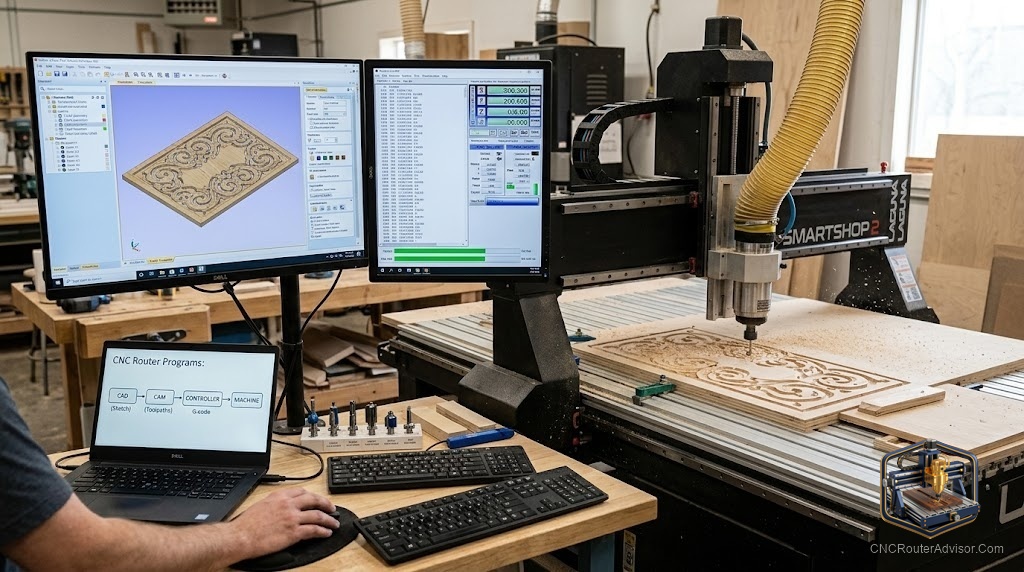
The machine follows instructions. It cannot write its own. Between the finished design and the first cut lies a specific chain of software: a drawing tool that creates geometry, a CAM program that converts geometry into toolpaths, and a sender that communicates those toolpaths to the machine. Understanding each tier prevents the most common beginner mistakes.
CNC router programs fall into three categories: design software to create or import geometry, CAM software to generate toolpaths and G-code, and G-code senders that control the machine during the job.
Design Software
Inkscape (free): Vector drawing. Exports SVG and DXF. The free standard for 2D sign layouts and text designs. No 3D capability.
Fusion 360 (free personal use): 3D parametric modeling plus integrated CAM. Required for mechanical parts and true 3D work.
Adobe Illustrator: Professional vector tool. If it is already in your workflow, all major CAM programs accept its exports.
CAM Software
Carbide Create (free, Carbide 3D): Best free starting point. Pocket, profile, and V-carve toolpaths. Works with any GRBL machine. Ceiling: advanced V-carving requires the Pro upgrade.
VCarve Desktop (Vectric, paid): The practical step-up for woodworking and sign work. V-carve toolpath quality visibly outperforms free alternatives. Simulation prevents material waste. Worth the investment for any consistent production.
Easel (Inventables, free tier): Browser-based, no installation. Fastest route to a first cut. V-carving behind a Pro paywall.
G-Code Senders
gSender (free, Sienci Labs): The best GRBL sender available. Windows, Mac, Linux. Active development. First choice for any non-Shapeoko GRBL machine.
Carbide Motion (free, Carbide 3D): For Shapeoko machines. Simple, reliable within that ecosystem.
Universal G-Code Sender (free): Java-based, cross-platform. Less polished but broadly compatible.
The Minimum Stack
Inkscape + VCarve Desktop + gSender covers most hobby woodworking and sign work without compatibility headaches.
FAQ
What is the best free CNC router program? Carbide Create for CAM, gSender for machine control, and Inkscape for design. This combination covers most hobby work at no cost.
Is VCarve worth the investment? For sign making and woodworking: yes. V-carve toolpath quality and the toolpath simulation produce clearly better results.
What is a post-processor in CNC software? A file that formats G-code output for your specific machine controller. Wrong post-processor causes incorrect movement.
References
- Vectric. VCarve documentation. vectric.com
- Sienci Labs. gSender guide. github.com/sienci-labs/gsender