
Hobby CNC Router Buying Guide: Work Area, Power, Software, and Trade-Offs
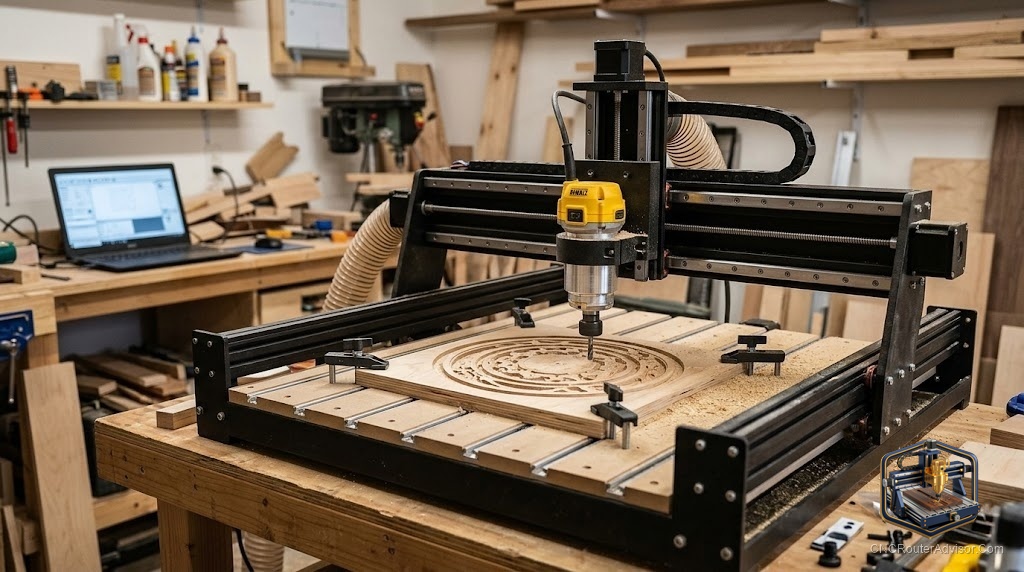
You spend three hours designing a personalized address plaque in your CAD software, post the G-code, hit run - and your new hobby CNC router chews through the wood at an angle, leaving a stepped, fuzzy edge where the letters should be crisp. The frame flexed. You bought a timing-belt machine with an undersized work area and a trim router that couldn’t hold speed under load. That afternoon cost you a bit, a blank, and your confidence.
A hobby CNC router is a computer-controlled cutting machine designed for home shops, garages, and small studios. Three stepper motors move a spinning cutter across X, Y, and Z axes according to G-code instructions, letting you cut, carve, and engrave wood, soft plastics, and thin aluminum with repeatable precision. Unlike industrial machines, hobby-grade routers are sized for a single-car garage, priced for an individual budget, and paired with software that a beginner can learn in a weekend.
If you’re buying your first hobby CNC router, prioritize a minimum 24-by-24-inch work area, a machine with linear rails rather than V-slot wheels, and either a dedicated spindle or a mid-size router with electronic speed feedback. Machines from Shapeoko and Onefinity hit that standard at entry-level prices and come with onboarding resources that save beginners weeks of frustration.
What Work Area Do You Actually Need?
Pick a work area based on the biggest single piece you realistically plan to cut, then add a few inches on each side for clamps.
Most hobbyists making signs, cutting boards, and small shelf décor are well-served by a 24-by-24-inch (roughly 600 by 600 mm) table. That fits a standard kitchen cutting board blank with room for toe clamps. If you want to cut cabinet doors or long address plaques, you need at least 24 by 36 inches. Anything larger starts to require a dedicated, level workbench and a dust collection setup that matches.
A common first-machine mistake: buying a 12-by-18-inch desktop machine because it fits the budget, then immediately hitting its limits. Those machines are fine for jewelry inserts, PCB engraving, and small coasters, but you will outgrow them the moment you try to make a 20-inch name sign.
Z-axis travel matters too. Most hobby machines offer 3 to 5 inches of Z clearance. That is enough for signs and relief carvings in half-inch stock. If you want to carve thick bowl blanks or route the faces of thick slabs, look for machines advertising 5 or more inches of Z travel and confirm the actual usable clearance after accounting for the bit length and collet.
Frame Rigidity: Steel vs. Aluminum Extrusion
The frame is what separates a machine that holds tolerances from one that drifts mid-cut.
Aluminum extrusion frames (the kind built from 2020 and 4040 T-slot profiles) are common on entry-level machines because they are light, affordable, and easy to ship flat. The Shapeoko line uses aluminum extrusion paired with steel reinforcement plates and has proven itself across hundreds of thousands of users. The limitation is that long extrusion spans flex under aggressive cuts, which shows up as chatter on hard woods or soft aluminum.
Steel-tube frames are heavier and stiffer. Machines like the Onefinity use thick steel tubes for the gantry rails and are noticeably more rigid than pure-extrusion designs at a similar price. The trade-off is weight - a steel-frame machine is harder to move and needs a sturdier bench.
For wood sign-making, decorative carving, and light production work, a well-designed aluminum extrusion frame is perfectly adequate. If you plan to cut hardwoods aggressively, make furniture joints, or edge-cut plywood all day, spend the extra money on a steel or hybrid frame.
Motion Systems: Belt, Lead Screw, or Ball Screw?
This is the spec most beginners overlook, and it matters more than spindle wattage for everyday cut quality.
Timing-belt drives are fast, cheap, and common on entry-level machines. A properly tensioned belt on a stiff frame will hold positional accuracy of roughly plus or minus 0.1 to 0.5 mm — more than good enough for signs and décor. The catch: belts stretch with age, stretch more under aggressive cuts, and need periodic re-tensioning. For wood carving and 2D profiles, belt drives work well. For inlay work or parts that need to fit together precisely, they introduce enough slop to be frustrating.
Lead screws (acme-thread or T8) offer better rigidity and finer positional resolution than belts. They are slower but more precise, and they self-lock, meaning the Z axis stays put when the spindle stops. Most mid-tier hobby machines use lead screws on at least the Z axis even when the X and Y run on belts.
Ball screws use recirculating steel balls to eliminate most of the friction and backlash in a lead screw. Positional accuracy of plus or minus 0.01 to 0.05 mm is typical. Ball screws appear on machines priced above $2,000 and make a meaningful difference if you cut aluminum, do joinery, or want inlay-level fit. They are overkill for making painted wood signs.
For a first hobby machine, a belt-drive or lead-screw design on a rigid frame is the right call. Reserve ball screws for a second machine once you know exactly what you need.
Linear Rails vs. V-Slot Wheels
V-slot wheels ride in the channel of aluminum extrusion and wear down over time, especially when sawdust gets between the wheel and the track. They require eccentric nut adjustment to remove slop, and a machine that was tight at purchase can develop noticeable play after a few months of use.
Linear rails (hardened steel rails with recirculating-ball carriages) stay accurate far longer, tolerate dust better, and require less adjustment. If two machines are otherwise similar and one has linear rails, pay the difference. Machines like the Shapeoko 5 Pro and Onefinity models have moved to linear rail systems specifically because the community complained loudly about wheel wear.
Spindle vs. Trim Router: Which Cutting Head to Choose
The thing spinning the bit matters nearly as much as the frame holding it.
Trim routers (Makita RT0701, DeWalt 611, and similar 1.25 hp units) are the most common hobby-machine cutting heads because they are inexpensive, widely available, and easy to replace. They run at fixed or manually set speeds between roughly 10,000 and 30,000 RPM. The limitation is that they lack electronic feedback under load - when the bit bites hard into dense oak, the RPM drops, heat builds up, and edge quality suffers. They also have collets that can introduce runout if not kept clean.
Dedicated spindles with a VFD (variable-frequency drive) maintain their set RPM under load through electronic feedback, run quieter, use larger ER20 or ER16 collets that hold bits more securely, and have longer bearing life. An 800-watt to 2.2-kilowatt water-cooled or air-cooled spindle paired with a VFD is a genuine upgrade over a trim router for anyone cutting more than a few hours per week. Many hobbyists retrofit a VFD spindle onto their existing machine as a first upgrade.
If budget is tight, start with a trim router. If the machine you’re considering offers a spindle option for a few hundred dollars more, it’s worth it.
GRBL Controllers, G-Code, and Software Stack
Most hobby machines run GRBL, an open-source motion controller firmware that interprets G-code and drives the stepper motors. GRBL-based machines are well-supported, with a large community and many compatible sender programs (UGS, CNCjs, Carbide Motion).
The software stack has two layers:
CAD/CAM software is where you design your project and generate toolpaths. For beginners, Carbide Create (free, paired with Shapeoko) and Easel (free with X-Carve) are the gentlest entry points. Vectric VCarve Desktop is the community standard for sign-making and wood carving — it produces excellent V-carve toolpaths and has hundreds of tutorials. Fusion 360 is free for hobbyists and handles complex 3D work, but has a steeper learning curve.
Sender software takes the G-code file and streams it to the machine. Many manufacturers have their own, but UGS (Universal Gcode Sender) is a reliable free option that works with any GRBL machine.
Sample the CAD/CAM software before you commit to a machine. Some software is Windows-only, which matters if you run macOS.
Workholding: The Part Nobody Talks About Until a Part Flies Off
Your cut quality is only as good as your workholding. A part that shifts mid-cut ruins the piece and can throw a bit across the shop.
Toe clamps (small wedge clamps that press down on the workpiece edge) are the most versatile option and work with any spoilboard. Double-sided tape is reliable for flat, thin stock but can be hard to release without warping the piece. Vacuum tables are the professional solution but add cost and complexity.
Most beginners drill their spoilboard and use M5 or 1/4-20 bolts with toe clamps. That works for 90% of hobby work. Budget for a set of clamps from day one.
What Hobbyists Actually Make - and What That Means for Your Buying Decision
Signs (name plaques, house number signs, quote boards) are by far the most common hobby CNC project. They need a V-bit, a straight or upcut end mill, a work area of at least 16 by 20 inches, and a machine that can hold plus or minus 0.2 mm or better. Almost any machine above entry-level handles this.
Cutting boards, coasters, and engraved kitchen items need a flat surfacing pass and clean pocket cuts in hardwood. This is where frame rigidity starts to matter.
Furniture parts (shelf brackets, box joints, cabinet doors) need a machine with consistent repeatability across the full work area. A belt-drive machine on a worn V-slot frame struggles here. Lead screw or ball screw drives on linear rails are the right choice.
Small-batch production (making 50 of the same item to sell) puts hours on your spindle and stress on your motion system. Durability and ease of maintenance matter more than raw specs.
The Real First-Machine Trade-Off
You are choosing between three things: work area, rigidity, and price. You can have two.
A large, rigid machine costs more. A cheap, large machine will be floppy. A cheap, small machine will be rigid but limiting. The sweet spot for most hobbyists is a 24-by-24-inch or larger machine with linear rails, on a steel or reinforced aluminum frame, with a mid-size trim router or small spindle, in the $1,500 to $3,000 range.
Machines like the Shapeoko 5 Standard or Onefinity Woodworker hit that range and have proven communities, good documentation, and upgrade paths.
Conclusion
Buy for the projects you actually plan to make in the next two years, not the ones you might eventually attempt. A 24-by-24-inch work area handles the vast majority of hobby and small-business work. Linear rails will outlast V-slot wheels by a large margin. A trim router is a fine start; a VFD spindle is the better long-term choice if budget allows.
Four takeaways:
- Work area under 24 by 24 inches limits you faster than any other spec.
- Linear rails beat V-slot wheels for longevity and consistency.
- Belt drives are fine for signs and décor; lead screws and ball screws matter for joinery and aluminum.
- Learn the CAD/CAM software before you buy the machine - it shapes everything else.
FAQ
What is a hobby CNC router? A hobby CNC router is a desktop or benchtop computer-controlled cutting machine designed for home shops and small studios. It moves a spinning bit across three axes to cut, carve, and engrave wood, plastic, and soft metals based on G-code instructions.
What software do I need for a hobby CNC router? You need CAD/CAM software to design projects and generate toolpaths (Carbide Create, Easel, or VCarve Desktop are beginner-friendly choices) and a G-code sender to stream the file to the machine. Many manufacturers bundle their own sender software.
Is a belt-drive CNC router good enough for wood signs? Yes. A well-tensioned belt drive on a rigid frame holds accuracy well within the tolerances needed for sign-making and decorative carving. Problems arise with joinery work or aluminum cutting, where backlash matters more.
What is GRBL? GRBL is open-source firmware that runs on a small microcontroller and interprets G-code to drive the stepper motors in a CNC router. It is the standard controller for most hobby machines and is supported by a wide range of sender software.
Do I need a VFD spindle or can I use a trim router? A trim router like the Makita RT0701 is a fine starting point for wood carving and sign-making. A VFD spindle maintains RPM under load, runs quieter, and has longer bearing life. If the machine you’re buying offers a spindle option for a reasonable premium, it is worth the upgrade.
What work area should I choose for my first machine? A minimum of 24 by 24 inches handles most hobby and small-business projects. Go larger if you plan to cut cabinet doors, long signs, or furniture panels. Avoid machines smaller than 18 by 24 inches unless you are certain your projects will stay small.
What is a spoilboard and why does it matter? A spoilboard is a sacrificial flat surface mounted to the machine bed. You cut into it intentionally to ensure through-cuts don’t damage the machine bed, and you surface it flat periodically to keep your workpiece perfectly level.
Can a hobby CNC router cut aluminum? Yes, but with limitations. A rigid frame with a lead screw or ball screw drive, a proper single-flute upcut carbide end mill, and conservative feeds and speeds can cut aluminum sheet. Belt-drive machines on thin aluminum frames will chatter and produce poor results.
How long does it take to learn CNC routing? Most beginners can produce clean, saleable signs and simple projects within two to four weeks of consistent practice. Mastering feeds and speeds, workholding, and toolpath strategies for complex work takes months, but the entry bar is genuinely low with modern software.