
Desktop CNC Router Buying Guide: Work Area, Power, Software, and Trade-Offs
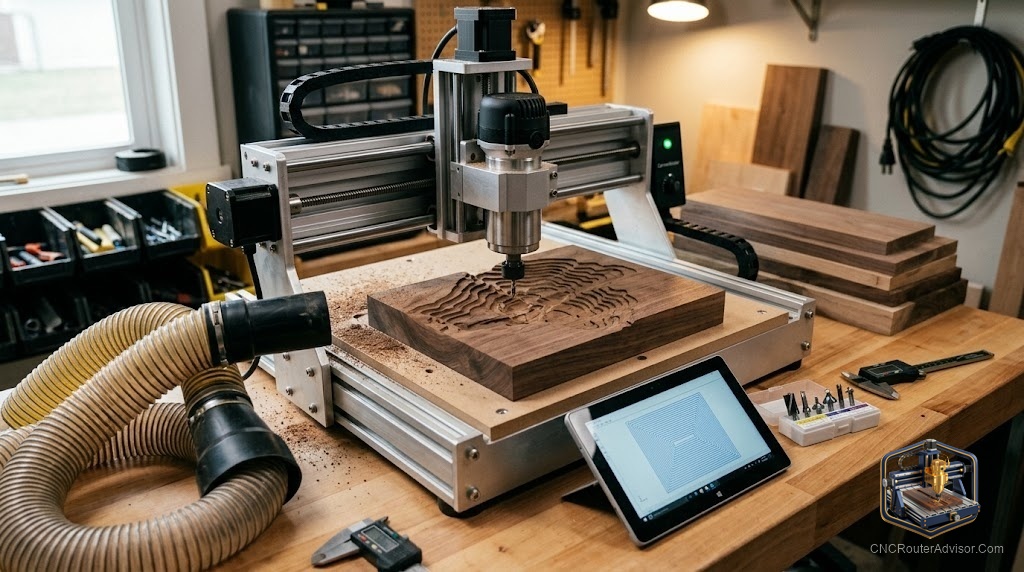
The Shapeoko arrived in a single box. Two hours later it was assembled on a folding table in a spare bedroom, and by evening it had cut the first sign. Three months later it was cutting 0.750” oak at 150 inches per minute without breaking a sweat, and the person who bought it had quietly sold their scroll saw. That’s the desktop CNC router experience at its best. The experience at its worst is a belt-drive machine that flexes through every hardwood cut, produces half-inch positional errors after an hour of running, and gets listed on Craigslist inside a year. The difference comes down to a handful of specifications most buyers don’t know to look for.
A desktop CNC router is a compact, self-contained CNC routing machine designed to sit on a workbench, garage table, or dedicated stand. Work areas typically run from 12” x 12” to roughly 24” x 48”, putting them between 3018 hobby machines and full 4x8 production routers. They cut wood, plastics, soft metals, and composites — and unlike a floor-standing industrial router, they go where you put them.
The best desktop CNC router for most buyers is one with ball screw or lead screw drives, linear rails, and a spindle (not a trim router) in a 24” x 24” or larger work area. Everything below explains why those four things matter and where the real compromises live.
Work Area: What Size Do You Actually Need?
Most desktop CNC buyers underestimate how quickly a small work area becomes a bottleneck.
A 12” x 12” table sounds like enough for small projects. In practice, you’re tiling (repositioning the workpiece mid-job) for anything larger than a book cover. Tiling introduces alignment error. It’s manageable, but it’s extra work every time.
A 24” x 24” table fits most sign blanks, cabinet door insets, guitar bodies, and flat panel decorative work. This is the practical minimum for a hobbyist doing mixed projects.
A 24” x 36” or 24” x 48” table opens up half-sheet work without tiling. This is the sweet spot for someone doing production signs, furniture panels, or custom cutting boards regularly.
Z-axis travel is equally important and more often ignored. A 3” Z stroke limits you to stock under about 2.5” thick (accounting for bit length and clearance). If you plan to carve relief work, 3D topographic maps, or anything that raises significantly off the spoilboard, look for 4” to 6” of Z travel.
Note: manufacturers often list “travel” and “work area” differently. The work area is the usable cutting zone. Travel includes the full axis movement range, which is slightly larger. Verify work area, not travel, when comparing machines.
Spindle vs. Trim Router: The Honest Comparison
Every desktop machine uses one of two types of cutting power: a trim router (Makita RT0701C, DeWalt DWP611, Bosch Colt) or a purpose-built CNC spindle.
Trim routers are inexpensive, easy to replace, and available at any hardware store. A Makita RT0701C delivers 1.25 hp and runs 10,000 to 30,000 RPM via a numbered dial. The weaknesses are real: RPM varies under load because there’s no feedback loop, the dial settings don’t correspond to exact RPMs without calibration, collets are limited to 1/4” shank, and bearing life in continuous CNC use is shorter than in a dedicated spindle.
CNC spindles run on a VFD (variable frequency drive) that holds RPM constant under load, accepts both 1/4” and 1/2” shank collets, and are designed for continuous-duty cycles that would overheat a trim router. A 2.2 kW (roughly 3 hp) air-cooled spindle costs more upfront but outlasts multiple trim routers in shop hours and produces more consistent surface quality in hardwood.
For occasional hobbyist use in pine, poplar, MDF, and foam, a trim router is completely adequate. For oak, maple, walnut, or any production-rate work, a spindle is the right tool.
Motion System: The Difference Between Accurate and Frustrating
The motion system is how the machine translates G-code commands into axis movement. It’s the most consequential spec most buyers ignore.
Timing belt drives are the entry-level standard. They’re used in older Shapeoko models, X-Carve, and most machines under a certain price point. Belts stretch over time, and that stretch shows up as positional error at the end of long cuts and slop at direction reversals. For engraving, light carving in soft materials, and foam work, belt drives are perfectly fine. For hardwood cutting or precise joinery, they introduce errors you’ll feel before you measure them.
Lead screws with anti-backlash nuts are a meaningful step up. They’re stiffer than belts, more resistant to tool pressure, and hold position through direction changes better. Most mid-tier machines use lead screws. Good choice for mixed wood and plastic work.
Ball screws are the precision standard. They’re preloaded to eliminate backlash in both directions, handle tool cutting forces without deflection, and remain accurate over long production runs. The Shapeoko 5 series switched from belts to ball screws specifically because users were running into the accuracy limits of belt drives in harder materials. Ball screws add cost but pay back in dimensional consistency.
Linear rails vs. V-wheels: V-wheel carriages ride on aluminum extrusion edges. They wear over time, need periodic adjustment, and introduce a small amount of play that increases as the wheels wear. Supported linear rails are stiffer and wear more predictably. For hardwood cutting, linear rails are the better long-term choice.
Frame Rigidity: Why It Matters More Than Specs Suggest
Frame flex is what limits how aggressively you can cut. When the cutting force from a 1/4” end mill in oak pushes back against the gantry, a rigid frame holds position and the cut stays clean. A flexible frame deflects, the bit takes a different path than commanded, and you get chatter marks and dimensional error.
Aluminum extrusion frames (the familiar 20mm or 40mm V-slot extrusion used in most hobby machines) are lightweight, modular, and work well for wood and plastics at normal cutting parameters. They flex under heavy loads and are not ideal for aluminum or composites.
Welded steel frames are significantly stiffer. Industrial desktop machines and higher-end prosumer routers use welded steel gantries and bases. For a desktop CNC router used primarily in wood and plastics, aluminum extrusion is usually adequate. If you plan to cut aluminum regularly, carbon fiber, or HDPE at production feeds, steel is the better choice.
Gantry height matters too. A tall gantry (high Z clearance) requires a longer gantry tube spanning the X axis. The longer the span, the more it can flex. Choose Z clearance sized to your actual needs, not maximum.
Controller and Software: What Runs the Machine
GRBL is the open-source firmware running most desktop CNC routers. It’s free, actively maintained, and connects to a range of sender software including Carbide Motion, OpenBuilds Control, and Universal G-Code Sender. GRBL supports 3-axis control, spindle speed, and basic probing. For the vast majority of desktop woodworking and sign-making work, GRBL is completely sufficient.
Mach3/Mach4 appears on higher-end prosumer and industrial machines. It’s more capable (more axes, macro scripting, more precise motion planning), runs on Windows, and has a larger feature set for production environments.
For CAM software, Carbide Create is free and tightly integrated with Shapeoko machines. Vectric VCarve Desktop is the woodworking shop standard — its toolpath options for signs, inlay, and 3D carving are well-tested and the workflow is efficient. Fusion 360 handles complex 3D work for free on personal use licenses.
The Real Trade-Offs: What You Give Up at Each Price Point
Entry-level desktop machines (3018-format, belt-drive, trim router, aluminum extrusion) deliver light engraving, thin MDF carving, and foam cutting reliably. They are not production wood routers. Work area is small, accuracy in hardwood is limited by frame and drive flex, and spindle power caps your material options.
Mid-range machines (24” x 24” to 24” x 48”, lead screw or ball screw, aluminum extrusion or steel frame, trim router or spindle option) are where most hobbyists and small production shops land. Machines like the Shapeoko 5, Onefinity Woodworker, and MillRight Mega V 2 live here. You give up some of the industrial smoothness of a full gantry router, but you gain a machine that cuts hardwood reliably, fits on a workbench, and has active user communities for troubleshooting.
Upper-tier desktop machines (ball screws, linear rails, steel gantry, 2.2 kW spindle, controller with probing and homing) approach the lower end of what small cabinet shops use. These machines cost significantly more but produce commercial results: dimensional accuracy tight enough for joinery, feed rates that match small production demands, and duty cycles designed for hours of daily use.
Conclusion
A desktop CNC router is a capable tool when its specifications match your actual project list. Four things to pin down before you buy:
- Work area first: measure your largest typical workpiece and add 4” on each side.
- Ball screws or lead screws over belts for any hardwood or precision work.
- Spindle over trim router if you plan to cut oak, maple, or walnut regularly or at production rates.
- Match controller and software to your CAM workflow before you commit to a machine ecosystem.
FAQ
What is the best desktop CNC router for beginners? For a beginner cutting wood and plastics, a machine with a 24” x 24” or larger work area, lead screw or ball screw drives, and a trim router or entry spindle covers most projects without the complexity of a full production machine. The Shapeoko series is consistently recommended for its build quality, active community, and well-documented assembly process.
What is GRBL and do I need it? GRBL is open-source CNC firmware that interprets G-code commands and drives the stepper motors. Most desktop CNC routers run GRBL. You don’t configure it directly for normal use — your sender software handles communication. GRBL is reliable, well-documented, and actively maintained.
What is the difference between a ball screw and a lead screw? Both convert rotational motor motion into linear axis movement. A lead screw is threaded rod with a nut; it’s affordable and works well but has some inherent backlash (play on direction reversal). A ball screw uses recirculating ball bearings between the screw and nut, which are preloaded to eliminate backlash. Ball screws are more accurate, especially in bidirectional cutting, and are the upgrade path for precision work.
Can a desktop CNC router cut aluminum? Some can, with important caveats. Machines with rigid frames, ball screws, and a proper spindle can cut aluminum at conservative feeds. Belt-drive machines and light aluminum extrusion frames will flex under aluminum cutting forces and produce poor results. If aluminum is a primary use case, choose a machine specifically rated for it.
What size work area do I need for sign making? Most sign blanks run 12” x 24” to 18” x 36”. A 24” x 24” machine covers the majority of common sign sizes. A 24” x 48” table is worth considering if you plan to make larger signs or want to run multiple small signs in a single job without repositioning.
How loud is a desktop CNC router? A trim router at 24,000 RPM in hardwood is roughly 85 to 90 dB at the machine — comparable to a loud shop vacuum. A water-cooled spindle is significantly quieter, typically 70 to 75 dB. Plan for hearing protection regardless of machine type.
Do I need dust collection for a desktop CNC router? Yes, especially for MDF. MDF dust contains fine particles and resin binders that are a respiratory hazard with repeated exposure. A shop vacuum connected to a dust shoe is the minimum viable setup. For shops cutting MDF regularly, a proper dust collector with a cyclone separator provides meaningful air quality improvement.