
CNC Router Software Guide: Features, Compatibility, Setup, and Pricing
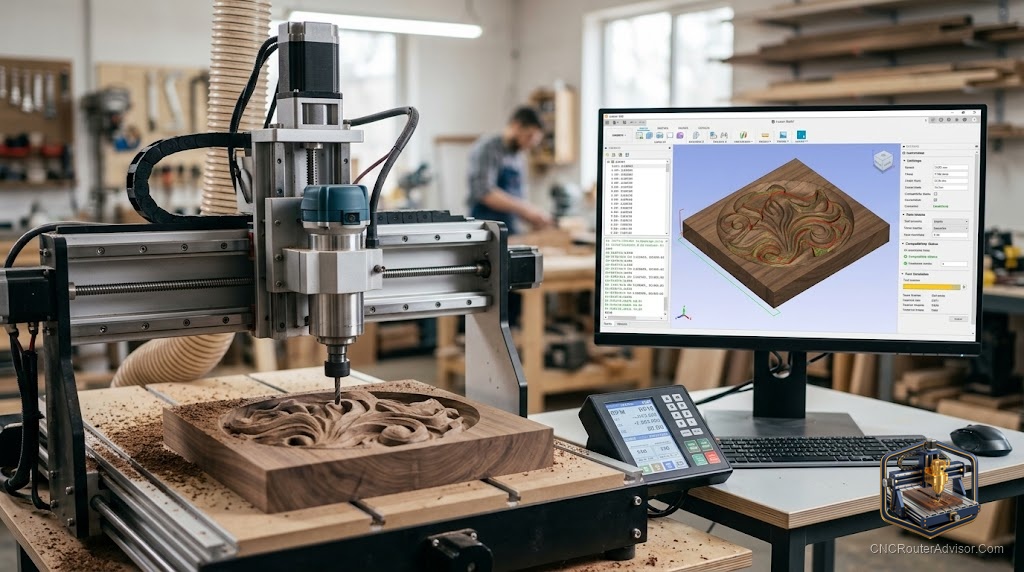
The machine arrives, gets bolted together, and then you open your laptop and realize you have no idea how to get a design into it. That moment catches most new CNC owners off guard. The router itself is the easy part. The cnc router software stack, from design to G-code to machine control, is where people lose weeks trying to figure out what they actually need.
CNC router software performs two distinct jobs. CAD (Computer-Aided Design) software is where you draw or import your part geometry. CAM (Computer-Aided Manufacturing) software converts that geometry into toolpaths, which tell the bit where to move, at what speed, and to what depth. The machine controller then reads the G-code output from CAM and drives the motors. Some software bundles all three stages. Others specialize in one.
The direct answer: Most hobbyists and small-shop woodworkers need a combined CAD/CAM tool that handles 2D and 2.5D work, outputs G-code through a post-processor matched to their specific controller, and has an active user community. Vectric’s product line (Cut2D, VCarve, Aspire) dominates this space because the CAM side is exceptionally good for wood and sign work. Fusion 360 is stronger for 3D mechanical design. Easel and Carbide Create are the right starting points for beginners who don’t yet know if they’ll stick with the hobby.
Understanding the CAD-CAM-Controller Chain
Before picking software, it helps to know what each stage actually does.
CAD is where geometry lives. You draw vectors, import SVG or DXF files, or build 3D models. CAD output is geometry, not cutting instructions.
CAM takes that geometry and generates toolpaths. You tell the software which bit you’re using, how deep to cut, how fast to move (feed rate), and how fast the bit should spin (RPM). The CAM software simulates the result and then exports G-code.
G-code is a text file of motion commands: move to X12.5 Y3.2 at this feed rate, lower Z to -6mm, start spindle. It looks cryptic but is actually straightforward once you read a few lines.
The post-processor is a translation layer. Different machines and controllers expect G-code in slightly different dialects. The post-processor in your CAM software converts generic G-code to the exact format your controller accepts. Choosing software that ships with a post-processor for your machine saves significant frustration.
The controller is the hardware-and-software combination that reads G-code and sends signals to the stepper or servo motors. GRBL is the most common open-source controller firmware, used in dozens of hobby and mid-range machines. It runs on an Arduino-based board and communicates over USB. More capable machines use proprietary controllers with dedicated motion hardware.
Toolpath simulation lets you watch a virtual preview of the cut before touching the machine. Every serious CAM package includes it. Always run the simulation before you cut real material.
Software by Tier: What Each Level Gets You
Free Tier
Easel (by Inventables) is the gentlest on-ramp in the category. It is entirely browser-based, requires no installation, and lets you import SVG files or draw basic shapes in minutes. Toolpath options are limited to profile cuts, pockets, and V-carve. If you own an X-Carve or a machine that runs the Easel driver, the machine connection is automatic. The free tier covers most beginner projects. The paid upgrade adds more toolpath types and 3D roughing, but the consensus among experienced users is that you will outgrow the core tool before you need the paid features, and better options exist at that point.
Carbide Create (by Carbide 3D) is the companion software for Shapeoko and Nomad machines but works with any GRBL-based router. It handles 2D design, contour, pocket, and V-carve toolpaths for free. The interface is clean and the learning curve is shallow. It exports GRBL-compatible G-code directly. For beginners on any machine in the Carbide 3D ecosystem, this is the correct starting point.
Fusion 360 has a free tier for personal, non-commercial use. The CAD side is full parametric 3D modeling, which is more than most woodworkers need but genuinely powerful if you design mechanical parts or complex 3D geometry. The CAM side supports 2.5D and 3D toolpaths, and the simulation and collision detection are excellent. The limitation is that the free tier has periodic restrictions that Autodesk adjusts, so confirm current terms before building a workflow around it. The learning curve is steep compared to Vectric tools. For someone coming from engineering or product design, Fusion 360 is the natural choice.
Entry-Paid Tier
Cut2D (Vectric) is the stripped-down version of VCarve. It handles 2D profile and pocket cutting, V-carving, and basic engraving. If your work is flat, 2D sign and shape cutting, Cut2D does it without paying for features you will not use.
VCarve Desktop and VCarve Pro are where most serious hobby woodworkers land. VCarve Desktop has a material size limit (the design area is capped). VCarve Pro removes the cap, which matters if you run a 4x8 table. Both offer excellent vector drawing tools, V-carve and 3D pocket toolpaths, toolpath simulation, and a large library of post-processors for nearly every machine on the market. The interface is designed for woodworkers, not engineers, which means the learning path is shorter than Fusion 360. The community around Vectric software is large, active, and generates a steady stream of tutorials and free design files.
Carveco Maker is subscription-based and targets similar users to VCarve. It includes artistic 3D relief design tools that the base Vectric tiers lack. For users who want to create their own 3D relief artwork rather than import finished files, Carveco Maker is worth serious consideration. The subscription model works in its favor for users who want a lower upfront commitment.
Professional Tier
Aspire (Vectric) is the full-featured top of the Vectric line. It adds comprehensive 3D relief design and modeling tools on top of everything VCarve Pro does. If you produce custom 3D carved panels, furniture appliques, or sculptural work, Aspire is purpose-built for it. The perpetual license carries a significant upfront cost, which is worth it for production shops but harder to justify for occasional use.
Mastercam is the industrial standard. It runs on the shop floor of aerospace suppliers, automotive manufacturers, and production machining facilities. The feature set and toolpath quality are unmatched. So is the price and the learning investment. Unless you are running a CNC business at production scale or transitioning from an industrial background, Mastercam is not the right tool.
Compatibility and Setup: What to Check Before Buying
Post-processor match. Before purchasing any CAM software, confirm it ships with a post-processor for your machine’s controller. Vectric maintains a large, actively updated post-processor library. Fusion 360 also has broad coverage. If your machine uses a less common controller, check the vendor’s forums for confirmed compatibility.
Operating system. VCarve and Aspire are Windows-native. Running them on macOS requires a Windows emulator or a Boot Camp partition. Fusion 360, Easel, and Carbide Create run natively on both platforms.
Machine size limits. VCarve Desktop limits your design area to 25 inches by 25 inches. If you have or plan to buy a machine larger than that, start with VCarve Pro.
GRBL controller setup. If your machine uses GRBL firmware, you also need a separate sender application to stream G-code from your computer to the machine during cutting. UGS (Universal G-code Sender) is the most widely used free option. gSender is a newer alternative with a cleaner interface. These senders do not generate toolpaths; they just communicate with the controller. Your CAM software generates the G-code; the sender delivers it.
CAD/CAM Software Comparison
| Software | Platform | Best For | Toolpath Depth | Tier |
|---|---|---|---|---|
| Easel | Browser | Absolute beginners | 2D, basic V-carve | Free / Paid upgrade |
| Carbide Create | Win/Mac | Shapeoko/GRBL beginners | 2D, V-carve | Free / Pro add-on |
| Fusion 360 | Win/Mac | 3D designers, engineers | 2.5D, full 3D | Free personal / Paid commercial |
| Cut2D | Windows | Flat 2D sign cutting | 2D profiling, V-carve | Entry paid |
| VCarve Desktop | Windows | Hobby woodworkers | 2.5D, V-carve, 3D pocket | Entry-mid paid |
| VCarve Pro | Windows | Mid-size to large tables | Same, no size limit | Mid paid |
| Carveco Maker | Win/Mac | Relief art, woodcarving | 2.5D, 3D relief | Subscription |
| Aspire | Windows | 3D production carving | Full 3D relief design | Professional paid |
| Mastercam | Windows | Industrial production | Full industrial CAM | Enterprise |
Which Software Should You Start With?
If you are brand new and unsure whether CNC is a long-term hobby, start with Easel or Carbide Create. Both are free or nearly free, they get you cutting fast, and you lose nothing if you switch later.
If you already know you are serious about wood sign work, decorative cutting, or selling CNC products, go directly to VCarve Desktop. The learning investment pays off within the first month of real projects, and the post-processor library means it works with virtually any machine you might own or upgrade to.
If your background is mechanical design or engineering and you work with 3D parts, Fusion 360 is the better fit even with its steeper curve. The CAD-CAM integration and the quality of the 3D toolpaths are genuinely superior for that use case.
If you want 3D artistic relief work and you want to design it yourself rather than buy files, look at Carveco Maker before Aspire. The subscription cost is lower, and the relief design tools are strong.
Verdict and Takeaways
The right software for cnc router work is the one that matches what you are actually making, not the most powerful option available. Most sign and gift-product makers live happily in VCarve for years.
Four concrete takeaways:
- Confirm post-processor compatibility with your specific machine before buying any CAM software.
- Free tools (Easel, Carbide Create) are genuine starting points, not compromises, for beginners.
- VCarve Desktop covers 90 percent of hobby and small-business sign and woodworking needs. Upgrade to Pro only when your table size demands it.
- A GRBL-based machine also needs a separate G-code sender (UGS or gSender). That is not a CAM tool; it is a communication tool.
FAQ
What is the difference between CAD and CAM software? CAD software is for designing geometry: drawing vectors, modeling parts, or importing artwork. CAM software takes that geometry and generates the actual toolpaths and G-code that tell the CNC machine how to move. Some tools like Fusion 360 and VCarve bundle both stages in one package.
What is G-code? G-code is the text-based language CNC machines read. It contains motion commands: where to move, at what speed, and to what depth. Your CAM software generates it automatically once you set up your toolpaths. You rarely need to edit it manually, but reading a few lines helps you understand what the machine is doing.
What is a post-processor in CNC software? A post-processor translates generic toolpath output into the specific G-code dialect your machine’s controller understands. Different controllers, including GRBL, Mach3, and LinuxCNC, expect slightly different command formats. Without the right post-processor, G-code from your CAM tool may not run correctly or at all.
Is free CNC software good enough for real projects? Yes, for many projects. Carbide Create and Easel handle 2D cutting, pocket carving, and V-carve work well enough for signs, custom gifts, and basic furniture parts. The limits appear when you want 3D relief toolpaths, large material sizes, or integration with specific machines. At that point, a paid option pays for itself quickly.
Does VCarve work on Mac? VCarve and Aspire are Windows-only applications. Mac users need to run Windows via Boot Camp, Parallels, or a similar environment. Easel, Carbide Create, and Fusion 360 all have native macOS versions.
What is GRBL? GRBL is open-source CNC controller firmware that runs on Arduino-based hardware. It interprets G-code and converts it into motor control signals. It is the most common controller type on hobby and mid-range CNC routers. To send G-code to a GRBL machine, you use a sender application like UGS or gSender in addition to your CAM software.
What is the Onefinity CNC software? Onefinity machines ship with a Raspberry Pi-based controller running a custom interface called Onefinity Controller. It has a web-based G-code sender built in, accessible from any device on your network. It does not generate toolpaths; you still use a separate CAM package like VCarve to create G-code, then load it into the Onefinity interface.
Can I use Fusion 360 for woodworking? Yes, though it is better suited to 3D mechanical parts than to the 2.5D sign and relief work that dominates most woodworking CNC use. For complex joinery, parametric furniture design, or jigs that need precise 3D geometry, Fusion 360 is excellent. For flat sign cutting and V-carving, VCarve is faster to set up and more intuitive.