
8020 CNC Router Plans: Build Options, Parts, and Key Measurements
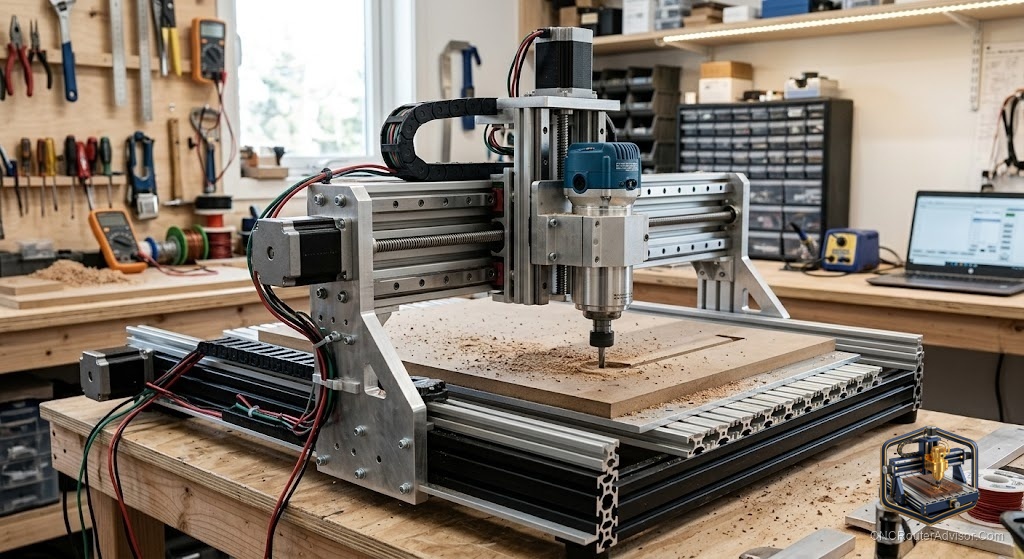
You want to build a CNC router and you have heard the term “8020” thrown around in every forum thread. Some people are talking about extrusion suppliers. Some are posting plans with cut lists. Some are arguing about which axis profile is stiff enough. You just want to know: what makes a good set of 8020 CNC router plans, what parts will you actually need, and what can you cut when the machine is done?
“8020” in the CNC builder community refers to T-slot aluminum extrusion, the modular structural system popularized by 80/20 Inc. The slash and the space both get dropped in search queries: “8020 cnc router plans” and “80/20 cnc router plans” and “80 20 cnc router plans” describe the same thing. A plan in this category tells you how to build a machine frame from extruded aluminum profiles, what drive and motion components to fit to it, and how to wire and configure the resulting machine.
Here is the short answer on whether these plans are for you: 8020 CNC router plans are the right starting point if you want to build rather than buy, you want a machine you can understand and modify, and you are comfortable with a project that takes several weekends and involves mechanical assembly, electronics wiring, and software configuration. If you want to cut parts as soon as possible, buy a finished machine.
What a complete set of plans includes
Not all plans are equal. A complete set covers:
Cut list. Every extrusion length and quantity, organized by axis. Good plans also tell you the cross-section for each piece (2020, 2040, 4040, etc.).
Bill of materials. Every part beyond the extrusion: linear rails, drive screws, stepper motors, drivers, controller board, spindle or router mount, limit switches, drag chains, fasteners, and cable. A bill of materials without part numbers or sourcing guidance is frustrating to use.
Assembly drawings. Dimensioned views that show how parts relate. Isometric renders are helpful but not enough on their own. You need dimensions to actually cut and drill.
Wiring diagram. How the stepper drivers connect to the controller board, how limit switches wire in, and how the spindle or router is switched. This is what many free plans omit and what causes the most build failures.
Software configuration notes. The steps per millimeter for each axis, the acceleration and velocity limits, and how to configure homing and soft limits.
Common build sizes in 8020 plans and what they cut
T-slot extrusion builds concentrate in three rough size families.
Mini desktop (300mm x 300mm to 400mm x 400mm). Usually 2020 or 2040 profiles, NEMA 17 motors, trim router or small spindle. Cuts wood, acrylic, PCB, and foam well. Lightest and easiest to build. Aluminum is marginal on the lightest frames.
Mid-size (500mm x 500mm to 600mm x 900mm). 2040 or 4040 profiles, NEMA 23 motors, water-cooled spindle with VFD. Cuts hardwood, dense plastics, and soft aluminum cleanly on a well-built frame with ball screws and square linear rails. This is the size where the build investment clearly pays off versus a comparable commercial machine.
Large-format (800mm x 1200mm and up). Extrusion is often supplemented with welded steel for the base at this size. NEMA 34 or servo motors, rack and pinion or heavy ball screws on the long axis. Few free plans cover this size with enough detail to build confidently.
The parts that decide how well the machine cuts
The extrusion is the skeleton. These are the organs:
Linear rails. How the moving parts are guided under load. V-wheels on extrusion are the entry option: cheap and adequate for light wood. Round supported rod is a step up. Square profile rails with recirculating blocks are the highest-accuracy option and the right call for any machine aimed at hardwood or aluminum. Square rails deflect less under the side load that cutting generates.
Drive system. How the motors move the axes. Ball screws use recirculating steel balls to minimize friction and backlash, and they hold their accuracy over time. Lead screws use sliding contact and cost less, with more friction and more play as they wear. Timing belts are fast and simple but stretch under load.
Stepper motors. NEMA 17 for mini builds, NEMA 23 for anything mid-size and heavier. Match the motor torque to the axis load. A NEMA 23 is not automatically better than a NEMA 17 if the driver is not set correctly.
Spindle. A trim router in a 65mm mount is the practical entry: you likely own one and it cuts wood and plastic well. A water-cooled spindle with a VFD is the upgrade for lower runout, precise speed control, and quiet long sessions.
Controller. GRBL is the default for 8020 builds. It runs on an Arduino-compatible board, reads standard G-code, and pairs with free senders like Candle and UGS. Mach3 is an alternative for those who need a richer feature set.
Key measurements you will need before you cut extrusion
Every plan has a cut list, but these are the measurements to verify before you commit to the list:
- The real work area you need, not the nominal size. The machine footprint is always 200mm to 300mm larger than the cutting area on each side.
- The gantry clearance above the bed: Z travel plus your tallest workpiece plus your tallest clamp.
- The spacing between gantry supports on the X axis: this sets how wide a part you can load perpendicular to the gantry.
- The spoilboard mounting pattern: where your workholding bolts go relative to the bed edge.
Projects you can cut once the machine is running
These are the projects that work reliably on a well-built desktop or mid-size 8020 machine:
- Personalized name signs and address plaques in plywood, MDF, hardwood, and cedar
- Engraved cutting boards in end-grain maple or walnut with V-bit text and border details
- Geometric wall art from Baltic birch plywood with through-cuts on a spiral upcut bit
- Quote signs with multi-depth V-carving in painted MDF
- Pet memorial frames with relief-carved borders in softwood or MDF
- Jewelry boxes with fitted lids, pocketed trays, and laser-engraved lids (if you add a diode laser module)
- Cribbage boards with pocketed hole patterns and relieved surfaces
- Wooden shelves with CNC-cut bracket profiles and dadoed slots
All of these use a small set of bits: a 6mm or 1/4-inch upcut spiral for profiles and pockets, a 60-degree V-bit for text and fine detail, and a ball-nose for any 3D relief work.
Where to find 8020 CNC router plans
Instructables has the largest collection of free plans, searchable by machine size and complexity. OpenBuilds is the other major free source, with plans built around their compatible extrusion ecosystem and a dedicated parts store.
Paid plans on Etsy and from individual designers typically include more complete documentation, part numbers, sourcing guidance, and a contact for questions. For a first build, a paid plan that costs less than a bag of stepper motors is often worth it.
Verdict
A good set of 8020 CNC router plans gets you to a machine you understand completely and can modify freely. The frame is adjustable and expandable without specialized tools. The quality of the machine depends on the rails, drive, and spindle you choose to build into it.
Four things to have confirmed before you buy a single part:
- A complete plan with bill of materials, assembly drawings, wiring diagram, and software notes, not just photos.
- Profile sizes verified against your work area and material hardness (4040 minimum for mid-size hardwood cutting).
- Drive system chosen: ball screws for accuracy and longevity, lead screws only for the lightest work.
- CAM software identified and installed before the machine arrives.
FAQ
What does 8020 mean in CNC router plans? It refers to T-slot aluminum extrusion, the system popularized by 80/20 Inc. The slash is dropped in search queries. All three spellings (8020, 80/20, 80 20) mean the same thing.
What is the difference between 8020 and 80/20 CNC router plans? None. They are the same search term with different punctuation.
Are 8020 CNC router plans suitable for a beginner builder? Yes, if you choose plans with a complete bill of materials and wiring diagram. Missing either one turns a weekend project into a multi-week troubleshooting exercise.
What tools do I need to build an 8020 CNC router? A chop saw or cold saw for cutting extrusion, a set of metric hex keys and wrenches, a precision square for squaring the frame, and wire strippers and crimpers for the electrical work.
What can I cut with an 8020 CNC router? Wood, plywood, MDF, acrylic, HDPE, foam, and PCB material are the standard materials for a desktop or mid-size build. A rigid mid-size frame with ball screws and a proper spindle also handles soft aluminum.
How long does it take to build from plans? Expect two to four weekends: mechanical assembly, then wiring and electronics, then calibration and first cuts.
Where do I find free 8020 CNC router plans? Instructables and OpenBuilds carry the most comprehensive free plans. Etsy sellers offer paid plans with better documentation for first-time builders.
References
- Instructables, “DIY CNC Router Plans: How to Build”: https://www.instructables.com/DIY-CNC-Router-Plans-How-to-Build/
- OpenBuilds community and plans: https://openbuildspartstore.com
- BubbleRelief, “CNC Router Projects for Beginners”: https://bubblerelief.com/cnc-router-projects-for-beginners/