
STL Files for CNC Router: Where to Find Them, What to Look For, and Project Ideas
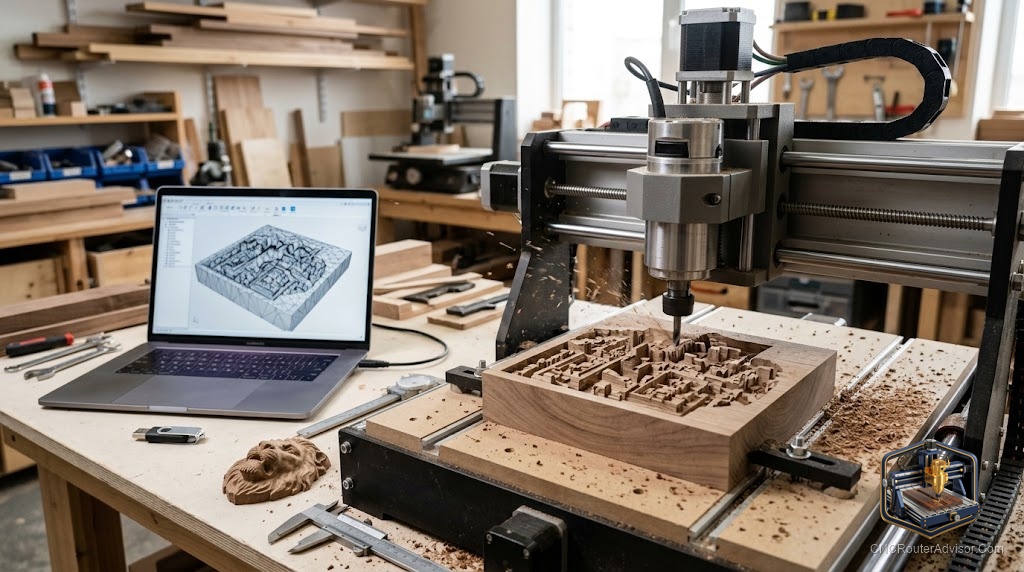
The library of STL files available for free or purchase online is enormous, and most of it was made for 3D printers. That sounds like a problem, but it is mostly an opportunity with a filter applied: most 3D printing STL files translate to CNC carving well, a few do not, and knowing the difference before you download saves you an hour of troubleshooting in CAM. Once you know what to look for in a file, the same catalogs that supply 3D printing enthusiasts become a rich source of 3D relief carving designs for your CNC router.
STL files for CNC routers are 3D geometry files used as design source material for 3D relief carving, dimensional signs, carved panels, and other work that requires varying depth across the surface. Unlike flat 2D files (SVG, DXF) used for profiles and pockets, an STL describes a three-dimensional surface that a CNC router can carve into material using 3D roughing and finishing toolpaths in CAM software.
The short guide to finding good ones: choose files with high mesh resolution for smooth carved curves, verify the design has no internal overhangs that a CNC bit cannot reach, confirm the depth of the carving fits your material thickness and Z clearance, and check that the file is solid (watertight in 3D printing terms) so your CAM software does not generate broken toolpaths. Do those four checks and most downloaded files are usable.
Where to find STL files for CNC carving
Four categories of source cover most of what a CNC router owner needs.
Free general repositories. Thingiverse (thingiverse.com), Printables (printables.com), Cults3D (cults3d.com), and MyMiniFactory (myminifactory.com) host millions of user-uploaded STL files across every category. Most were made for 3D printing, but relief designs, decorative panels, animal and portrait carvings, geometric art, and architectural ornaments translate directly to CNC carving. Search within the “relief” or “carving” categories on each platform for files more likely to be CNC-ready.
CNC-specific design stores. Design Bundles (designbundles.net), CNCFileStore, and the CNC section of Creative Fabrica and Etsy sell files specifically formatted for CNC routing, often labeled as “3D CNC carving files” or “relief carving files.” These files are made with CNC cutting in mind: the depth is consistent with carvable material thickness, there are no overhangs, and the mesh resolution is optimized for a smooth finish. Paying a few dollars for a well-prepared file often saves more in wasted material than it costs.
Software-bundled libraries. Carbide Create Pro, Aspire, and ArtCAM ship with libraries of 3D relief designs included. These are ready to use within the software, already optimized for the toolpaths the software generates, and often the fastest path from “I want to cut a relief” to actual cutting.
Creating your own. For custom work, 3D design software like Blender (free), ZBrush, or Fusion 360 lets you create original STL files. This has the steepest learning curve but gives you fully custom designs, which matters for personalized gifts, bespoke signs, and unique art pieces.
What makes an STL file CNC-ready (and what to avoid)
Here is the practical filter to apply before spending time on a file.
Mesh resolution matters for carved curves. An STL is a mesh of triangles, and the smaller those triangles, the smoother a curved surface looks when carved. Low-resolution files designed for fast 3D printing (where the printer adds material in layers and imperfections are less visible) can look faceted and angular when carved, especially on faces, animals, and smooth organic shapes. Look for files described as “high-res” or check the file size: a larger file usually means more triangles and smoother curves.
No internal overhangs or undercuts. A 3D printer can handle overhangs with support structures. A CNC router bit can only reach surfaces from above (or from the side, in rare setups). Any design feature that faces downward and inward cannot be cut by a standard CNC setup. Faces, spheres, and organic carvings are generally fine because the carved surface faces upward. Deep undercuts are not.
Watertight geometry. A solid, watertight STL (no holes in the mesh, no intersecting surfaces) generates clean toolpaths. A problematic mesh with gaps or errors can confuse CAM software into generating incomplete or broken paths. Most files from reputable sources are watertight, but free files from individual contributors sometimes have mesh errors. Many CAM programs include repair functions for minor issues.
Depth versus material and Z clearance. Check how deep the carving runs (often listed in the file description) against your material thickness and your machine’s Z clearance. A 50 mm deep carving requires at least 50 mm of Z clearance plus tool engagement, and you need stock material at least that thick. Most decorative relief carvings are designed for 20 to 50 mm depths, which is manageable on most prosumer machines.
Project ideas that use STL files well
Here is where the real inspiration lives. These are the categories where CNC carving from STL files produces results that flat cutting cannot come close to.
Dimensional portrait carvings. A carved face or figure in hardwood, cut from a high-resolution portrait STL, is one of the most impressive things a CNC router can produce. These sell well as gifts and commissions. Use a slow step-over finishing pass (5 percent or less) and a good quality ball-nose bit for the finest detail.
Topographic maps. STL files of geographic relief (mountain ranges, local terrain, coastlines) make striking wall art in stacked or single-piece wood. They are popular gift items and available on both free sites and paid CNC-specific stores.
Decorative panel carvings. Celtic knotwork, geometric mandalas, floral reliefs, and architectural ornaments all translate to beautiful carved panels for furniture, cabinet doors, and wall art. These are among the most common CNC relief projects and have huge design libraries.
Personalized signs with dimensional elements. Combining a 3D-carved relief element (a bird, a crest, an animal) with router-cut text in the same file lets you produce custom signs that look handmade at a quality level that actually requires a machine to replicate.
Game and display pieces. Relief carvings of game boards, display plaques, prop replicas, and decorative boxes are popular in maker communities and available in large numbers on free and paid design sites.
For the machine setup that makes 3D STL carving possible, our guide on how to choose a CNC router helps confirm whether your machine’s Z clearance and frame rigidity are suited to deeper carving work before you commit to a project.
The takeaway: the library of STL files available for CNC carving is large, getting larger, and mostly excellent if you apply the four filters (resolution, no undercuts, watertight, right depth). Find files from CNC-specific stores for the easiest experience, raid the 3D printing repositories for volume, and create your own for truly custom work.
Frequently asked questions
Where are the best free STL files for CNC carving? Thingiverse, Printables, Cults3D, and MyMiniFactory are the largest free repositories. Search for “relief carving” or “CNC” within each to find files made or adapted for cutting.
Are there paid STL files specifically for CNC routers? Yes. Design Bundles, CNCFileStore, Creative Fabrica, and dedicated Etsy CNC shops sell files made specifically for carving, with appropriate depth, resolution, and no overhangs.
How do I know if an STL file is high enough resolution for CNC carving? Look for files described as “high-resolution” or check the file size: larger files have more triangles and produce smoother carved curves. Preview the mesh in a free viewer like Microsoft 3D Viewer or Meshmixer before committing to cut it.
Can I use 3D printing STL files on a CNC router? Mostly yes, with the caveat of avoiding files with overhangs or undercuts that a CNC bit cannot reach. Flat-based designs, reliefs, and organic shapes without deep undercuts usually translate well.
What software converts STL to CNC toolpaths? Carbide Create Pro, VCarve Pro, Aspire, ArtCAM, Fusion 360, and several others all import STL and generate 3D carving toolpaths for export as G-code.
What is the best bit for carving from STL files? A ball-nose bit for the finishing pass, because its rounded tip follows curved surfaces smoothly. Bit diameter determines detail capability: smaller bits follow finer detail but run slower.
References
- Thingiverse, STL file repository — https://www.thingiverse.com/
- Cults3D, CNC and 3D design files — https://cults3d.com/
- Design Bundles, CNC carving file store — https://designbundles.net/
- Carbide 3D, “3D Toolpaths Documentation” — https://docs.carbide3d.com/