
CO2 Laser and CNC Router Projects: What You Can Make When You Have Both
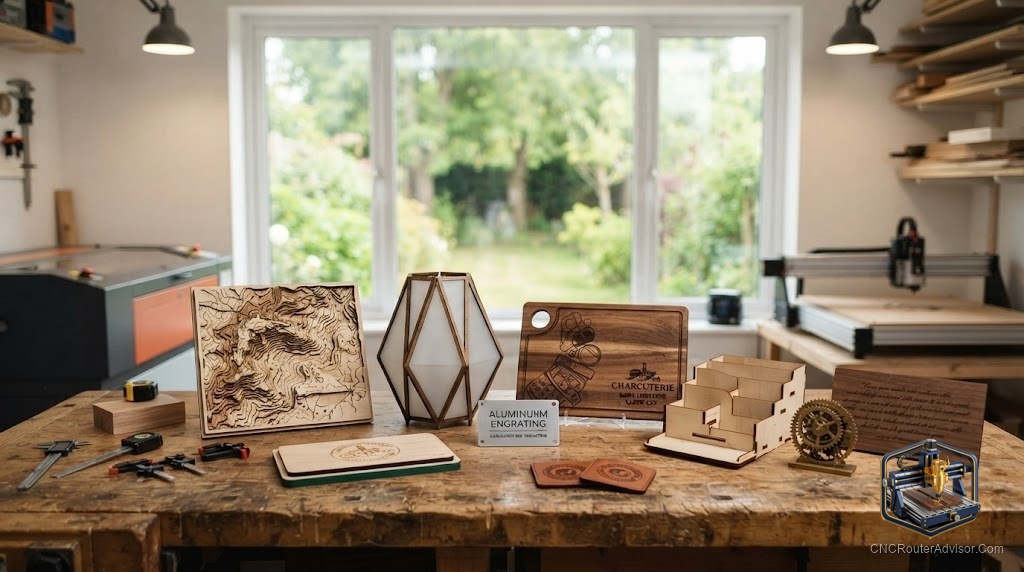
Owning a CNC router and a CO2 laser is not redundancy, it is vocabulary. Each tool says things the other cannot, and knowing what belongs to which machine is what separates projects that look impressive from ones that look impossible. A CNC router carves depth, shape, and texture into material. A CO2 laser cuts crisp lines, scorches fine detail, and works on things a spinning bit would tear apart. Together they cover a creative range that either tool alone never reaches, and the most interesting work happens exactly at the seam between them.
A CO2 laser and CNC router combination lets makers cut and carve complex three-dimensional forms with the router and then add precise engraving, inlays, fine text, or decorative cut-outs with the laser, either on a two-in-one machine or by moving work between dedicated tools. The combination is especially popular for layered signs, furniture with inlaid detail, custom gifts, and production pieces that mix structural forms with decorative surface work.
The short version: use the CNC router when you need shape, depth, and structural form in wood, plastic, or soft metal. Use the CO2 laser when you need precision engraving, intricate cuts, or clean work on thin, delicate, or non-flat material. Use them together when a project needs both, which happens more often than you expect once you own both tools.
What each machine actually contributes
Understanding the tools starts with being honest about what they do well and what they refuse to do.
The CNC router excels at removing bulk material, shaping three-dimensional forms, cutting tight-tolerance joinery, machining soft metals, and producing thick parts with depth. It is the tool for a carved relief, a dadoed cabinet joint, a shaped bracket, a surfaced spoilboard, or a hundred identical routed parts. What it cannot do cleanly: engrave extremely fine text or photo-quality images without visible tool marks, or cut very thin or flexible material without it lifting or tearing.
The CO2 laser excels at precision engraving, crisp photo etching, intricate vector cuts in thin wood and acrylic, and decorative surface work that a bit would smear or tear. It works beautifully on flat or curved surfaces and handles material a router cannot, like thin fabric, leather, and paper. What it cannot do: carve depth into thick material or machine any metal that a router handles routinely.
Most combinations work by using the router for the structural work, then the laser for surface detail. The workflow is usually: rout the form, fixture it in the laser, burn the detail. Getting fixturing right between machines is the main practical skill, because if the work shifts, the engraved detail will not land where the routed form expects it.
Project ideas that show the combination at its best
Layered dimensional signs. Route the letters and relief shapes in thick stock, then laser the fine texture, grain lines, or detailed logo marks onto the raised surfaces. The router makes the dimension. The laser makes it intricate.
Wood and acrylic inlay panels. Route the pockets in the wood base to precise dimensions, cut the acrylic inlay shapes with the laser for clean, smooth edges that a bit would chip, and press the acrylic into the pockets. The combination produces jewelry-quality inlay work faster than either tool alone.
Personalized cutting boards and gifts. Route the handle shape, edge profile, and juice groove with the router for the functional form, then laser the name, design, or date onto the surface with crisp, food-safe engraving.
Cabinet and furniture panels. Route door profiles, decorative bevels, and joinery with the CNC router, then laser cane-pattern or geometric decorative cuts into a central panel for a look that would take a craftsman days to produce by hand.
Architectural models and prototypes. Route structural parts with the router for strength and dimensional accuracy, cut thin overlay and detail layers with the laser, and stack or glue them together. This is a standard approach in architectural model-making because it produces clean, professional results quickly.
Production sign work. Batch-rout the blank shapes and edge profiles on the router, then run them through the laser for consistent engraving across the entire batch. Separating the two operations by machine type keeps each tool doing what it does fastest.
Adding laser capability to a CNC router you already own
You do not necessarily need two separate machines to combine these capabilities. A diode laser module mounts on many CNC routers and adds engraving and thin-material cutting on the same motion system. The limitation is power: diode modules are excellent engravers but do not match a CO2 laser’s ability to cut thick material cleanly or handle a wide range of non-wood materials. For light engraving and thin cuts, a module like the LASER TREE 10W optical module on your existing router covers a good share of the combination use cases without buying a second machine.
The upgrade path for serious combined work is eventually a dedicated CO2 machine, because the power, cutting range, and speed of a CO2 laser are difficult to match with a diode module, but a diode attachment is a sensible and cheap first step toward understanding whether you actually use both capabilities before committing to two machines.
Workflow and fixturing: the part people underestimate
The practical skill most tutorials skip is holding work in the same position across both machines so the laser detail lands exactly where the routed form expects it. Simple registration pins or a repeatable fixture jig solves this reliably. Mark your origin consistently, design your router and laser files to reference the same zero point, and test the registration with a light burn before committing a finished piece. Spend an hour building a good fixture jig and it pays back on every project that follows.
Material selection matters too. Most wood types work beautifully in both tools, but test your specific board before cutting a finished piece, because density and resin content affect how material responds to the laser, and what works on one board may scorch or resist on another.
Who benefits most from combining both tools
The combination pays off best for makers who sell personalized or decorative work at scale, furniture and product designers who mix structural and decorative elements, sign shops that need both dimensional carving and precision engraving, and prototype builders who work in mixed materials. It is less compelling for a maker who does exclusively structural work (just use the router) or exclusively engraving (just use the laser). The pairing shines when projects genuinely need both depth and detail, and that describes a lot of the most visually appealing work in the maker market today.
If you are still choosing the right CNC router to pair with laser work, our guide on how to choose a CNC router helps match machine specs to the kinds of projects you plan to make.
The takeaway: the CO2 laser and CNC router combination is not about owning more tools, it is about saying more with the tools you own. Each machine has a language the other does not speak, and knowing which language a project needs, and when to use both, is where the most impressive work comes from.
Frequently asked questions
Can a CNC router replace a CO2 laser? Not fully. A CNC router cannot engrave with the precision and surface quality of a laser, and it cannot cut thin or delicate material cleanly. They are complementary, not interchangeable.
Can a CO2 laser replace a CNC router? Not for three-dimensional carving, structural cutting of thick material, or machining soft metals. Again, they complement rather than replace each other.
How do I register work accurately between the two machines? Use registration pins or a repeatable fixture jig that holds the work in the same position on both machines, and design both files to reference the same origin point.
Can I add a laser to my existing CNC router instead of buying a dedicated one? Yes. A diode laser module mounts on many CNC routers and handles engraving and thin-material cutting well, though a dedicated CO2 laser has more power and range for serious cutting work.
What materials work well for combined projects? Most wood species, MDF, acrylic, and leather work well in both tools. Test your specific material before cutting finished work, since density and resin content affect laser behavior.
What is the main skill for combined-tool projects? Fixturing and registration, getting the work to sit in the same position on both machines so the laser detail aligns with the routed form. A good jig built once solves this for all future projects.
References
- OMTech, “CNC Router vs Laser Engraver: Can You Use Both?” - https://omtechlaser.com/blogs/news/cnc-router-vs-laser-engraver
- Laguna Tools, “41 Inspiring CNC Router Projects” - https://lagunatools.com/blog/cnc-router-projects/
- Onefinity CNC, “CNC and Laser Project Ideas” - https://www.onefinitycnc.com/blog/cnc-laser-projects