
CNC Router 3D Carving: Explained, Projects, and Key Considerations
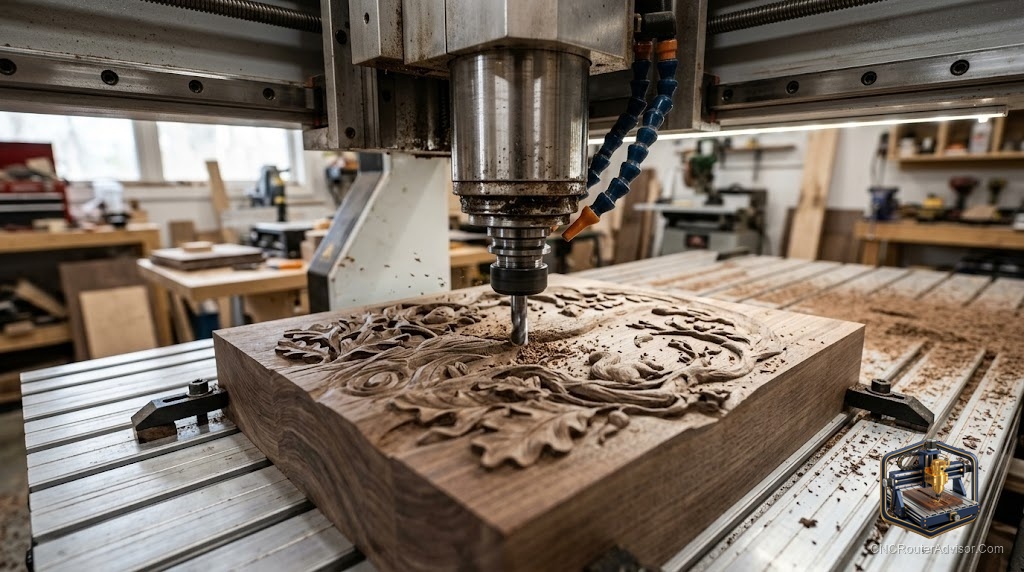
Three-dimensional carving is where a CNC router shows what it can do beyond straight lines and flat pockets. Instead of following a 2D outline, the machine follows a sculpted 3D surface, raising and lowering the bit as it moves across the material to produce detailed reliefs, portraits, signs, decorative panels, and sculptural forms. It is the process that produces the intricate work you see on carved signs, personalized gifts, and artistic panels, and understanding how it works, what projects it suits, and the key considerations that determine quality is what separates clean, detailed carvings from rough, faceted ones.
3D carving raises the capability of a CNC router into artistic and craft territory, so understanding the process, toolpaths, and finish controls is what makes it produce beautiful work.
CNC router 3D carving uses a three-dimensional toolpath (a 3D surface file) and ball nose bits to cut a sculpted relief or three-dimensional form from a workpiece, following a 3D surface rather than a flat 2D profile. Common projects include name signs and decorative lettering with dimensional depth, portrait reliefs, animal and nature carvings, artistic panels, plaques and awards, and SVG or DXF designs converted to 3D models. Key considerations are: the 3D model or file (clean, high-quality geometry produces clean carvings), the ball nose bit (tip size sets detail, and tapered bits add strength for fine work), the roughing and finishing strategy (roughing removes bulk quickly; a fine-stepover finishing pass produces the smooth surface), material choice (dense, fine-grained woods like hardwoods hold better detail than soft woods), and machine rigidity (more rigidity equals finer, cleaner detail). Done well, 3D carving produces work of a quality that would take a skilled hand carver far longer.
The three elements that most determine 3D carving quality are the model, the ball nose bit tip size, and the finishing stepover; get those right for work that rivals hand carving.
How 3D carving works
Unlike 2D profiling and engraving, 3D carving follows a three-dimensional surface:
- A 3D surface model describes the form to be cut, a relief, sculpted portrait, or decorative design.
- The toolpath follows this surface in raster (parallel passes) or other 3D strategies, raising and lowering the Z axis to match the surface as the bit moves across.
- A ball nose bit follows the curves without leaving flat-bottomed scallops, blending adjacent passes into smooth, continuous contours.
The result is a part with genuine three-dimensional form cut directly from solid material.
Popular 3D carving projects
Name signs and decorative lettering. Raised or recessed letters with dimensional depth and decorative borders are one of the most popular 3D carving projects. Converting a name or phrase to a 3D relief produces a striking, tactile result.
Portrait and face reliefs. Photolithophane and relief portrait carving produce detailed facial and figure work, a popular gift and display item.
Animal and nature carvings. Wildlife scenes, leaf and vine patterns, and sculptural animals are classic 3D carving subjects in wood.
Artistic and decorative panels. Geometric reliefs, ornamental designs, and artistic panels for walls and furniture are well-suited to 3D carving at panel scale.
Plaques and awards. Raised logos, seals, and dimensional lettering on plaques are a common commercial 3D carving application.
SVG and DXF to 3D. Flat vector designs in SVG or DXF format can be converted to 3D reliefs in CAD/CAM software, making it easy to take any vector design and give it sculptural depth.
Key considerations
The 3D model or file. The quality of the carving reflects the quality of the model. Clean, detailed geometry produces clean, detailed carvings; poor geometry produces faceted, noisy results. Use high-quality relief files or model accurately, and preview the toolpath in your CAD/CAM software before cutting.
Ball nose bit and tip size. The ball nose bit is the essential 3D carving tool. Larger tips smooth broad forms; smaller tips capture fine detail. Tapered ball nose bits add strength for fine or deep work with small tips. Use the largest tip that captures the finest detail you need, and use a smaller finishing bit for detail passes.
Roughing and finishing strategy. 3D carving is most efficient and cleanest when split into two stages:
- Roughing: remove bulk material quickly with a larger bit or an aggressive toolpath. This saves time without needing fine finish quality.
- Finishing: follow with a fine-stepover ball nose pass that smooths the surface, with stepover (the distance between passes) controlling how smooth the result is. A smaller stepover gives a smoother surface at the cost of time.
Material choice. Dense, fine-grained materials hold detail better. Hardwoods (such as cherry, maple, and walnut) produce crisper detail than soft, open-grain woods. HDU sign board (a dense foam) carves extremely cleanly and is popular for sign work. MDF carves consistently but lacks the warmth of solid wood.
Machine rigidity. More rigidity equals cleaner, finer detail and less chatter on deep 3D work. A rigid machine produces work that a flexible one cannot.
The verdict
CNC router 3D carving uses a 3D surface model and ball nose bits to cut sculpted reliefs and three-dimensional forms, producing detailed work in name signs, portrait reliefs, animal and nature carvings, artistic panels, plaques, and SVG or DXF designs given sculptural depth. The three elements that most determine quality are the model (clean geometry), the ball nose bit tip size (matched to the finest detail), and the finishing stepover (smaller for smoother surfaces). Split every 3D job into a fast roughing pass and a fine-stepover finishing pass, choose a dense, fine-grained material for the best detail, and favor a rigid machine. Done right, 3D carving produces work of a quality that rivals hand carving.
Three things to take with you:
- 3D carving follows a 3D surface model with ball nose bits, producing sculpted reliefs in name signs, portrait reliefs, decorative panels, and SVG or DXF designs given depth.
- The three biggest quality factors are the model (clean geometry), ball nose tip size (matched to fine detail), and finishing stepover (smaller is smoother); split every job into a roughing and a fine-stepover finishing pass.
- Choose a dense, fine-grained material like hardwood or HDU for the best detail, and favor a rigid machine for cleaner, finer results.
FAQ
What is CNC router 3D carving? It is a process in which the router follows a three-dimensional surface model, raising and lowering the bit as it moves across the material, using ball nose bits to cut sculpted reliefs and three-dimensional forms. The result is work with genuine depth and texture, from name signs to portrait reliefs and decorative panels.
What bits do I need for 3D carving on a CNC router? Ball nose bits are the essential tool. Their rounded tip follows curved surfaces and blends adjacent passes into smooth contours. Use a larger tip for broad forms and roughing, and a smaller tip for fine detail. Tapered ball nose bits add strength for fine or deep work with small tips.
How do I get a smooth 3D carving? Reduce the stepover on the finishing pass; a smaller stepover leaves smaller scallops and a smoother surface. Always split the job into a roughing pass (fast, less precise) and a fine-stepover finishing pass (slower, smooth). The finishing stepover, as a fraction of the bit’s tip diameter, controls the surface quality directly.
What wood is best for 3D carving? Dense, fine-grained woods hold the finest detail: hardwoods such as cherry, maple, and walnut produce crisper carvings than soft or open-grained woods. HDU sign board carves extremely cleanly and is popular for signs. MDF is consistent but lacks the warmth of solid wood. The best material is the densest that fits your project and budget.
Can I convert an SVG or DXF file into a 3D carving? Yes. Most CAD/CAM software can import a flat SVG or DXF vector design and convert it to a 3D relief by extruding, beveling, or sculpting the flat vectors into a dimensional form. This is a popular way to give any vector design, a name, a logo, or an illustration, sculptural depth without modeling from scratch.
Does machine rigidity affect 3D carving quality? Yes, significantly. A rigid machine follows the 3D surface precisely and cuts finer detail without chatter. A flexible machine deflects under the cutting load, producing rougher surfaces, less crisp detail, and visible tool marks, especially on deep 3D work. Rigidity is one of the reasons professional machines produce finer 3D results.
References
- Wikipedia, CNC router and 3D machining: https://en.wikipedia.org/wiki/CNC_router
- All3DP, 3D carving and relief machining guide: https://all3dp.com