
4 x 4 CNC Router Table Guide: Work Area, Table Design, and Buying Factors
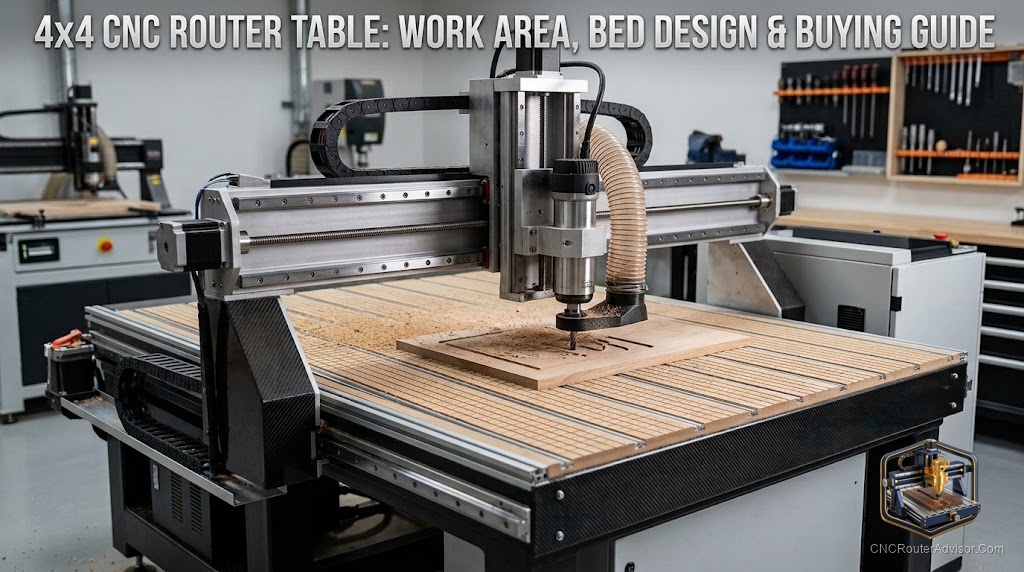
When people say “4 by 4 CNC router table,” they are usually thinking about the whole package, not just the gantry that moves the cutter, but the table it all sits on and works over: the bed that holds the work, the surface you clamp or vacuum to, and the structure that keeps everything flat and rigid. The table is easy to overlook next to flashy specs like spindle power, yet it quietly determines flatness, workholding, and how pleasant the machine is to use. This guide covers the 4 by 4 size, the table design choices that matter, and the buying factors that separate a machine you will enjoy from one that fights you.
A CNC router is only as accurate as its bed is flat and its workholding is secure, so understanding the table, its surface, flatness, and hold-down options, is as important as the size and spindle. For a 4 by 4, the table also has to stay flat and rigid across a substantial span.
A 4 by 4 CNC router table refers to a router with a roughly 48 by 48 inch (about 1220 by 1220 mm) work area, considered together with the table or bed the machine works over. It suits half-sheets, signs, cabinet parts, and panels while fitting a normal shop. The table design matters as much as the size: a flat, rigid bed keeps cuts accurate, and the surface type, T-slot, spoilboard (a sacrificial MDF layer), or vacuum, determines workholding. Buying factors include bed flatness and rigidity across the 48 inch span, the surface and hold-down system (T-track, spoilboard, or vacuum), overall frame rigidity and drive system, spindle power, Z clearance, and whether 4 by 4 fits your projects. A well-designed table makes a 4 by 4 accurate and easy to hold work on.
The table is the quiet foundation of cut quality; a flat, rigid, well-equipped bed matters as much as the headline specs.
What a 4 by 4 table gives you
At roughly 48 by 48 inches, a 4 by 4 table handles:
- Half-sheets: a full 4 by 8 sheet cut in two.
- Signs, panels, and cabinet parts up to a large size.
- Medium-to-large 3D carvings.
It fits a normal shop and often runs on standard power, without the demands of a full 4 by 8. Usable area is slightly less than nominal once workholding is accounted for.
Table design: the part people overlook
The table (bed) is where accuracy and workholding live:
Flatness and rigidity. The bed must be flat and stay flat across the full 48 inch span, and rigid enough not to flex under cutting forces or the weight of material. A bed that sags or twists puts error into every cut, no matter how good the gantry. On a 4 by 4, maintaining flatness across the larger span is a real design challenge, so judge the bed structure, not just the gantry.
Surface and hold-down type. How you secure work is set by the surface:
- Spoilboard (sacrificial MDF): a flat MDF layer you cut into and resurface periodically; simple, cheap, and surfaceable flat with the machine. Work is held with screws, clamps, or tape.
- T-slot / T-track: aluminum tracks let you place clamps anywhere, versatile and strong, especially for varied parts; slightly more setup per job.
- Vacuum table: holds sheets flat by suction with no clamps in the way, fast and productive for sheet work, but adds a pump and cost.
Many 4 by 4 machines combine a spoilboard with T-track, or offer vacuum as an option. Match the surface to your work: T-track and spoilboard for varied parts, vacuum for volume sheet work.
Surfacing. A good practice is to surface (flatten) the spoilboard with the machine itself, so the bed is flat relative to the gantry. A machine and workflow that make this easy help keep cuts accurate over time.
Buying factors
Bed flatness and rigidity across the span. This is the table-specific priority. Confirm the bed is flat and rigid across the full 48 inch work area and does not flex or sag. Ask how flatness is achieved and maintained (surfaceable spoilboard, rigid substructure).
Surface and hold-down system. Choose T-track, spoilboard, vacuum, or a combination based on your work. Confirm the hold-down suits your typical parts and materials, since workholding is where day-to-day frustration or ease is decided.
Frame rigidity and drive system. Beyond the bed, the gantry, frame, and drive (linear rails, ball screws or rack) set cut quality and material capability across the span. Prioritize rigidity for clean hardwood cutting.
Spindle power matched to your hardest material, with an upgrade path if possible.
Z clearance and travel for your workpiece thickness and tooling.
Fit, space, and power. Confirm 48 by 48 inches suits your projects, plan the footprint (larger than the work area), and check the power requirement (often single-phase, a practical advantage).
The verdict
A 4 by 4 CNC router table pairs a versatile roughly 48 by 48 inch work area with the bed and workholding that quietly determine cut quality. The table is easy to overlook, but a flat, rigid bed across the full span and a hold-down system matched to your work, T-track, spoilboard, or vacuum, matter as much as spindle power. Prioritize bed flatness and rigidity, choose the surface that suits your parts, and back it with a rigid frame, adequate spindle, and enough Z clearance. Confirm the size fits your projects and plan space and power. Get the table right and a 4 by 4 is accurate, easy to hold work on, and a pleasure to run.
Three things to take with you:
- A 4 by 4 CNC router table combines a versatile 48 by 48 inch work area with the bed and workholding that determine accuracy; the table is as important as the headline specs.
- Prioritize bed flatness and rigidity across the full span, and choose a hold-down system, T-track, spoilboard, or vacuum, matched to your work.
- Back the table with a rigid frame and drive, an adequate spindle, and enough Z clearance; confirm the size fits your projects and plan space and power.
FAQ
What is a 4 by 4 CNC router table? A CNC router with a roughly 48 by 48 inch (about 1220 by 1220 mm) work area, considered together with the table or bed it works over, the surface that holds the work and keeps it flat. It suits half-sheets, signs, cabinet parts, and panels while fitting a normal shop.
Why does the table design matter on a CNC router? Because accuracy depends on a flat, rigid bed and secure workholding. A bed that sags or flexes puts error into every cut regardless of the gantry, and the surface type (T-track, spoilboard, or vacuum) determines how easily and securely you hold work. The table is a quiet foundation of cut quality.
What surface should a 4 by 4 CNC router table have? Common choices are a sacrificial MDF spoilboard (simple, surfaceable, held with screws, clamps, or tape), T-slot / T-track (clamps anywhere, versatile for varied parts), or a vacuum table (fast, clamp-free, best for sheet work). Many machines combine spoilboard with T-track; choose based on your work.
What is a spoilboard? A sacrificial layer, usually MDF, mounted on the bed that you cut slightly into and resurface periodically. It protects the machine bed, provides a flat surface you can surface with the machine itself, and gives a base to screw or clamp work to.
How do I keep a 4 by 4 CNC router bed flat? Use a surfaceable spoilboard and flatten it with the machine itself so the bed is flat relative to the gantry, resurfacing periodically as it wears. Choose a machine with a rigid bed substructure that maintains flatness across the full 48 inch span.
Does a 4 by 4 CNC router table need a vacuum? Not necessarily. A vacuum table is fast and productive for volume sheet work but adds a pump and cost. For varied parts, T-track and a spoilboard with clamps or tape work well. Choose vacuum only if you cut sheets in volume.
References
- OpenBuilds, CNC router bed and workholding reference: https://openbuilds.com
- All3DP, CNC router buyer’s guide: https://all3dp.com