
CNC Router Projects for Beginners: The First Five Jobs That Build Every Skill You Need
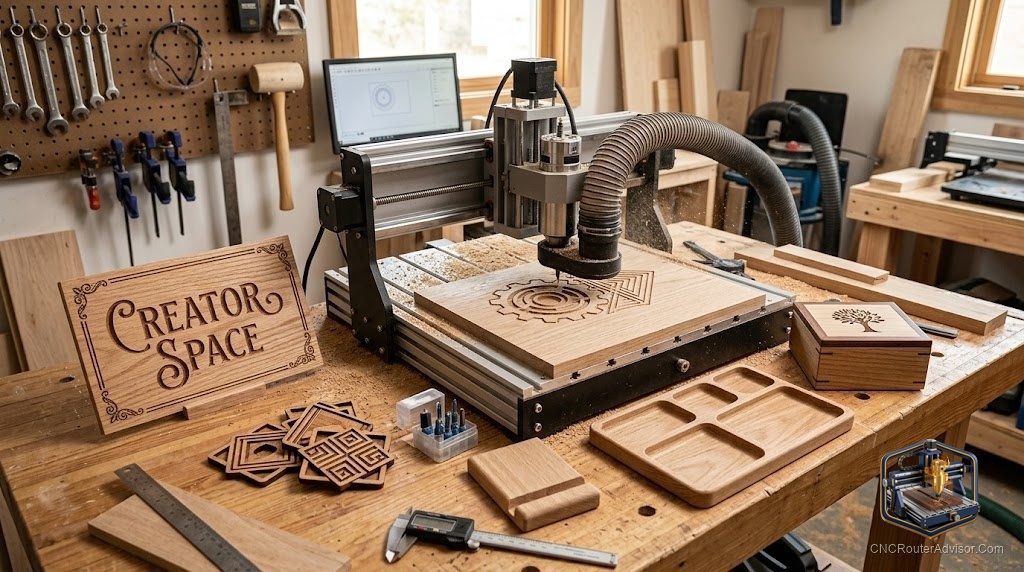
The first project on a new CNC router is both the most exciting and the most revealing. It tells you how well you understand the setup, the zeroing, the software, and the workholding, and it does so in a way that no amount of watching tutorials prepares you for. The good news is that you do not need a spectacular first project; you need a smart one. Choosing beginner projects that teach specific skills while producing something worth keeping is what transforms the first month with a CNC router from frustrating to genuinely productive.
CNC router projects for beginners are jobs chosen to build the core skills (design, setup, zeroing, workholding, and toolpath selection) in a progression that starts simple and adds complexity one element at a time, producing useful or meaningful objects at each stage rather than practice cuts that get thrown away.
Here is the direct take: the best beginner projects are small, forgiving, have a clear success condition you can see, and each teach one new skill the next project depends on. Five projects, done in order, cover the complete beginner-to-competent CNC skill set. The sections below walk through each one and what it teaches.
Project 1: A simple profile cut in softwood
Purpose: learn the full CNC cycle (design, CAM, setup, zeroing, and cutting) without complexity. Cut a simple shape, a star, a simple name plaque, or a geometric form, from a piece of soft pine or similar. This teaches zeroing, feeds and speeds for softwood, basic workholding, and how to generate and run a toolpath. Named success condition: a clean, complete profile with no step-over errors or missed tabs.
Project 2: A sign with V-carved lettering
Purpose: learn V-carving toolpaths and the additional zeroing care they require. Design a simple name or word sign in your CAM software using a V-groove toolpath and a V-bit. V-carving is the skill that opens up the most hobby income potential (signs, name boards, gifts) and it adds the important lesson that bit geometry determines what the toolpath can do. Named success condition: crisp, clean lettering with consistent V-groove depth and no burning or missed passes.
Project 3: A pocketed project (box lid or tray)
Purpose: learn pocketing, depth control, and the difference in workholding for pocketed versus through-cut work. A simple box lid with a pocketed label or a shallow tray with a recessed area teaches controlled depth passes and shows why flat, well-clamped material matters for pocket depth consistency. A Genmitsu hold-down clamp kit makes this project significantly easier by keeping thin stock flat across the full surface. Named success condition: consistent pocket depth across the full area with clean floor and edges.
Project 4: An inlay
Purpose: learn the precision that the machine is capable of when everything is set up correctly. An inlay combines a pocket in one piece with a matching raised feature in another, and it works when the machine is well-calibrated and the setup is tight. A simple two-color wood inlay in a coaster or small panel is the standard beginner inlay project. Named success condition: the inlay seats flush with light pressure and holds without glue (or fits cleanly with a consistent, planned glue gap).
Project 5: A 3D relief carving
Purpose: learn 3D toolpaths, ball-nose bits, and the patience that fine 3D work requires. A shallow 3D relief (a face, a leaf, a simple landscape scene) introduces finish passes, stepover settings, and the visual difference between a 10% and 5% stepover. This project takes longer and the result shows everything the machine can do at its best. Named success condition: a smooth, scallop-free surface finish with clearly readable 3D detail.
For a broader look at projects beyond the beginner stage, see our guide to CNC router project ideas.
Final verdict
Five beginner projects, each teaching one key skill, build the complete CNC competency in the shortest possible time while producing objects worth keeping at each stage. Simple profile cut, V-carved sign, pocketed tray, inlay, and 3D relief: that sequence covers every fundamental skill without repetition and ends with a beginner who understands their machine thoroughly. Resist the temptation to jump to the impressive projects first; the impressive result comes from building the skills in order.
FAQ
What is the best first CNC router project for a beginner? A simple profile cut in softwood. It teaches the full CNC cycle (design, CAM, setup, zeroing, and cutting) without demanding advanced skills, and the success condition is clear.
What materials should beginners use? Softwood (pine, poplar) and MDF are the most forgiving starting materials. They cut cleanly at conservative settings and are inexpensive enough that mistakes are cheap.
What is V-carving and should beginners try it? V-carving is the second beginner project because it is approachable yet teaches the important lesson that bit geometry determines toolpath capability. It also opens up the most hobby income potential.
How long does a beginner project take to set up and cut? Expect one to two hours for the first few projects including design, setup, and cutting. As setup becomes routine, the machine time dominates and each project finishes faster.
Do I need expensive wood for beginner projects? No. Softwood and MDF from any hardware store are the right starting materials. Save expensive hardwoods and exotics for once you have reliable settings and setup habits.
What if my first project comes out wrong? Expected. Check whether the problem is zeroing (shift in the design position), workholding (material moved), feeds and speeds (burning or tearing), or bit geometry (wrong tool for the cut). Each failure teaches a specific lesson.
References
- Carbide 3D, beginner project tutorials: https://carbide3d.com
- SainSmart Genmitsu, beginner project walkthroughs: https://www.sainsmart.com/blogs/news
- V1 Engineering, beginner project and skill progression: https://docs.v1e.com