
CNC Router Plans: Build Options, Parts, and Key Measurements
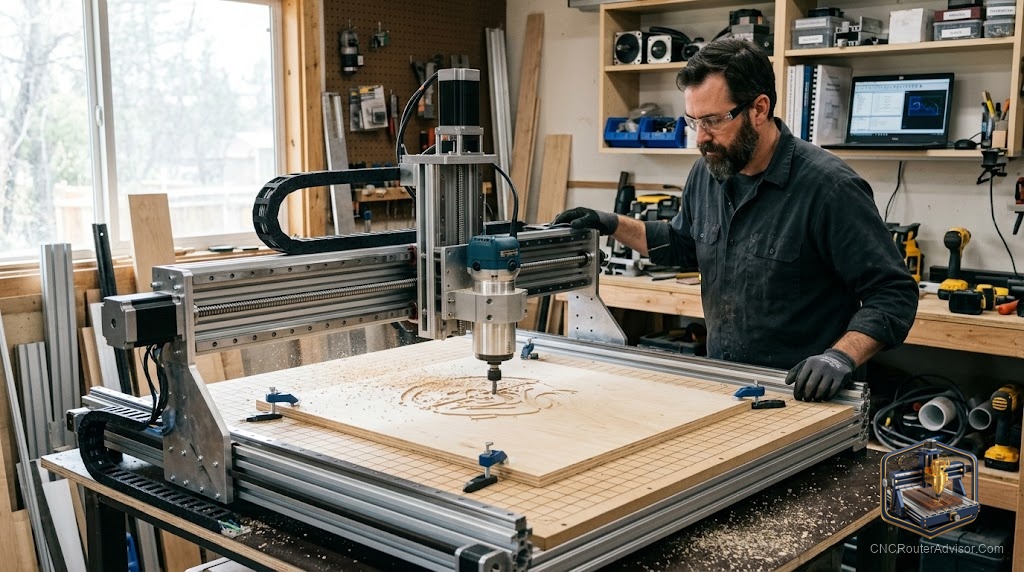
There is a particular satisfaction in cutting parts on a machine you built yourself, and for a lot of makers, building a CNC router is the first big project they tackle. It saves money, teaches you every system of the machine, and lets you tailor the size and capability to your exact needs. But a DIY build lives or dies by its plans. Good plans turn a pile of extrusion and electronics into an accurate machine; vague ones turn it into a frustrating, flexy disappointment.
CNC router plans are the documented designs, part lists, and measurements that guide you in building your own CNC router. They range from free community designs to detailed paid plans, and they specify the frame, motion system, electronics, and dimensions. Choosing the right plans means matching the build to your skills, budget, tools, and the work you want to do, then following measurements carefully so the finished machine is square, rigid, and accurate.
Short answer: CNC router plans span free community builds to detailed paid designs. Pick plans that match your target work area, skill level, and budget, and that specify a rigid frame, quality motion components, and clear measurements. The build revolves around the frame, motion system, drive, spindle, and electronics, and success depends on precise, square assembly. Choose a proven design with good documentation and community support.
Why build instead of buy
Building your own router offers real advantages: lower cost than an equivalent bought machine, a deep understanding of every system, the ability to customize size and capability, and easy repair since you know the machine intimately. The trade is time, effort, and a learning curve. For makers who enjoy the process, a build is rewarding; for those who just want to cut, a ready-made machine may be the better use of time.
Types of plans
- Free community plans shared by makers, often with forums and build threads for support. Great value, though documentation quality varies.
- Paid detailed plans with complete part lists, drawings, and instructions, usually more polished and easier to follow.
- Open-source proven designs with large communities, which combine free plans with extensive shared knowledge and upgrades.
- Kit-based builds where plans pair with a purchasable parts kit, reducing sourcing hassle.
Proven designs with active communities are the safest bet for a first build, since nearly every problem has already been solved by someone.
Core parts of a build
Most router plans specify the same systems:
- Frame. The structural base, commonly aluminum extrusion, steel, or a torsion-box style. Rigidity here drives everything.
- Motion system. Linear rails or rods and bearings that guide each axis. Stiffness and quality determine accuracy.
- Drive. Lead screws, ball screws, or belts that move the axes, plus stepper motors. The choice trades precision against speed and cost.
- Gantry. The bridge carrying the spindle across the bed. Its rigidity and clearance shape capability.
- Spindle or router. A trim router for a budget build or a VFD spindle for quieter, stronger cutting.
- Electronics. A control board (often GRBL-based), stepper drivers, a power supply, and wiring.
- Bed and workholding. A flat spoilboard with a way to clamp material.
Key measurements and considerations
Plans live and die by their numbers:
- Work area. Decide your target cutting envelope first, since it drives the size of every part. Remember the machine footprint is larger than the cutting area.
- Z clearance and travel. Enough to fit your material and fixtures and to plunge as deep as you need.
- Squareness. The build must be assembled square and true; small errors compound into inaccurate cuts.
- Rigidity margin. Favor stiffer frame and motion components than the minimum, since flex is the most common regret in DIY builds.
- Component compatibility. Confirm motors, drivers, screws, and electronics match the plan and each other.
Matching plans to your needs
Choose plans by working backward from your goals:
- Define the work and the cutting area you need.
- Assess your skills and tools, since some builds need machining or welding.
- Set a budget including frame, motion, drive, spindle, and electronics.
- Pick a proven design in that range with good documentation and a community.
- Plan sourcing, deciding between individually sourced parts and a kit.
The bottom line
CNC router plans are the difference between a rigid, accurate DIY machine and a flexy disappointment. Choose plans that match your target work area, skills, and budget, favoring proven designs with clear measurements and strong community support. Focus the build on a rigid frame and quality motion system, follow the measurements precisely, and assemble square. Do that and building your own router delivers a capable machine, a deep understanding of how it works, and real pride in the result.
FAQ
What are CNC router plans? Documented designs, part lists, and measurements that guide you in building your own CNC router, from free community designs to detailed paid plans.
Is it cheaper to build a CNC router than buy one? Usually cheaper in parts, but you invest time and effort. The payoff is lower cost, customization, and a deep understanding of the machine.
What parts do I need to build a router? A frame, motion system (rails or rods), drive (screws or belts) with stepper motors, a gantry, a spindle or router, electronics, and a bed.
What is the most important factor in a build? Rigidity and square assembly. A stiff frame and precise, true construction are what make the finished machine accurate.
Should a beginner build or buy? Build if you enjoy the process and want to learn and customize. Buy if you mainly want to start cutting quickly with less effort.
Which plans are best for a first build? Proven open-source designs with large, active communities, since documentation is strong and nearly every problem has already been solved.
How do I decide the size? Start from the largest work you want to cut, then design the cutting area around it, remembering the machine footprint is larger than the cut area.
References
- Instructables, DIY CNC router plans and how to build: https://www.instructables.com/DIY-CNC-Router-Plans-How-to-Build/
- BubbleRelief, CNC router projects for beginners: https://bubblerelief.com/cnc-router-projects-for-beginners/