
Why CNC Routers Matter: Uses, Advantages, and Limitations
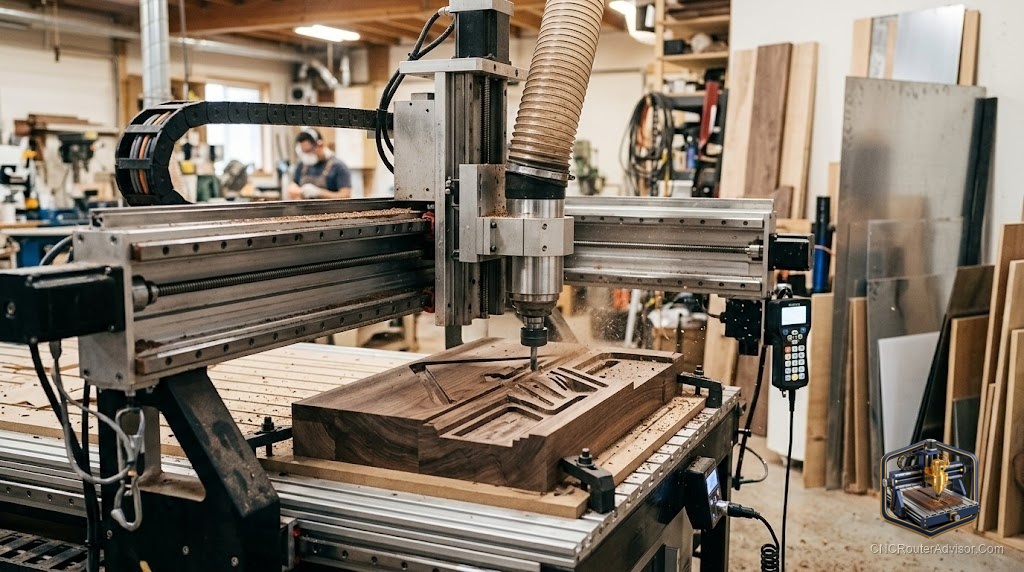
You bought a scroll saw, a jigsaw, and a trim router. You still spent three hours cutting a name sign that came out crooked, with fuzz along every letter edge that took another hour to sand. The neighbor who owns a CNC router cut the same sign in eleven minutes, painted it, and posted it on Etsy the same afternoon. That gap is what cnc router significance actually means in practice.
A CNC router is a computer-controlled cutting machine that moves a spinning bit along programmed X, Y, and Z axes to cut, carve, or engrave materials like wood, plywood, MDF, acrylic, and soft metals. You draw or import a design on your computer, convert it to toolpaths, and the machine executes those moves with sub-millimeter repeatability. Unlike a handheld router you guide by feel, the CNC follows the same path every single time.
The short answer: A CNC router gives you the ability to cut complex, repeatable shapes in wood and other materials that would take far longer by hand, with consistent results across every copy. It is the right tool when precision, repeatability, or design complexity matters. It is not the right tool for quickly thicknessing rough lumber or for projects where a single hand-guided cut would take ten seconds.
What Can You Actually Make with a CNC Router?
The project list is long. Start with the things people buy:
CNC routed signs are the gateway project. A personalized name sign takes one SVG or DXF file, a V-bit, and fifteen minutes of cut time. Scale that to an address plaque in cedar, a quote sign with raised letters on painted MDF, or a house number plaque in hardwood, and you have products people actively search for on every handmade marketplace.
Functional gifts convert raw plywood and hardwood into objects people keep. An engraved cutting board with a family name and established date routed 2mm deep in maple is a wedding gift that costs you under an hour of machine time. A jewelry box with fitted finger-joint corners, a piggy bank box with a slot lid, a pet memorial photo frame with a breed silhouette, and bookends shaped like animal silhouettes all live in this category. Each one starts as a DXF or SVG file and ends as a sanded, finished object.
CNC carving goes further. A V-bit cuts crisp, tapered lettering. A ball-nose bit produces smooth 3D relief carving in hardwood that would take a skilled hand-carver days. Geometric wall art, portrait relief panels, and decorative wooden shelf brackets all rely on 3D toolpaths that only become practical when a machine is doing the repetitive passes.
Cribbage boards are a perennial CNC favorite: a grid of 120-plus holes drilled to consistent depth and spacing, something genuinely tedious by hand and genuinely easy on a CNC router.
Prototyping and furniture round out the list. A CNC table base with interlocking plywood parts, custom cabinet doors with routed panel profiles, and guitar bodies are all production-worthy once you own a machine with enough cutting area.
CNC Router Advantages: Where It Actually Beats Manual Methods
Repeatability is the real killer feature. If you need twenty identical address plaques, the CNC cuts number twenty exactly like number one. No hand-guided tool does that.
Complex geometry becomes routine. Tight inside corners, curved lettering, interlocking joinery, and 3D relief surfaces are tedious or impossible by hand. On a CNC, they are just more lines in a toolpath file.
Speed at scale. A single piece might not save time over a skilled hand-router pass. Fifty pieces almost always do. The machine runs while you do other work.
Design flexibility. Change a customer’s name on a sign by editing text in your CAD software. Change a box dimension by adjusting one parameter. The physical execution is unchanged.
File formats are universal. SVG and DXF files from Adobe Illustrator, Inkscape, or any vector editor drop straight into most CNC CAM software. A massive library of free and paid CNC designs exists online because of this standardization.
CNC Router vs. Planer: Two Tools That Don’t Actually Compete
People often wonder whether a CNC router can replace a thickness planer. The honest answer is: they do different jobs, and the comparison only matters for slab flattening.
| Task | CNC Router | Thickness Planer |
|---|---|---|
| Flatten a large live-edge slab | Yes, with a surfacing bit | Usually can’t fit |
| Thickness rough lumber quickly | Slow, not ideal | Fast, purpose-built |
| Cut shapes and profiles | Core function | Cannot do this |
| Carve 3D relief | Yes | No |
| Process rough lumber in bulk | Impractical | Efficient |
A planer takes a rough board from twisted to flat in seconds. A CNC router does the same job in multiple slow passes, burning expensive spindle time. But for slabs wider than your planer’s capacity, or for boards you need to flatten and then immediately carve in the same setup, the CNC is the only practical option. Most serious shops keep both.
CNC Router Carving: Bit Selection Changes Everything
The bit you load determines what the cut looks like, and two bits matter most for decorative work:
V-bits cut a V-shaped groove that widens as it deepens. In V-carve mode, the software automatically varies depth to keep letterform width consistent, producing the crisp, tapered look you see on high-end routed signs and cribbage boards. A 60-degree V-bit produces tighter, sharper detail. A 90-degree V-bit cuts faster with slightly softer detail.
Straight bits (also called upcut or downcut spiral bits) remove material in flat-bottomed passes. They clear out the background on relief carvings, cut joinery, and profile edges. A downcut spiral leaves a cleaner top surface on plywood; an upcut clears chips faster.
For 3D relief work in hardwood, a ball-nose bit is what finishes the surface. Rough clearance passes with a straight bit remove most of the material; the ball-nose finish pass follows the 3D surface and leaves the smooth, sculpted result.
Where a CNC Router Falls Short
Setup time is real. A simple cut that takes three minutes of machine time might take twenty minutes of file prep, toolpath generation, material clamping, and zeroing the spindle. For one-off cuts, a handheld router or a jigsaw is faster.
Material limits. Hobby and mid-range CNC routers handle wood, plywood, MDF, soft plastics, and thin aluminum well. Hardened steel, thick aluminum plate, and stone require a CNC mill with significantly higher rigidity and cutting force. Trying to push a wood-spec CNC router into hard metal work destroys bits and stresses the machine frame.
Learning curve. CAD and CAM software take real time to learn. File preparation, toolpath strategy, feeds-and-speeds for different materials, and workholding all require hands-on experience before results are reliable.
Cost of ownership. Bits dull and break. Spoilboards get chewed up and need resurfacing or replacement. Software licensing adds up. The machine itself takes up significant shop space.
Not a planer replacement for production work. If your shop processes rough lumber in volume, you need a dedicated planer. Running thickness passes on a CNC is wasteful in both time and spindle wear.
The Verdict
A CNC router makes the most sense if you produce multiples of the same item, if your work involves complex geometry or lettering, or if you want to sell custom wood products without hand-cutting each one. The cnc router significance for a small maker business is real: a name sign that takes a hobbyist three hours by hand takes a CNC operator fifteen minutes. Over a hundred signs, that difference is the business model.
Four concrete takeaways:
- Start with V-carve sign projects. They have the highest ratio of impressive result to learning required.
- Use plywood and MDF for learning. Save your hardwood for pieces you are confident about.
- A CNC router does not replace a thickness planer for lumber prep. Plan for both if you work with rough stock.
- SVG and DXF are your file format workhorses. Learn one vector drawing tool well and every design gets faster.
FAQ
What materials can a CNC router cut? Most hobby and prosumer CNC routers cut wood, plywood, MDF, acrylic, HDPE plastic, soft aluminum, foam, and leather reliably. Hardened steel requires a rigid CNC mill, not a wood-spec router. Always check your machine’s rated cutting force before trying new materials.
Is a CNC router good for making signs? Yes, and signs are one of the most practical entry points. A V-bit in V-carve mode cuts crisp lettering in wood or MDF quickly. Personalized name signs, address plaques, quote signs, and house number plaques are all straightforward projects with strong resale demand.
What file formats does a CNC router use? Most CNC CAM software imports SVG and DXF vector files for 2D and 2.5D work. For 3D relief carving, STL files are common. The CAM software converts those files to G-code, which is what the machine actually reads and executes.
Can a CNC router replace a planer? For flattening wide slabs that exceed your planer’s capacity, yes. For routine thicknessing of rough lumber in volume, no. A planer processes boards in seconds. A CNC performs the same task in multiple slow passes and wears out bits faster than the planer equivalent.
How precise is a CNC router? Well-built hobby routers hold tolerances in the range of a few thousandths of an inch on short cuts in soft materials. Precision degrades with machine flex, bit deflection, and material movement. For tight joinery in hardwood, feed rates and bit selection matter as much as machine specification.
What is the difference between a V-bit and a straight bit? A V-bit cuts a tapered groove whose width changes with depth, which is ideal for lettering and decorative carving. A straight bit cuts a flat-bottomed channel of fixed width, which is ideal for joinery, profile cuts, and background clearance in relief work.
Do I need a dust collection system? You need one from day one. A CNC router cuts wood fast and throws chips and fine dust in every direction. At minimum, connect a shop vacuum to a dust shoe mounted at the spindle. A dedicated dust collector with a cyclone separator handles higher-volume work better and protects both your lungs and your machine’s electronics.
What is a spoilboard? A spoilboard is a sacrificial flat surface, usually MDF, that sits on top of your machine’s bed. It protects the table from through-cuts and provides a flat, consistent reference surface for workholding. You surface it periodically with a large-diameter flat-bottom bit to restore flatness.