
3-Axis CNC Router Kit Guide: What You Build, What You Learn, and Which Kits Deliver
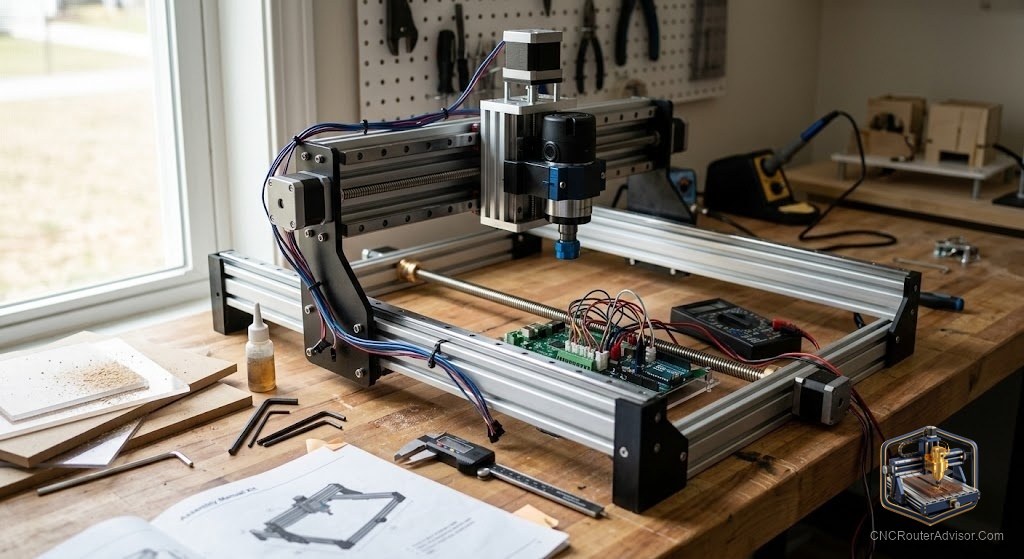
A 3-axis CNC router kit is a project, and the project is the point as much as the machine. When you build a CNC router from a kit, the hours of assembly are not wasted time before you can start making parts - they are the education in mechanical systems that makes you a competent CNC machine owner rather than a user who is helpless the first time something goes wrong. You build the motion system, so you understand how the ball screws or rack-and-pinion work. You wire the controller, so you know where every signal goes. You calibrate the axes, so you know what to adjust when repeatability drifts after a year of use. That knowledge does not come with a finished machine purchase. It comes with a kit build.
A 3-axis CNC router kit is a set of mechanical, structural, and electronic components provided for self-assembly into a working three-axis CNC routing machine. Kits range from the comprehensive (every fastener, cable, and bracket included with step-by-step instructions) to the component-level (motion hardware and frame without electronics or spindle) depending on the supplier and the target market. The finished machine is functionally equivalent to a similarly specified finished machine; what changes is how you acquired it and what you know about it.
The short guide: a kit is right for you if you have basic mechanical aptitude, can allocate one to three weekends to the build, are comfortable troubleshooting electrical connections, and value the knowledge gained from the build process. It is not right for you if you need to be making parts immediately or are not comfortable with mechanical and electrical systems.
What a comprehensive 3-axis CNC router kit includes
A well-specified kit for a machine in the 24×48 or larger class should include:
Structural:
- Machine frame and gantry (pre-cut, pre-drilled welded steel or heavy extrusion)
- All structural fastening hardware
Motion:
- Linear rails and carriages for X, Y, and Z axes
- Drive system: ball screws with anti-backlash nuts (or rack-and-pinion with motor plate hardware) for each axis
- Motor mounts
Electronics:
- Stepper or servo motors for all three axes
- Motor drivers (matched to motor specification)
- Motion controller board (GRBL, Mach4 compatible, or proprietary)
- Power supply
- Limit switches and wiring
- Spindle control relay or VFD (if spindle is included)
Documentation:
- Assembly manual with step-by-step instructions, torque specifications, and alignment procedures
- Wiring diagram specific to the kit’s electronics configuration
- Software configuration files
Not typically included:
- Spindle or trim router (specified separately)
- Computer (for PC-based control systems)
- CAM software (sometimes a trial license is included)
- Spoilboard material
Kits that the community recommends
Avid CNC: The benchmark for US-manufactured kit machines at the prosumer and production scale. Rack-and-pinion on X/Y, ball screw on Z, steel frame, Mach4 control. Configurable from small desktop sizes to 4×8 and larger. Strong documentation, active forum, domestic service and parts sourcing.
OpenBuilds-based kits: Community-designed machines (WorkBee, OX, C-Beam) sold through OpenBuilds and third-party resellers. V-slot extrusion frame, lead screw or ball screw options, GRBL control. Best for smaller work areas (up to approximately 600×800mm) and learning-focused builds.
Bulkman 3D / MakerMade: Similar to OpenBuilds ecosystem, with some additional documentation and pre-assembled sub-assemblies.
The build process: what to expect
- Frame assembly (4 - 8 hours): Squaring and securing all structural members; critical to get this square before proceeding.
- Rail and drive installation (4 - 6 hours): Mounting linear rails, assembling carriages, installing ball screws or rack hardware.
- Electronics (3 - 5 hours): Wiring motors, limit switches, and spindle control; the most precision-demanding phase.
- Software setup (2 - 4 hours): Controller configuration, axis calibration, soft limits.
- Spoilboard installation and surfacing (1 - 2 hours): Final step before first cuts.
For the Genmitsu spoilboard surfacing bit, use it for the initial spoilboard surfacing pass immediately after completing the build.
Our guide on how to choose a CNC router covers the full kit vs. finished machine evaluation.
The takeaway: a 3-axis CNC router kit builds a capable machine and teaches machine mechanics simultaneously. The investment is two to three weekends of focused build time and the patience to troubleshoot the calibration phase. The payoff is a machine you understand completely and can maintain confidently.
Frequently asked questions
How long does a 3-axis CNC router kit take to build? Typically 15 - 30 hours depending on the kit size and the builder’s mechanical experience.
What tools do I need to build a CNC router kit? Metric and SAE wrenches, Allen key set, power drill, dial indicator or precision square, and a multimeter.
Is an Avid CNC kit better than a finished machine? For buyers who want domestic service, a configurable format, and the knowledge that comes with the build process, yes. For buyers who want immediate productivity, a finished machine is the better choice.
What is the best 3-axis CNC kit for a beginner? OpenBuilds-based kits (WorkBee, C-Beam) are well-documented and well-supported by the community for learning-scale machines. Avid CNC for production-scale builds.
Do 3-axis CNC kits include a spindle? Typically no. The spindle is specified and purchased separately.
What CAM software works with 3-axis kit machines? GRBL-based machines work with Carbide Create, UGS, and Easel. Mach4-based machines (Avid CNC) work with VCarve, Aspire, and Fusion 360.
References
- Avid CNC, kit machine documentation — https://www.avidcnc.com/
- OpenBuilds, community kit designs — https://openbuilds.com/
- CNC Router Info, kit machine guide — https://cncrouterinfo.com/guides/how-to-choose-a-cnc-router/