
CNC Router for Kitchen Cabinets: Setup, Workflow, and Key Considerations
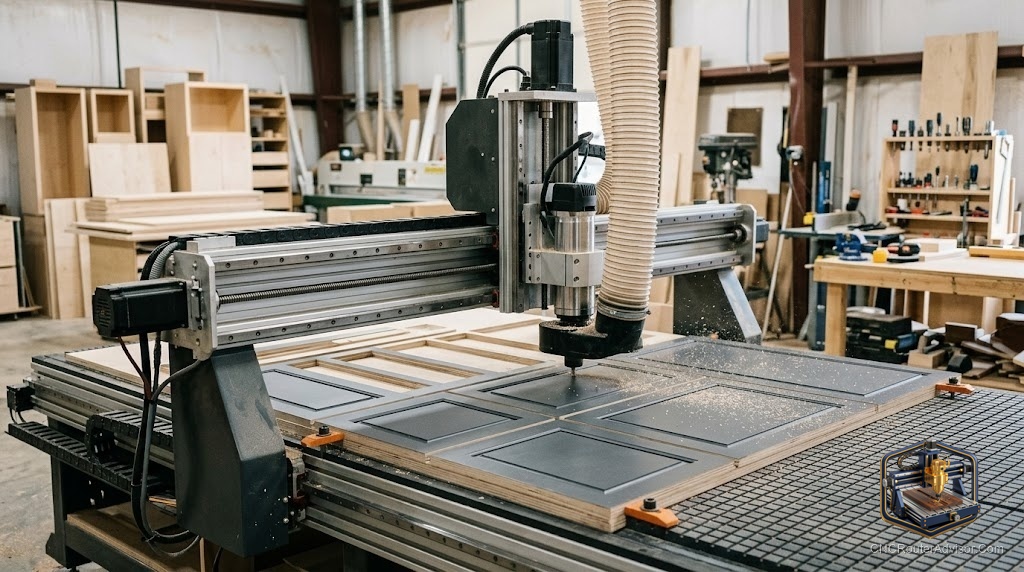
Kitchen cabinet production is the application that pushed CNC routers into small shops more than almost anything else. The economics are direct: a kitchen has thirty to sixty parts that are nearly identical in construction, the joints and dimensions must be precise, and each miscut board is expensive to redo. A CNC machine that cuts all of those parts consistently, exactly to file, removes the most time-consuming and error-prone part of cabinet making, and leaves the maker to focus on finishing, fitting, and installation.
Using a CNC router for kitchen cabinets means producing cabinet carcasses, doors, drawer fronts, shelves, and joinery from sheet goods and solid material using computer-controlled cutting from digital files, with joinery such as dados, rabbets, and hardware holes included in the cut program.
Short answer: the CNC earns its keep in kitchen cabinets through repeatability and nesting. Repeatability means every side, bottom, and shelf is identical to the plan. Nesting means you optimise every sheet and produce less waste. The machine does not do design, finishing, or installation, but it removes the repetitive precision cutting that slows most small shops down.
What the CNC does in kitchen cabinet production
A typical kitchen cabinet job involves carcass sides, tops, bottoms, shelves, backs, and face frames, plus drawer boxes and doors. The CNC cuts all of these to exact dimension, including any dados or rabbets for joinery, hardware pilot holes, and shelf pin holes. Parts that previously required careful sawing, routing, and drilling in sequence are produced in one nested run from a sheet of plywood or MDF.
The result: parts that go together without fitting, joints that line up, hardware holes where they should be, and a carcass that squares up without shimming.
Machine requirements
Kitchen cabinet parts start as full 4-by-8-foot sheets. A CNC that cannot handle a full sheet means cutting sheets down first, which largely erases the machine’s advantage. Full-sheet (48 by 96 inch) work area is the practical requirement for cabinet production.
A compression end mill produces clean edges on both faces of melamine and veneered plywood in one pass, which is essential for visible cabinet surfaces. A vacuum hold-down table replaces manual clamping for full sheets and makes nested parts safe to cut.
Software: the cabinet-specific workflow
Design software generates the part list; parts are nested onto sheets in CAM; toolpaths are output as G-code; the machine cuts. Purpose-built cabinet CAM software handles this nesting and part generation efficiently. General-purpose CAD/CAM can do it but requires more manual work.
For a shop new to CNC cabinet production, the software learning curve is real. Plan for the time to learn and tune the workflow before the first paid kitchen job.
The honest failure mode
Errors in the design file become errors in every part. A dado that is 1mm off in the file is 1mm off in every cabinet it applies to, and that error does not show until assembly. Quality control of the digital file replaces quality control of the physical cut, and building that discipline takes time.
The verdict
For a small shop doing regular kitchen cabinet production, a CNC router with full-sheet capacity pays off through repeatability, consistent joinery, and nesting efficiency. Invest in full-sheet capacity, a vacuum table, and capable cabinet software, and plan for the file and workflow discipline the production method requires.
Three things to remember:
- Full-sheet work area is the practical requirement; cutting sheets down first erases most of the efficiency gain.
- A compression end mill for melamine and veneered plywood is the critical tool for clean visible cabinet surfaces.
- Errors in the design file become errors in every part; digital file quality control replaces physical cut quality control.
FAQ
Is a CNC router worth it for kitchen cabinet making? Yes, for shops doing regular cabinet production. Repeatability on carcass parts, joinery, and hardware holes is where it pays off most.
What work area do I need for kitchen cabinets? A full 4-by-8-foot work area. A smaller machine requires cutting sheets down first, losing most of the efficiency advantage.
What bits do I need for cutting kitchen cabinets? A compression end mill for melamine and veneered plywood, a spiral or straight bit for dado and rabbet joinery, and a drill bit for hardware and shelf-pin holes.
Do I need a vacuum table? A vacuum table makes nesting full sheets practical and safe. Manual clamping across a full sheet of nested parts is awkward. For production cabinet work, it is a strong investment.
What software do I use? Purpose-built cabinet CAM software handles part generation, cut list, and sheet nesting efficiently. General-purpose CAD/CAM works but requires more manual setup.
How does CNC change the cabinet making workflow? Design and file work moves up front; the machine does the cutting. The skill shifts toward file preparation, machine operation, and assembly rather than marking, sawing, and routing by hand.
Can I cut cabinet doors on a CNC router? Yes. Solid wood raised panel doors, routed recesses, and profiled edges can all be done on a CNC with appropriate bits.
References
- ShopSabre, Best CNC Routers for Small Businesses: https://www.shopsabre.com/cnc-routers-for-small-business/
- 731 Woodworks, Best CNC Machines for Small Woodworking Shops: https://www.731woodworks.com/731-blog/best-cnc-machines-for-small-woodworking-shops-in-2025-beginner-to-pro-picks
- Avid CNC, Full Sheet CNC Routers: https://www.avidcnc.com/pro4896-4-x-8-cnc-router-machine-p-1337.html