
Table CNC Router Guide: Compatibility, Setup, and Upgrade Options
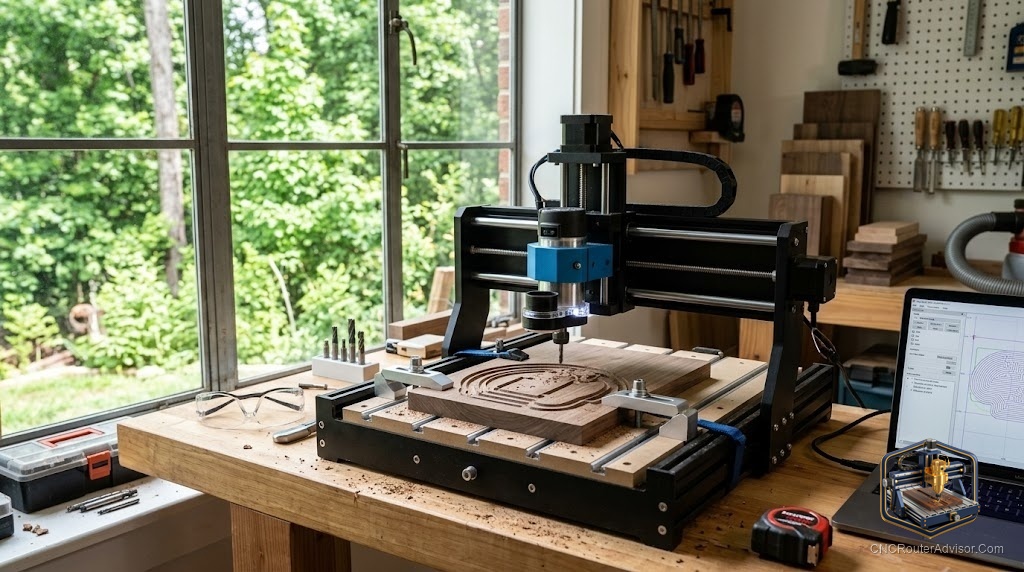
The table is the part of a CNC router that everyone touches every single time they use the machine, and yet it is the part most people think about least when they buy one. That is a mistake, because the table is where workholding happens, where flatness is established, and where a surprising amount of your day-to-day frustration or ease originates. A good table setup makes every job faster and more accurate; a poor one makes every job a fight. This guide is about understanding your router’s table, setting it up well, and upgrading it when the stock arrangement holds you back.
The term “table CNC router” gets used two ways: sometimes it means a full-size table-format router (a standalone machine with its own table, as opposed to a benchtop unit), and sometimes it means the table or bed component of any CNC router. This guide covers both angles, because whether you are choosing a table-format machine or improving the table on the machine you have, the same principles about flatness, workholding, and upgrades apply.
A CNC router table is the flat bed that supports and holds the workpiece during cutting, and it is central to accuracy and workholding. Tables come in several types: T-slot (aluminum extrusion with slots for clamps and fixtures), a wasteboard or spoilboard (a sacrificial flat surface, often MDF, that can be surfaced flat and cut into), and vacuum tables (which hold work by suction across zones). Setup centers on getting the table flat and true to the machine’s motion (surfacing the spoilboard) and choosing workholding that suits your work. Upgrades range from adding a spoilboard or T-track to fitting a vacuum system.
The right table setup makes workholding fast and cutting accurate; the wrong one causes movement, inaccuracy, and wasted time.
Table types and what they suit
T-slot table
A T-slot table is an aluminum bed with T-shaped channels that accept clamps, hold-downs, and fixtures. It is versatile and strong: you can clamp almost anything, anywhere, and add fixtures for repeat work. The trade-off is that clamps intrude into the work area and toolpaths must avoid them, and the aluminum surface is not sacrificial (you must not cut into it).
Best for: varied work, thick stock, and situations needing strong mechanical clamping.
Spoilboard (wasteboard)
A spoilboard is a sacrificial flat surface, usually MDF, mounted on the table. You surface it flat with the machine itself (a facing operation) so it is perfectly true to the machine’s motion, and you can cut slightly into it on through-cuts without harming the machine. It is often combined with T-track or threaded inserts for clamping, or used with tape-and-glue workholding.
Best for: through-cutting sheet goods, achieving a dead-flat reference surface, and tape-based workholding of small parts. The most common setup on hobby and prosumer machines.
Vacuum table
A vacuum table holds the workpiece by suction, pulling it down against the bed across one or more zones fed by a vacuum pump. It clears the work surface of clamps entirely, allows fast loading and unloading, and holds full sheets flat, which is why it dominates production sheet work.
Best for: high-volume nested sheet cutting and any work where fast, clamp-free holding matters. More common on larger and industrial machines, though small vacuum setups exist.
Setup: flatness first
The foundational table setup task is establishing flatness true to the machine’s motion, and it is done by surfacing the spoilboard:
- Mount a spoilboard (MDF is standard) securely to the table.
- Surface it with a surfacing bit (a wide, flat cutter), running a facing toolpath across the entire surface so the machine skims it flat. This makes the surface parallel to the machine’s X-Y plane, which is what “flat and true” means for a router.
- Re-surface periodically as the spoilboard gets cut into and dinged over time; a quick refacing restores flatness.
A surfaced spoilboard is the reference for everything: accurate Z-zeroing, consistent cut depth, and flat-bottomed pockets all depend on it. This is the highest-value setup step on any router table.
Workholding on the table
The table type shapes your workholding options:
- Mechanical clamps (on T-slot or T-track): strong, reusable, but intrude on the work area.
- Screws into the spoilboard: very secure for through-cuts, leaving holes in the spoilboard.
- CNC double-sided tape or tape-and-CA-glue: excellent for thin stock and small parts, clamp-free.
- Vacuum: fast and clamp-free where available.
- Fixtures and jigs: for repeat work, a fixture mounted to T-slots or the spoilboard positions parts identically every time.
Choose the method for the part: clamps and screws for heavy or through-cut work, tape for thin and small parts, vacuum for sheets and volume.
Upgrade options
When the stock table holds you back, common upgrades:
- Add or improve a spoilboard with embedded T-track or threaded inserts for flexible clamping while keeping a surfaceable sacrificial top.
- Add T-track to a plain table for clamp versatility.
- Fit a vacuum system (pump and zoned bed) for clamp-free, fast sheet holding, the biggest productivity upgrade for sheet work.
- Build a fixturing system for production, using dowel pins or fixture plates so repeat parts locate identically.
- Upgrade to a torsion-box or more rigid base on machines where the table itself flexes, improving flatness and stability.
Match the upgrade to your bottleneck: if clamps are in the way, add vacuum; if flatness drifts, improve the spoilboard; if repeat setups are slow, build fixtures.
The verdict
The table is where workholding and accuracy live, and it deserves more attention than it usually gets. Understand your table type (T-slot, spoilboard, or vacuum) and its strengths, make flatness your first priority by surfacing a spoilboard true to the machine, choose workholding that suits each part, and upgrade the table to remove your specific bottleneck. A well-set-up table makes every job on the machine faster and more accurate.
Three things to take with you:
- Surfacing a spoilboard flat and true to the machine’s motion is the highest-value table setup step; accurate Z-zeroing, consistent depth, and flat pockets all depend on it.
- Match the table type and workholding to your work: T-slot and clamps for heavy or varied work, spoilboard with tape for thin and small parts, vacuum for sheets and volume.
- Upgrade to remove your specific bottleneck, whether that is adding T-track for clamping, fitting a vacuum system for sheets, or building fixtures for repeat production.
FAQ
What is a CNC router table? The flat bed that supports and holds the workpiece during cutting. Types include T-slot (aluminum with clamp channels), a spoilboard or wasteboard (a sacrificial surfaceable top, usually MDF), and vacuum tables (holding work by suction). It is central to accuracy and workholding.
What is a spoilboard and why surface it? A spoilboard is a sacrificial flat surface mounted on the table that you can cut slightly into on through-cuts. Surfacing it with a facing bit makes it perfectly flat and true to the machine’s motion, which is the reference for accurate Z-zeroing, consistent cut depth, and flat-bottomed pockets.
What is the difference between a T-slot table and a vacuum table? A T-slot table uses mechanical clamps in aluminum channels: strong and versatile but clamps intrude on the work area. A vacuum table holds work by suction with no clamps: fast to load and ideal for full sheets and volume, but requires a vacuum pump and suits larger machines.
How do I hold small parts on a CNC router table? CNC double-sided tape, or the painter’s tape plus CA glue method, on a surfaced spoilboard holds small and thin parts firmly without clamps intruding on the work. For heavier parts, use clamps or screws into the spoilboard.
How often should I resurface my spoilboard? Resurface when it accumulates enough cuts, dings, and unevenness to affect flatness, or before a job needing high accuracy. A quick refacing pass restores a flat, true reference surface. Frequency depends on how much through-cutting you do.
What is the best table upgrade for sheet cutting? A vacuum system (a pump with a zoned bed) is the biggest productivity upgrade for sheet work, holding full sheets flat and clearing the surface of clamps for fast loading and unloading. For lighter needs, a spoilboard with embedded T-track adds clamping flexibility.
References
- OpenBuilds, CNC table and spoilboard setup reference: https://openbuilds.com
- Vectric, workholding and surfacing guidance: https://www.vectric.com