
CNC Router for Cabinet Making Guide: Compatibility, Setup, and Upgrade Options
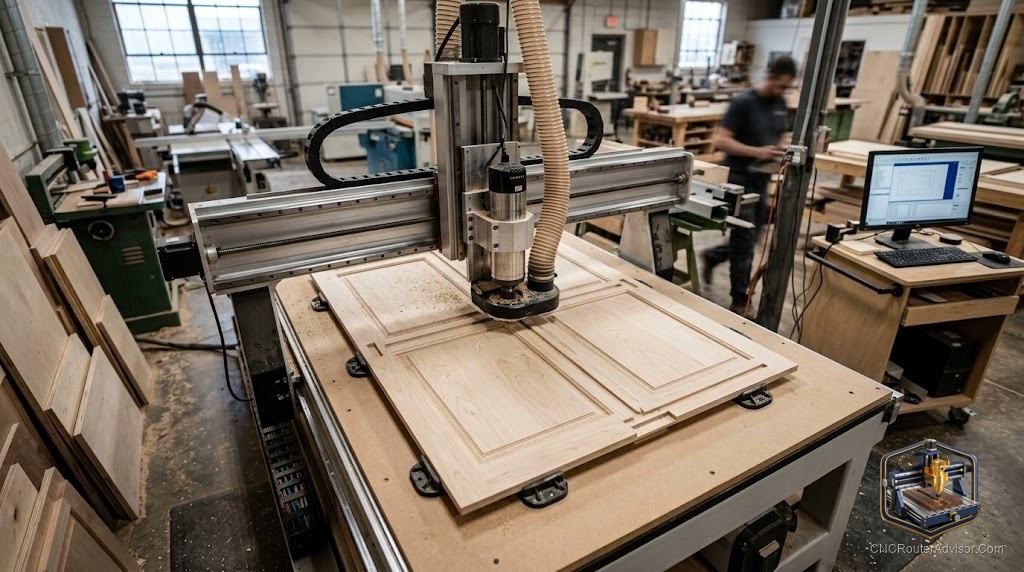
Cabinet making is one of the applications that most transforms a shop when a CNC router arrives. What used to take hours of layout, measuring, and repetitive cutting, sizing panels, boring shelf-pin and hinge holes, cutting dados and grooves, becomes a nested, automated process that turns a full sheet of plywood into labeled, ready-to-assemble cabinet parts. But cabinet making places specific demands on a router, and choosing, setting up, and upgrading a machine for cabinetry is different from buying one for signs or hobby carving. Getting these choices right is what separates a machine that streamlines your shop from one that becomes a bottleneck.
A CNC router for cabinet making is a machine, typically a full-sheet (4x8 foot or larger) router, used to cut, bore, and groove sheet goods into cabinet components: carcass panels, doors, shelves, and face frames. Cabinet work rewards a rigid machine with full-sheet capacity, nesting software, efficient workholding (usually vacuum), and, for production, an automatic tool changer (ATC) and a drilling unit.
The short answer on what cabinet making needs: a rigid full-sheet router (4x8 minimum) with vacuum hold-down and nesting software is the practical baseline; for volume production, add an ATC spindle (so cut, drill, and groove happen without manual bit changes) and a boring/drill unit for shelf-pin and hinge holes. Match the machine’s scale to your production volume.
What cabinet making demands of a router
Full-sheet capacity. Cabinets are built from 4x8 foot sheet goods (plywood, MDF, melamine). A 4x8 (or 5x10 for oversized) work area lets you process full sheets without pre-cutting, which is central to efficient cabinet production.
Rigidity and repeatability. Cabinet parts must be accurate and consistent, sheet after sheet. A rigid steel or heavy-frame machine with quality motion (rack and pinion or ball screws) holds tolerances across the large span.
Vacuum workholding. Holding full flat sheets securely without clamps in the toolpath is effectively required. A zoned vacuum table with a suitable pump keeps sheets flat and enables full-sheet nesting.
Nesting software. The heart of CNC cabinetry. Cabinet design software (Cabinet Vision, Mozaik, KCD, or Fusion-based workflows) outputs parts that nesting software arranges efficiently on each sheet, minimizing waste and generating labeled toolpaths.
Machine tiers for cabinet making
Entry / small shop. A rigid 4x8 prosumer or entry-industrial router with a single spindle and vacuum hold-down. You change bits manually between operations. Suitable for low volume and custom work.
Production shop. A 4x8 industrial router with an ATC spindle (commonly a 9kW class), a linear or rotary tool magazine (8 to 12 tools), servo drives, and a double-deck vacuum table. This runs cut, groove, and drill operations in one program without manual intervention.
High-volume / dedicated. A nesting machine with an integrated boring (drill) unit for shelf-pin and hinge holes, sometimes with a labeling printer and automated load/unload. Built for continuous panel-furniture production.
Setup essentials
- Vacuum system: size the pump to your table zones; a spoilboard (often phenolic or MDF) distributes vacuum.
- Software workflow: design (cabinet software) to nesting to post-processor to machine. Confirm a working post-processor for your specific controller (Syntec, Mach, etc.).
- Tooling: compression bits for clean plywood/melamine edges, plus drilling and grooving tools.
- Dust collection: full-sheet cutting produces significant dust; size extraction accordingly.
- Labeling and organization: for multi-cabinet jobs, part labeling saves major assembly time.
Upgrade options as you grow
- Add an ATC to eliminate manual bit changes, the biggest productivity jump for multi-operation cabinet work.
- Add a boring/drill unit for fast, accurate shelf-pin and hinge-cup drilling.
- Add vacuum zones or a stronger pump for reliable full-sheet hold-down.
- Add an auto-labeler or load/unload for high-volume throughput.
- Upgrade software from basic CAM to dedicated cabinet + nesting software for material optimization.
The verdict
A CNC router for cabinet making should be chosen around full-sheet capacity, rigidity, vacuum workholding, and nesting software, the four things cabinetry actually demands. A rigid 4x8 machine with vacuum and nesting is the practical starting point for custom and small-shop work; production shops add an ATC and a drilling unit to run cut, groove, and bore operations without manual intervention. Match the machine to your real volume, invest in the software workflow as much as the machine, and plan vacuum and dust collection from the start, because in cabinetry the whole system, not just the router, determines your throughput.
Three takeaways: cabinet making needs full-sheet (4x8+) capacity, rigidity, vacuum hold-down, and nesting software as the baseline; for production, add an ATC spindle and a boring/drill unit to automate multi-operation work; and invest in the design-to-nesting software workflow, it drives material savings and throughput as much as the machine.
FAQ
What size CNC router do I need for cabinet making? A full-sheet machine, 4x8 foot minimum (5x10 for oversized sheets), so you can process full sheet goods without pre-cutting. Full-sheet capacity is central to efficient cabinet production.
Do I need an ATC for cabinet making? Not for low-volume custom work, where manual bit changes are workable. For production, an ATC spindle is the biggest productivity gain because cut, groove, and drill operations run without stopping to change tools.
What software is used for CNC cabinet making? Cabinet design software (Cabinet Vision, Mozaik, KCD) plus nesting software that arranges parts on sheets and generates labeled toolpaths. Confirm a working post-processor for your machine’s controller.
What workholding do cabinet routers use? Zoned vacuum hold-down is effectively required to hold full flat sheets without clamps in the toolpath. It keeps sheets flat and enables efficient full-sheet nesting.
What bits do I need for cabinet making? Compression bits for clean edges on plywood and melamine, plus drilling tools for shelf-pin and hinge holes and grooving tools for dados and grooves. Solid carbide is standard for sheet goods.
Can a hobby CNC router make cabinets? It can make cabinet parts, but small machines require cutting sheets down first and offer low throughput. For real cabinet work, a rigid full-sheet machine with vacuum and nesting is far more practical.
What is a boring or drill unit on a cabinet router? A multi-spindle drilling head that quickly bores shelf-pin and hinge-cup holes. It speeds up a repetitive, accuracy-critical task and is a common upgrade for high-volume cabinet production.
References
- YIHAI CNC, CNC Router for Cabinet Making: Nesting Software Workflow: https://yhcncrouter.com/cnc-router-cabinet-making-nesting-workflow/
- CATEK CNC, Best ATC CNC Routers for Cabinet Making: https://www.catekcnc.com/blogs/cnc-router/5-best-atc-cnc-routers-for-cabinet-making-in-2026.html
- iGolden CNC, Best CNC Router for Cabinet Making (ATC, nesting, 4-axis): https://www.igolden-cnc.com/best-cnc-router-machine-for-cabinet-making/
- Avid CNC, PRO Series Full-Sheet Routers for Woodworking: https://www.avidcnc.com/
- Blue Elephant, Nesting CNC Router Machine Recommendations: https://www.elephant-cnc.com/blog/top-8-popular-nesting-cnc-router-machine-recommendation/