
Axiscreat CNC Router Machine 6060 Explained: Uses, Setup, and Key Considerations
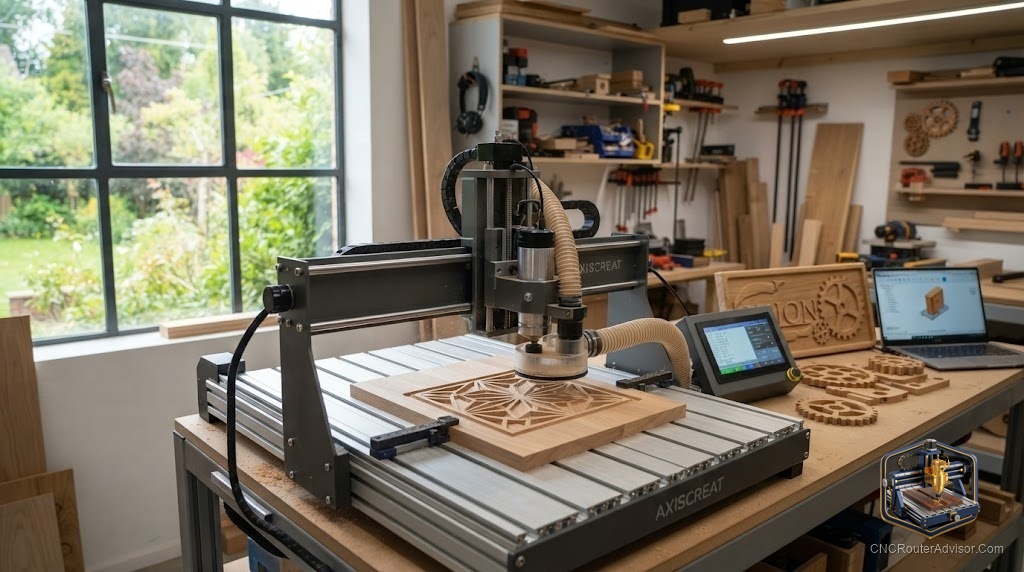
If you’ve been looking for a mid-size CNC router that bridges the gap between a tiny desktop machine and a big industrial one, the Axiscreat 6060 keeps coming up - and for good reason. It offers a generous work area in a footprint a serious hobbyist or small shop can actually accommodate. Here’s what the Axiscreat 6060 is, what it does, and how to get the most from it.
What the Axiscreat 6060 is
The Axiscreat 6060 is a mid-size CNC router with roughly a 600×600 mm work area - the “6060” refers to that ~60×60 cm cutting footprint. It’s a 3-axis machine built for wood, plastic, acrylic, and light metal, positioned above compact 3018-class desktop routers but below full-sheet industrial machines. You can find the Axiscreat 6060 CNC router on Amazon, which makes it an accessible step up for makers who’ve outgrown a small machine.
Note that Axiscreat offers the 6060 in more than one drive configuration - the widely available version uses a belt/linear-rail motion setup, while a closed-loop ball screw variant exists for those who want maximum precision. Confirm which configuration a listing is before buying if the drive type matters to your work.
What it’s used for
The 6060’s size makes it a versatile middle-ground machine:
- Larger signs and plaques that won’t fit a small desktop machine
- 2.5D and 3D carving - reliefs, decorative panels, ornaments
- Furniture parts and cabinetry components at a manageable scale
- Acrylic and plastic fabrication
- Light aluminum with appropriate tooling and settings
The fundamentals to understand
Judge the 6060 like any router, on the basics that determine cut quality:
- Work area. ~600×600 mm across the X axis and Y axis, with the Z axis travel determining how thick a workpiece you can handle - confirm Z travel for your projects.
- Motion system. The motion system rides on linear rails; the drive is belt-based on the standard version and ball screw on the closed-loop variant. Ball screws offer tighter repeatability and positioning accuracy.
- Frame rigidity. A mid-size machine needs good frame rigidity to cut cleanly - place it on a solid, stable surface.
- Spindle. Check the included spindle/router and its power for your materials.
Setup considerations
- Give it a stable base. A solid bench or stand supports rigidity and improves finish.
- Calibrate and zero. Set steps per unit, feeds, and acceleration, and zero your work coordinates carefully so cuts land where intended.
- Set homing and soft limits. These make zeroing repeatable and protect the machine.
- Solid workholding. A larger bed means larger parts - invest in clamps, a spoilboard, and good workholding.
- Plan dust and software. Budget dust collection, and choose CAM software that generates clean G-code for the 6060’s controller.
- Match tooling. A V-bit for lettering and an upcut/straight bit for profiling cover most projects; add a ball-nose for 3D.
Who it’s for
The Axiscreat 6060 suits makers who’ve outgrown a small desktop machine and want more room without jumping to an industrial footprint - sign makers, hobbyist woodworkers, and small shops. If you only cut small items, a compact machine is more economical; if you need full 4’×8’ sheets, you’ll want a larger machine.
The bottom line
The Axiscreat 6060 is a versatile mid-size CNC router with a ~600×600 mm work area, available on Amazon and offered in belt-driven and ball-screw configurations. It’s an ideal step up for makers who need more room than a desktop machine but not an industrial one. Set it on a stable base, calibrate and zero carefully, invest in workholding, and it’ll handle signs, carving, and light metal with ease.
Frequently asked questions
What does “6060” mean? It refers to the machine’s roughly 600×600 mm (about 60×60 cm) work area.
Does the 6060 use ball screws? The widely available version is belt/linear-rail driven; a closed-loop ball-screw variant exists for higher precision. Confirm the configuration before buying.
Can the Axiscreat 6060 cut aluminum? It can handle light aluminum with the right bits, feeds, and speeds - the ball-screw variant is better suited to metal precision. It’s best known for wood, plastic, and acrylic.