
Automated CNC Router Explained: Uses, Setup, and Key Considerations
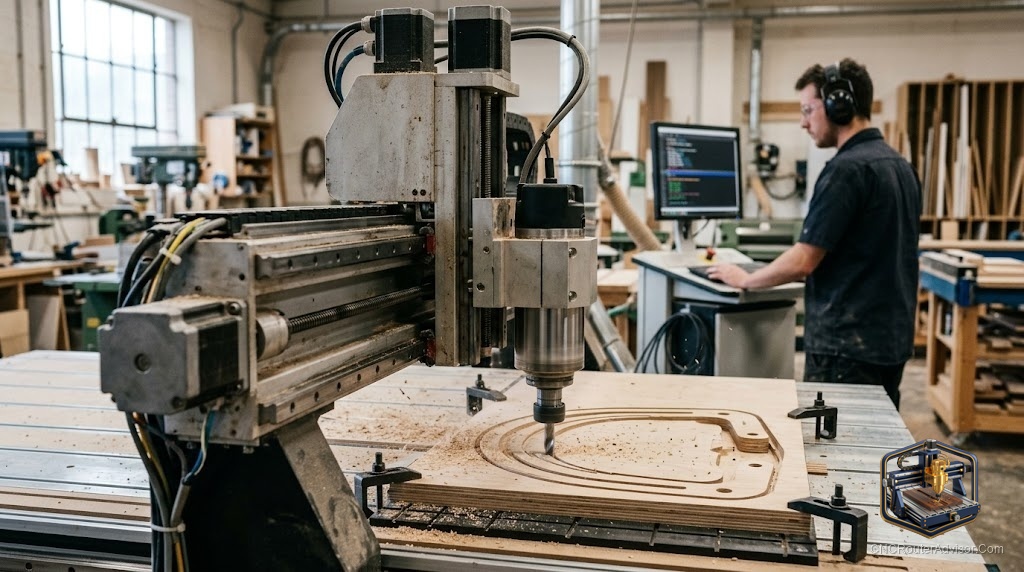
The word “automated” is really just describing what makes a CNC router a CNC router in the first place: instead of guiding a tool by hand, you let a computer drive it with precision no human wrist can match. If you’re exploring automated routers, here’s what that automation actually buys you, what to look for, and how to get started.
What “automated” really means here
An automated CNC router uses Computer Numerical Control to move a cutting tool along programmed paths automatically. You design a part, generate G-code, and the machine executes it - coordinating the X axis, Y axis, and Z axis to carve exactly what you designed, the same way every time. The automation is the whole point: repeatability, precision, and the ability to cut complex shapes hands-free.
This is different from a handheld router (which you guide manually) and from full industrial automation like automatic tool changers - an ordinary desktop CNC router is already “automated” in the sense that matters to most makers.
What automated routers are used for
- Signs and lettering with perfect, repeatable detail
- 2.5D and 3D carving - reliefs, decorative panels, ornaments
- Precise parts in wood, plastic, composites, and (on rigid machines) aluminum
- Batch work - cutting the same part accurately again and again
The common thread is that the machine does the precise, tedious work automatically while you design and supervise.
The fundamentals that determine quality
Automation only shines on a good machine, so judge any router on the basics:
- Frame rigidity. A stiff frame - quality aluminum extrusion or a steel frame - suppresses chatter and holds accuracy.
- Motion system. A smooth motion system on linear rails with ball screw, lead screw, or timing belt drive determines finish and precision.
- Spindle power. Enough spindle power - a trim router or a VFD spindle - for your materials.
- Control. A dependable controller (often a GRBL controller on hobby machines) that cleanly runs your G-code.
- Work area. A work area sized to your projects.
Getting started: machines to consider
The easiest path into automated routing is a complete, ready-to-run machine:
- The Genmitsu 3018-PROVer V2 is a proven, affordable starter with homing switches and a Z-probe.
- The Genmitsu 3020-PRO MAX V2 adds room and rigidity for wood, plastic, and light metal.
- The rigid, all-metal AnoleX 3030-Evo Max steps up to aluminum-capable precision.
- For larger spindle-driven work, the OCASAMI 6090 router or Axiscreat A6060 offer serious capacity.
Setup considerations
- Calibrate. Set steps-per-unit, feed, and acceleration so parts come out the right size.
- Zero carefully. Accurate work-coordinate zeroing is what makes automated cuts land where you intend.
- Solid workholding. Even automated cuts fail if the material shifts - invest in good workholding.
- Plan dust and safety. Dust collection and eye/ear protection from day one.
- Match software to work. Your CAM software generates the G-code the machine automates - choose one that fits your projects.
The bottom line
An automated CNC router is simply a router driven by computer control - precise, repeatable, and capable of shapes no hand could manage. The automation shines only on a rigid, well-calibrated machine with good workholding, so choose a solid machine sized to your work, set it up carefully, and let it do the exacting work while you focus on design.
Frequently asked questions
How is an automated CNC router different from a regular router? A regular (handheld) router is guided by hand; an automated CNC router follows programmed G-code to cut precisely and repeatably on its own.
Do I need special skills to run one? You’ll learn CAD/CAM to design and generate G-code, plus machine setup and zeroing. Complete beginner machines make the learning curve very manageable.
What’s the best automated router to start with? A complete desktop machine like the Genmitsu 3018-PROVer V2 - affordable, well-supported, and ready to run.