
Arduino Controlled CNC Router Explained: Uses, Setup, and Key Considerations
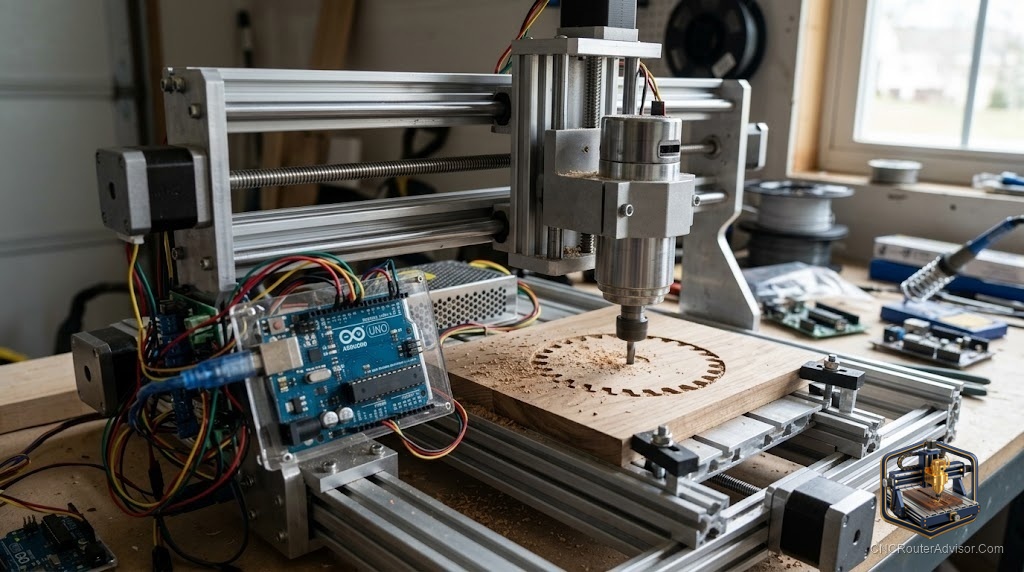
The phrase “Arduino controlled CNC router” describes something quietly remarkable: a genuine cutting machine whose entire brain is a hobbyist microcontroller running free firmware. If you’ve ever wondered how a sub-$300 machine can move with real precision, the answer lives in that little board. Here’s how Arduino control works, what it does well, and how to get the most from it.
How Arduino control works
An Arduino controlled CNC router uses an Arduino board running GRBL firmware as its motion controller. The job of that controller is specific and elegant: take a stream of G-code, interpret each coordinated move, and emit precisely timed step-and-direction pulses to the stepper drivers. Those drivers push the stepper motors, which turn the drive mechanism on each axis.
The result is that the X axis, Y axis, and Z axis move in exact coordination - the essence of Computer Numerical Control - all orchestrated by a board most people first meet blinking an LED.
Why Arduino/GRBL dominates hobby CNC
There are good reasons this approach runs the majority of desktop machines:
- Cost. The controller is inexpensive, keeping whole machines affordable.
- Openness. GRBL is open-source and endlessly documented - answers to every question exist online.
- Reliability. For the loads a hobby router sees, it’s proven and dependable.
- Community. A massive user base means shared configs, troubleshooting, and upgrades.
What it’s good for - and its limits
Arduino control is ideal for the work hobby routers actually do:
- Signs, engraving, and 2.5D carving
- PCB milling and small precision parts
- Light aluminum on a rigid machine with proper tooling
- Learning the real mechanics of CNC
Its limits are honest ones: GRBL is a hobby-and-prosumer, largely three-axis solution. It doesn’t natively run the automatic tool changers, closed-loop servos, and complex multi-axis work of industrial controllers. For production at scale, you move up to a dedicated industrial control package.
Getting started
The easiest way to experience Arduino control is a complete GRBL machine rather than a parts build:
- The Genmitsu 3018-PRO is the classic affordable Arduino/GRBL machine to learn on.
- The Genmitsu 3018-PROVer V2 adds limit switches, a Z-probe, and an E-stop for a smoother experience.
- For more room and rigidity while staying GRBL, the Genmitsu 3020-PRO MAX V2 is a strong step up.
To run jobs without a tethered PC, add a GRBL offline controller.
Setup considerations
- Calibrate GRBL. Set steps-per-mm, max feed, and acceleration for your hardware - this is what makes parts come out the right size.
- Clean wiring and grounding. Electrical noise causes missed steps; tidy, grounded wiring prevents it.
- Homing switches. Limit switches make zeroing repeatable and protect the machine from crashes.
- A good G-code sender. Choose a sender that communicates cleanly with GRBL.
- Rigidity and workholding. The controller is only half the equation - frame rigidity and solid workholding decide cut quality too.
The bottom line
An Arduino controlled CNC router turns free firmware and a cheap board into genuinely precise, coordinated motion - the foundation of nearly all hobby CNC. It excels at signs, carving, PCBs, and light metal, and its only real limits are the industrial features it was never meant to have. Start with a complete GRBL machine, calibrate carefully, and you’ll have a capable, deeply understandable tool.
Frequently asked questions
What does the Arduino actually do? It runs GRBL firmware that reads G-code and sends precise step/direction pulses to the stepper drivers - it’s the motion brain of the machine.
Is Arduino control accurate enough? Yes, for hobby and prosumer work. Accuracy comes from proper GRBL calibration plus a rigid machine, not from a fancier controller.
What can’t it do? Native industrial features like automatic tool changers, closed-loop servos, and complex multi-axis machining. For those, you need an industrial controller.