
What Is a CNC Router: Uses, Setup, and Key Considerations
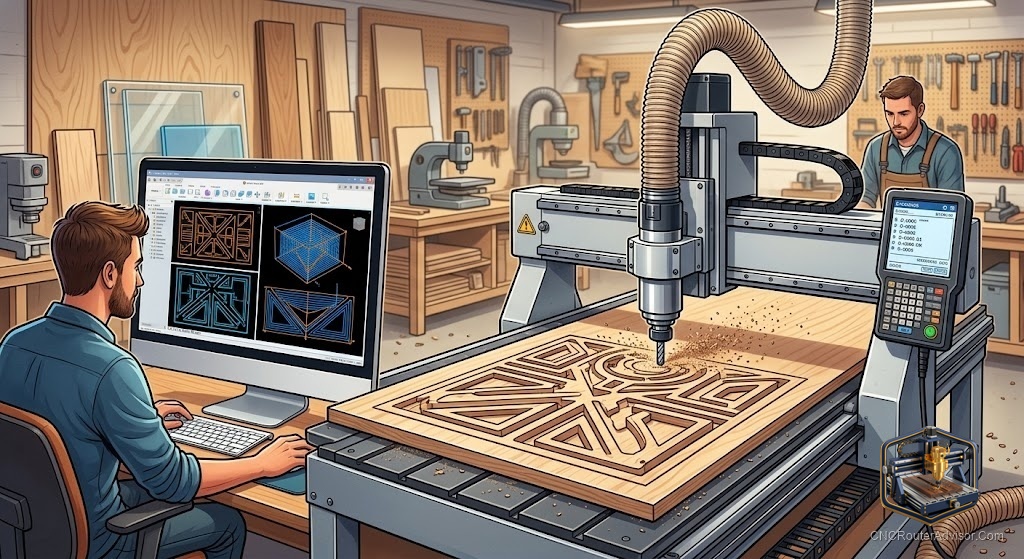
You have seen the videos. A slab of wood goes on the table, the spindle starts, and fifteen minutes later a sign with perfect lettering lifts off clean. No chisels, no tracing, no burning yourself on a wood burner. A CNC router does that, and it does it repeatedly to the same tolerance every time. Before you spend anything, here is what the machine actually is and what decides whether the one you buy does the job you need.
A CNC router is a computer-controlled cutting machine that moves a spinning cutter across three axes (X, Y, and Z) to carve, cut, and engrave material from a fixed workpiece. CNC stands for Computer Numerical Control: the machine reads a file of coordinates and moves the spindle to those positions with precision no hand tool can match.
Here is the short answer for a first-time buyer: a CNC router is the right tool if you need to cut or carve precise, repeatable shapes in wood, plastic, foam, or soft metal. It is not a laser engraver (it removes material mechanically, not with heat). It is not a 3D printer (it subtracts material instead of adding it). It is not a CNC mill (a mill cuts harder materials like steel and uses a heavier, more rigid machine). A CNC router is a versatile shop tool for the maker who wants to go from a file to a finished part without a lot of hand fitting.
The three axes: how a CNC router moves
Every CNC router moves the cutter in three straight-line directions.
- X axis: left to right across the machine (or right to left)
- Y axis: front to back (the length of the bed)
- Z axis: up and down (the cutter into and out of the material)
Combining all three movements simultaneously lets the machine follow any 3D path. Simple flat cuts use X and Y only. Relief carving uses all three. The combination defines what the machine can make.
A 4th axis adds rotation: a chuck spins the workpiece while X and Z cut, allowing carving around cylindrical stock.
Work area: the number that sets your ceiling
Work area is the maximum distance the cutter can travel in X, Y, and Z. A machine with a 300mm x 180mm work area cannot cut a 400mm-wide sign in a single setup. A machine with 400mm of Y travel cannot panel-mill a 500mm-long piece without repositioning.
Common size classes:
- Mini/desktop (300x180mm to 300x300mm): PCB milling, small engravings, acrylic parts, learning
- Mid desktop (400x400mm to 600x600mm): Signs, small furniture parts, prototypes
- Large desktop (600x900mm): Cabinet doors, guitar bodies, batch parts
- Full sheet (1220x2440mm): Industrial production of full plywood sheets
Most hobbyists and small shops land in the 400x400mm to 600x900mm range.
Frame rigidity: why it matters for every cut
Rigidity is the machine’s resistance to flexing under the forces of cutting. Every cut generates force: the material pushes back against the bit. If the frame flexes, the bit moves off its programmed path. The result shows up as wavy edges, inconsistent depth, and chattery surface finish.
Frame material runs from light aluminum extrusion (common on hobby machines) to welded steel and cast iron (industrial). For wood and plastic, well-designed aluminum extrusion is adequate. For aluminum and harder materials at real feed rates, stiffer is better.
Motion system: what drives accuracy
The motion system converts motor rotation into precise linear movement.
- Timing belts: cheap, fast, quiet, elastic under load, stretches over time. Common on entry machines, fine for engraving, less ideal for heavy cutting.
- Lead screws: threaded rod and sliding nut. Inexpensive, holds position under light loads, wears to backlash over time.
- Ball screws: recirculating steel balls between screw and nut. Low friction, very low backlash, durable, accurate. Standard on mid-tier and better machines.
Linear rails guide each axis. V-wheels on extrusion (entry level), round supported rails (mid), and square profile recirculating rails (best) each offer increasing rigidity and accuracy.
Spindle: the motor that spins the cutter
The spindle is the heart of the machine. Two categories dominate:
Trim router in a mount. A standard palm router (Makita RT0701C, DeWalt DWP611) clamped to the Z carriage. Easy, powerful, affordable. Loud and limited in speed range.
Dedicated water-cooled spindle with VFD. A purpose-built motor matched to a variable frequency drive. Quieter, wider speed range, better runout, designed for continuous duty. Standard on machines from the 600x900mm class up.
Spindle power runs from 60W on the smallest desktop machines to 3kW and beyond on mid-size production units. More power means deeper passes and harder materials at the same feed rate.
Controller and G-code
The controller is the electronics that read your toolpath file and command the motors. Every CNC router runs G-code, the universal language that describes tool positions, feed rates, and spindle speeds.
You do not write G-code by hand. CAM software (Computer Aided Manufacturing) converts your design into G-code automatically. Common CAM tools:
- Vectric VCarve / Aspire: popular for woodworking and sign making
- Fusion 360: free for hobbyists, handles 3D machining and 4-axis work
- Carbide Create: free, beginner friendly
- Easel (Inventables): browser-based, beginner focused
Controller firmware on hobby machines:
- GRBL: open-source, runs on cheap hardware, standard for most hobby and mid-size machines
- Mach3: Windows software, common on imported Chinese machines, needs older Windows
- Smoothieware / FluidNC: modern GRBL-compatible alternatives
Five CNC routers across size classes
For first-timers: Genmitsu 3018-PROVer V2
A 300x180mm desktop machine with limit switches, Z-probe, emergency stop, and full GRBL control. Lead-screw driven, light frame, 775 motor. Cuts wood, acrylic, PCB, and foam.
Honest flaw: the 40mm Z travel limits stock thickness. Stock 775 motor needs upgrading for sustained hardwood work.
For mid-size work: Genmitsu 4040-PRO
A 400x400mm aluminum-extrusion machine with a 300W spindle, dual Y-axis motors, and GRBL. Good for signs, small furniture parts, and prototype work.
Honest flaw: the 300W spindle is underpowered for dense hardwood at real depth. Upgrade to a 500W or 700W spindle for better performance.
For large desktop work: OCASAMI 2.2KW 4-Axis 6090
A 900x600x140mm machine with a 2.2kW water-cooled spindle, ball screws on all axes, and Mach3 control. Cuts hardwood, aluminum, and dense plastics.
Honest flaw: requires older 32-bit Windows for Mach3. Water cooling loop needs setup before first use.
For engraving and PCB: SainSmart Genmitsu 3018-PRO
The classic entry desktop CNC with a 300x180mm bed, offline controller, and GRBL. A proven beginner machine with a large community.
Honest flaw: no limit switches on the base version, so homing relies on manual zeroing.
For upgrade-minded hobbyists: Axiscreat A6060
A 600x600x75mm machine with GRBL/FluidNC, dual linear rails, touchscreen, and a 710W trim router in a 65mm mount. Larger work area than most desktop machines.
Honest flaw: belt-driven X and Y; shallow Z travel of 75mm. Aluminum cutting is marginal.
What can a CNC router cut?
| Material | Standard desktop | Mid-size with spindle | Large with 2.2kW spindle |
|---|---|---|---|
| Soft wood | Yes | Yes | Yes |
| Hard wood | Marginal | Yes | Yes |
| MDF / plywood | Yes | Yes | Yes |
| Acrylic / plastics | Yes | Yes | Yes |
| Aluminum | No | Light passes | Yes |
| Steel | No | No | No |
Verdict
A CNC router earns its place in a shop the moment you need to cut the same shape more than a few times, or cut any shape you could not reliably produce by hand. Start with a machine sized to your largest recurring project, not your most ambitious imagined project. The machine you will actually use is better than the machine that sits too big and too complicated on the bench.
Four buying rules:
- Size the work area to your parts, not your wish list.
- Match the spindle to the material: trim router for light work, water-cooled spindle for production and hard materials.
- Ball screws over belts for anything beyond engraving.
- Confirm your CAM software choice before the machine arrives. The workflow takes as long to learn as the machine.
FAQ
What is a CNC router used for? Cutting, carving, and engraving wood, plastic, foam, acrylic, and soft metals. Common projects include signs, furniture parts, inlays, prototypes, molds, and production parts.
What is the difference between a CNC router and a laser engraver? A CNC router removes material mechanically with a spinning cutter. A laser engraver burns material with a focused light beam. Routers cut deeper and handle a wider material range. Lasers are faster on flat engraving and etching.
What is the difference between a CNC router and a CNC mill? A mill is stiffer and heavier, designed to cut hard metals like steel at precise tolerances. A router is lighter, faster at feed rates, and suited for wood, plastic, and soft metals. Work area on routers is typically larger.
Do I need to know G-code to use a CNC router? No. CAM software generates G-code from your design. Basic operation only requires learning to use the CAM tool and the machine sender software.
How long does it take to learn CNC routing? Basic flat cutting: a day or two. V-carving and 2.5D relief: a few weeks. 3D machining and 4-axis work: months. The mechanical side of the machine is learnable in a weekend; the design and toolpath skills take longer.
What materials can a CNC router not cut? Steel, hard alloys, ceramics, and glass are beyond the range of a standard CNC router. Hardened steel and high-carbon steel are machined on CNC mills, not routers.
References
- cncrouterinfo.com, “How to Choose a CNC Router”: https://cncrouterinfo.com/guides/how-to-choose-a-cnc-router/
- cnc-dad.com, “Best CNC Router for Beginners”: https://www.cnc-dad.com/blog/best-cnc-router-for-beginners/