
CNC Router Machine Guide: Types, Sizes, Features, and Buying Factors
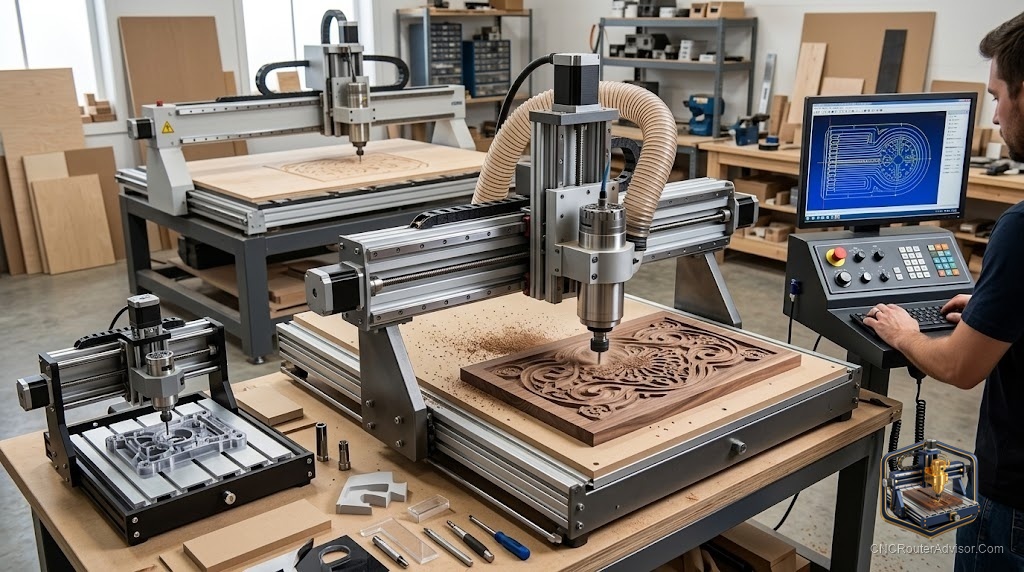
Walk into any CNC forum and you will find the same thread posted every week: “Which machine should I buy?” The replies split into two camps almost instantly. One camp names the machine they own and loves. The other asks the question that actually helps: what are you going to cut, and how much of it? A CNC router machine is not a single product you rank best to worst. It is a tool you fit to a job, and the fit matters more than the badge on the gantry.
A CNC router machine is a computer-controlled gantry that drives a spinning cutter across three axes to shape wood, plastic, foam, and soft metals. The right one for you falls out of four buying factors: the material you cut, the size of your parts, the accuracy you need, and the volume you produce. Answer those honestly and the field narrows fast.
Up front, the recommendation: match the machine tier to your parts and hours, and spend your budget on rigidity and drive system before chasing a larger work area. A right-sized rigid machine outperforms a bigger flimsy one on every job that matters.
Types of CNC router machines
Desktop and benchtop. Compact, affordable, and the honest way to learn. They carve small areas and flex under heavy cuts, but they teach the workflow on cheap material without a big commitment. The SainSmart Genmitsu line is the common entry point, and the router-powered 4040-PRO MAX is the model where beginners stop feeling constrained by a tiny work area and underpowered spindle.
See the SainSmart Genmitsu 4040-PRO MAX on Amazon
Prosumer full-frame. Shapeoko, Onefinity, and similar machines bridge hobby and small business. Larger beds, real workholding, and spindle upgrade paths. Most serious hobbyists buy here and stay for years.
Full-sheet industrial. A 4 by 8 foot bed, a heavy welded or extruded frame, a spindle, and often a vacuum table and tool changer. Avid CNC, ShopSabre, and their peers occupy this tier. If parts come off standard sheet goods and you sell them, the footprint earns its place.
Sizing by part, not by ego
Work area is the headline spec, and buying on it alone is the classic mistake. Owners who cut full sheets but bought a smaller bed describe the same pain: slicing stock in half to fit, then losing usable pieces on every cut. If your work starts from 4 by 8 sheets, a full-sheet bed pays back in yield.
The reverse is just as real. A giant bed you never fill is money spent on floor space and extra weight to keep square. Size to the largest part you make often, plus clamping room, and no larger.
Features worth paying for
Rigidity. Steel or heavy aluminum extrusion resists the flex that turns clean cuts into chatter. This is the feature that most changes your results and the one marketing pages mention least.
Drive system. Ball screws on linear rails are stiffest and most precise. Lead screws are a good middle. Belts are quiet and cheap and fine for light wood and foam but stretch under load. Match to material.
Cutting head. A VFD spindle holds torque, runs quiet, and lasts; a trim router keeps entry costs down and suits light use. Choose by run hours.
Controller and software. GRBL-based, well-supported machines with active communities save you real grief. A machine locked to obscure software becomes a paperweight when you hit a wall.
Z clearance. Thicker stock, taller clamps, and 3D work all need height. Overlooked until a collision reminds you.
Buying factors, ranked
- Material. Wood and plastic tolerate lighter machines; aluminum demands rigidity and a spindle; steel needs a mill, not a router.
- Part size. Sets your minimum work area, and nothing more.
- Accuracy. Tight tolerances push you toward ball screws and a stiff frame.
- Volume. High output justifies a spindle, a vacuum table, and eventually a tool changer.
Run your project through those four in order and you will usually end up pointing at a single tier, sometimes a single machine.
Who should skip the upgrade
If you make small parts occasionally, a full-sheet industrial machine is a maintenance chore you do not need. And if you have never run a CNC, do not start at the top; a modest machine teaches the fundamentals that carry straight upward when you scale.
The bottom line
Buy your CNC router machine in order: material, size, accuracy, volume. Put your money into rigidity and drive system before work area, match the cutting head to your hours, and insist on open, well-supported software. The machine people brag about is rarely the one that serves them; the one that fits the job is.
Frequently asked questions
How do I choose the right CNC router machine? Work through four factors in order: what you cut, how big your parts are, how accurate they must be, and how many you make. That sequence narrows the field to a tier and often a specific machine.
What is the most important feature to pay for? Rigidity. A stiff frame keeps cuts accurate and clean, and it is the feature marketing pages mention least. Drive system and cutting head come next.
Is a desktop machine enough for a small business? For small parts and low volume, yes. For production off sheet goods, a desktop machine becomes a bottleneck and a full-frame or full-sheet machine pays for itself.
What drive system should I look for? Ball screws on linear rails for precision and rigidity, lead screws for a solid middle ground, belts for light wood and foam. Match the drive to the material you cut most.
Do I need a tool changer? Only at higher volumes where changing bits by hand becomes a real bottleneck. Most hobbyists and many small shops never need one.
Why does software support matter when buying? A machine tied to obscure, locked software is hard to run and repair. GRBL-based machines with active communities and documented setups are far easier to live with day to day.
References
- The Maker’s Chest, “CNC Router Buying Guide: By Material, Size & Volume” (themakerschest.com)
- Wood Magazine, “A Buyer’s Guide to Benchtop CNC Machines” (woodmagazine.com)
- SainSmart / Genmitsu product documentation (sainsmart.com)