
6 x 12 CNC Router Guide: Work Area, Machine Size, and Buying Factors
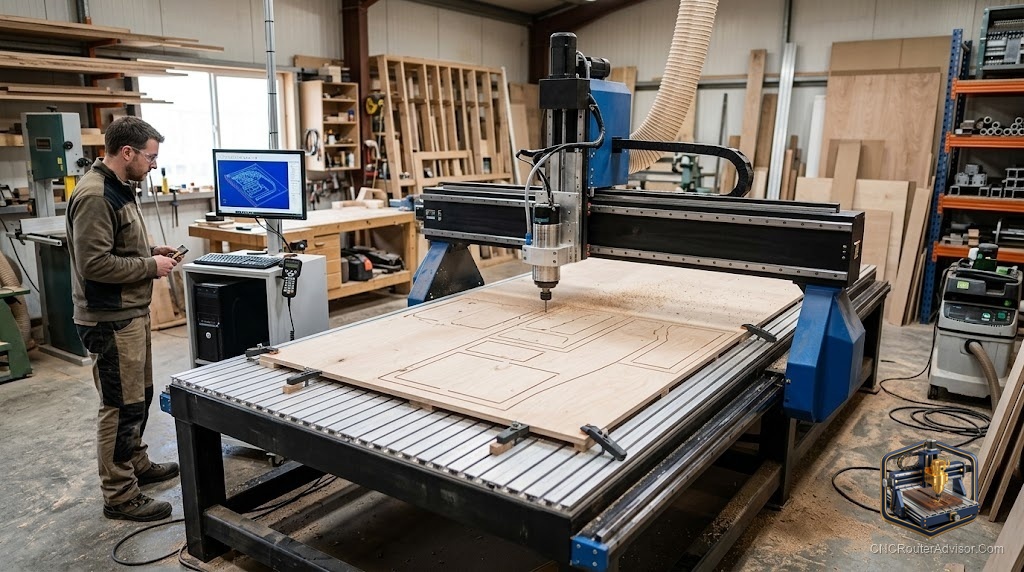
You are searching “6x12 CNC router” and the results are a mess. One page shows a two-ton industrial gantry table. The next shows a desktop kit the size of a shoebox. Before you spend any money, you need to know which machine people are actually talking about, because getting this wrong means either vastly overspending or buying something that will not cut what you need.
A CNC router is a computer-controlled cutting machine that moves a spinning bit across X, Y, and Z axes to carve, engrave, or cut material. The number before “CNC router” usually refers to the machine’s work area dimensions. That is where “6x12” gets confusing.
The short answer: In the consumer hobbyist world, “6x12” almost always means a desktop CNC router with a work area in the 6-inch-by-12-inch neighborhood, close to the popular 3018 class (300mm x 180mm, roughly 12 inches by 7 inches). These machines sit on a desk, cut wood, acrylic, PCB material, and soft metals. The other meaning, a full 6-foot-by-12-foot industrial gantry table, is a completely different category aimed at production shops. If you are reading a consumer review or shopping on Amazon, you are in the first camp.
What “6x12” Actually Means (And Why Both Readings Exist)
The industrial CNC world uses feet. A 6x12 table there means a 6-foot by 12-foot cutting surface, the kind of machine that weighs thousands of pounds and runs a VFD-controlled spindle.
The hobbyist world uses millimeters, and the 3018 format has become the reference point. “3018” means 300mm x 180mm, which converts to about 11.8 inches by 7.1 inches. People searching “6x12” in the consumer space are typically rounding up, describing the machine’s approximate footprint or comparing it to a sheet of paper. No mass-produced desktop CNC router ships with an exact 6” x 12” work area, but the 3018 class is the closest thing that exists on Amazon.
The rest of this guide covers the desktop 3018-class machines. If you need an industrial 6x12 gantry, contact a machine dealer directly. Those are not sold on Amazon.
What You Can Actually Cut in a 6x12 Work Area
Imagine a standard piece of printer paper laid flat. The 3018’s 300mm x 180mm table is almost exactly that size. That is your canvas.
In practical terms, it is enough for:
- Custom PCB prototypes
- Engraved name plaques and signs
- Small wood relief carvings and inlays
- Acrylic letters and logos
- Jewelry wax molds
- Small aluminum parts (light passes, slow feeds)
What it is not enough for: cabinet doors, guitar bodies, large panels, or anything that will not fit on a sheet of paper. If your project needs more than about 11 inches in any direction, you are already outgrowing this size class.
How the Motion System Affects Cut Quality
Lead screws use a threaded rod to convert motor rotation into linear motion. They are precise, hold position under load, and resist backlash over time better than belts. For a machine this size cutting wood and acrylic, lead screws are the right choice.
Timing belts are faster and less expensive to make but stretch over time. On a machine this small cutting light materials, a quality belt drive works fine, but lead screws will stay accurate longer.
Linear rails guide the moving axes. The entry-level 3018 uses V-wheels on aluminum extrusion rails. They work but flex slightly under lateral cutting loads. Higher-spec versions add hardened steel linear rails for noticeably less chatter on harder materials.
Ball screws are precision-ground, low-friction versions of lead screws. You will not find them on desktop machines in this size class. That is fine. The loads are small enough that standard lead screws perform well.
Spindle Power: The Number That Limits Your Materials
The stock spindle on most 3018-class machines is a 775 brushed DC motor producing somewhere between 60W and 120W. That is enough for PCB traces, thin acrylic, and shallow wood engraving. Push into hardwood or try to cut aluminum at any real depth and you will feel the spindle bog down.
The good news: the spindle is the easiest thing to upgrade. The 3018-PROVer’s mount accepts aftermarket 300W to 500W spindles without modifying the frame. Many owners do this upgrade within their first few months.
A trim router can also be mounted to some 3018-class frames. Running a real router spindle at 30,000 RPM changes what the machine can cut, but adds vibration, noise, and higher cutting forces that stress the aluminum extrusion frame. Workholding becomes critical.
Frame Rigidity: Aluminum Extrusion vs. Steel
Every 3018-class desktop machine uses aluminum extrusion for the frame. It is lightweight, easy to assemble, and good enough for the materials these machines are designed to cut.
The honest flaw: aluminum extrusion frames flex under aggressive cuts. If you push feeds and speeds hard, you will see chatter in the finished surface. The workaround is shallow depth-of-cut, slower feed rates, and sharp bits. Work within the machine’s limits and the frame is perfectly adequate.
GRBL and G-Code: The Software Stack
Every 3018-class machine on Amazon runs GRBL, an open-source motion controller that runs on an Arduino-compatible board. GRBL interprets G-code, the universal language that tells the machine where to move, how fast, and at what spindle speed.
This is actually a strength. Because GRBL is open-source and widely used, there is an enormous community, free tutorials, and compatible software options. Candle and UGS (Universal G-code Sender) are free. Fusion 360’s CAM output works directly with GRBL. Lightburn works for laser attachments.
The GRBL controller on the 3018-PRO runs at 24V. The PROVer version adds limit switches (so the machine can home itself), a Z-probe for precise tool-length setting, and an emergency stop button. These are not luxury features. If you are new to CNC, they prevent the kind of crash that ruins a workpiece or breaks a bit.
The Main Machines Worth Considering
Genmitsu 3018-PRO
The machine most people mean when they say “3018.” It has been on the market for years, has a huge community, and SainSmart maintains actual documentation and resources.
Work area: 300mm x 180mm x 45mm. GRBL controller. 775 spindle motor. Lead screw driven on all three axes. Aluminum extrusion frame. Ships as a kit requiring assembly (roughly two to three hours). The offline controller lets you run jobs without a laptop connected.
Flaw you should know: the Z-axis travel is only 45mm. If you want to clamp anything thicker than about an inch and a half, you will run out of Z-clearance quickly.
Genmitsu 3018-PROVer V2
This is the version to buy if you are choosing between the two Genmitsu options. Same footprint, same lead screw motion, but with limit switches on all axes, an emergency stop button, a Z-probe for automatic tool height setting, and an upgraded aluminum spoilboard with M6 threaded holes for workholding.
Work area: 284mm x 180mm x 40mm. The safety features alone make this the smarter starting point for a first CNC machine.
Flaw: no offline controller included in the base version. You will need a laptop connected during operation unless you add one separately.
Twotrees TTC 3018 Pro
An alternative from Twotrees with a similar 300mm x 180mm x 40mm work area. Ships with a 775 brushed spindle, ER11 collet chuck, and a standard GRBL control board. The machine is all-metal construction and includes 10 flat-bottomed engraving bits in the kit.
Flaw: Twotrees has a smaller community than SainSmart/Genmitsu, which matters when you are troubleshooting your first CNC project at 11pm with a ruined piece of walnut in front of you.
How the Three Machines Compare
| Genmitsu 3018-PRO | Genmitsu 3018-PROVer V2 | Twotrees TTC 3018 Pro | |
|---|---|---|---|
| Work area | 300 x 180 x 45mm | 284 x 180 x 40mm | 300 x 180 x 40mm |
| Limit switches | No | Yes | Yes |
| Emergency stop | No | Yes | Yes |
| Z-probe | No | Yes | No |
| Motion system | Lead screw | Lead screw | Lead screw |
| Frame | Aluminum extrusion | Aluminum extrusion | Aluminum extrusion |
| Community size | Large | Large | Small-medium |
| Offline controller | Included | Not included (base) | Not included |
The PROVer V2 is the clearest recommendation for most buyers. The safety features matter more than the offline controller for beginners, and you can always add an offline controller later.
Workholding: The Part Everyone Forgets
A CNC router cuts against the material. If the material moves, the cut is ruined. The 3018’s aluminum spoilboard (on PROVer variants) has threaded M6 holes for clamps. On the base PRO, you are improvising with tape, clamps at the edges, or hot glue.
Double-sided tape works for flat, thin stock. Painter’s tape plus CA glue (the “tape and glue method”) is more reliable. For repeat production work, a set of low-profile toe clamps into the threaded holes is the right move.
What to Know Before You Buy
Assembly is required. These are kits. Budget two to three hours for the first build. Watch a build video for your specific model before you start.
Software has a learning curve. You will need CAD or CAM software to generate G-code from your design. Fusion 360 (free for hobbyists), Carbide Create (free), and Easel (browser-based) all export GRBL-compatible G-code. Pick one and learn it before the machine arrives.
Bits matter more than most people expect. The included engraving bits in starter kits are adequate for a few test cuts. For real work, upcut spiral bits in 1/8-inch shank are the standard starting point.
Z-axis depth is the real constraint. The 40mm to 45mm Z travel on these machines limits you to thin stock. Keep your material under 20mm thick and your clamps below that height.
The Real Verdict
The Genmitsu 3018-PROVer V2 is the machine to start with if you want a desktop CNC router in this size class. The limit switches, Z-probe, and emergency stop are not marketing features. They prevent the kind of costly crash that happens during every beginner’s first dozen hours. The base 3018-PRO is workable but strips out safety features to save a small amount. That tradeoff is not worth it.
If you already know you will want more cutting power from day one, buy the PROVer V2, run it stock for a month to learn the machine, and then upgrade the spindle. You will make better upgrade decisions after you have actually used the machine.
Four takeaways before you buy:
- Verify your project fits in a 300mm x 180mm footprint before ordering. Most beginners overestimate how much work area they need.
- The Z-axis (40mm to 45mm travel) limits stock thickness more than the X/Y footprint does.
- Budget for bits separately. The included kit bits are for learning, not production.
- Pick your CAM software and do a tutorial run before the machine arrives. The hardware is the easy part.
FAQ
What does 3018 mean on a CNC router? It refers to the work area dimensions: 300mm on the X axis and 180mm on the Y axis. This is roughly 11.8 inches by 7.1 inches, close to a sheet of standard printer paper. The “6x12” search term maps loosely to this size class.
Can a 3018 CNC router cut aluminum? Yes, with significant limitations. Light passes at slow feed rates into soft aluminum (6061 alloy) are possible with a sharp two-flute upcut end mill. The stock 775 spindle motor is underpowered for serious aluminum work. Upgrading to a 300W or 500W spindle helps considerably.
What is the difference between a lead screw and a ball screw? Both convert rotary motor motion to linear travel. Lead screws are more common on budget machines and work well at low speeds and light loads. Ball screws use recirculating ball bearings for less friction and better positional accuracy, but cost more.
Do I need a VFD for a 3018-class desktop CNC router? No. VFD spindle control is a feature of larger machines with AC spindle motors. The 3018 uses a DC brushed motor controlled directly by the GRBL board’s PWM output.
What software works with these machines? GRBL-compatible senders include Candle, UGS (Universal G-code Sender), and OpenBuilds CONTROL. For generating G-code, Fusion 360, Carbide Create, and Easel all work.
Is GRBL hard to learn? The machine side of GRBL (homing, setting work coordinates, running a job) can be learned in an afternoon. The CAM side (generating toolpaths in software) takes longer.
How accurate are 3018-class machines? Repeatability is generally within 0.1mm to 0.2mm in normal operation on flat, properly fixtured stock. PCB traces at 0.2mm width are achievable.
What is the 6x12 CNC router used for in industrial settings? A 6-foot-by-12-foot CNC router is a production machine for cutting large panels of wood, MDF, aluminum composite, and plastics. It uses rack-and-pinion or ball-screw drive, a VFD-controlled spindle, and vacuum hold-down. It is not a desktop machine and is not the subject of this guide.
Can I add a laser to a 3018 CNC router? Yes. Most 3018-class machines support optional laser modules (typically 5W to 40W diode lasers) that replace the spindle for engraving work. Note that proper laser safety measures (enclosure, eyewear, ventilation) are required.
References
- SainSmart Genmitsu CNC Resource Center: https://docs.sainsmart.com/article/3jgtgas880-genmitsu-3018-pro-resources
- GRBL open-source motion controller project: https://github.com/gnea/grbl
- All3DP Genmitsu 3018-PRO spec review: https://all3dp.com/2/genmitsu-cnc-3018-pro-router-kit-buyer-s-guide/