
6090 CNC Router Machine Guide: Work Area, Machine Size, and Buying Factors
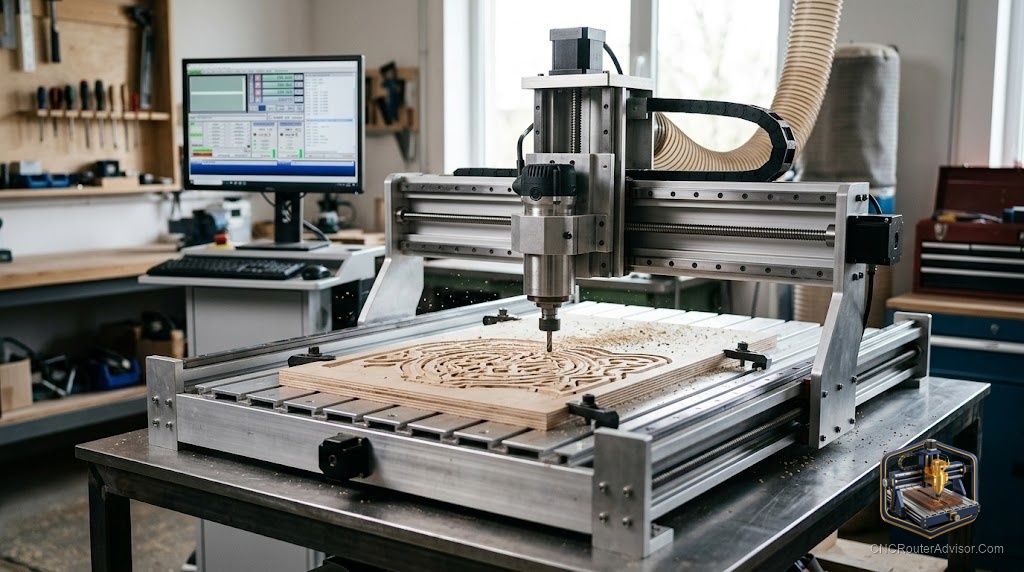
You clear a spot on the bench, measure twice, and realize the sign blank you want to cut is 30 inches wide. That single moment decides more about your next machine than any spec sheet will. A 6090 CNC router machine sits right at the line where a hobby tool starts acting like a small shop tool, and the name itself is your first clue about whether it fits your work and your space.
A 6090 CNC router is a compact three or four axis machine with a work area of roughly 600mm by 900mm (about 24 by 35 inches), driven by a spindle and a motion system that turns G-code into cuts. Think of it as the middle child of the desktop CNC router family: bigger than a 3018 toy, smaller than a full 4x8 sheet machine. Here is the short answer on whether to buy one: a 6090 is the right call when you cut wood, acrylic, MDF, and soft metals in pieces under two feet wide, you have a sturdy bench or floor space around four feet square, and you care more about clean repeatable parts than raw speed.
This page treats the 6090 as a whole purchase. Frame, spindle, controller, and the support behind them all decide whether you get a machine you trust or one that fights you.
What the “6090” number actually tells you (and what it hides)
The number is a size code. 60 means 600mm of travel on one axis, 90 means 900mm on the other. That is your cutting area, roughly 24 by 35 inches.
Here is the trap. The number says nothing about Z height, spindle power, frame material, or controller. Two machines can both wear the 6090 badge and behave nothing alike. Treat “6090” as a starting filter, not a promise. When you read a listing, hunt for the exact X, Y, and Z travel in millimeters, the frame material, the drive type per axis, and the spindle rating. If a seller hides those numbers, that tells you something too.
How much room a 6090 gives you on the bench
People buy for cutting area and forget about footprint. The machine is always bigger than its work envelope.
A typical 6090 with a true 600 by 900 work area has an outside footprint around 1150mm by 970mm, so figure roughly 45 by 38 inches of table space before you add a computer, a water pump for the spindle, and room to reach the far corners. Plan for a bench or stand near four feet square, plus clearance behind the gantry so the Y axis can travel fully.
Weight matters too. These machines run heavy for their size, and that mass is a feature, not a nuisance. A heavier frame sits still while the spindle cuts.
One more real-world note. The spindle usually needs water cooling, which means a bucket, a pump, and tubing living next to the machine. Budget the space for that loop now.
Frame and rigidity: where most 6090 buys go wrong
Rigidity is the whole game. Every bit of flex in the frame shows up in your cut as chatter, a wavy edge, or a dimension that drifts. You cannot fix a bendy frame in software.
Most 6090 machines use one of two frame approaches. Aluminum extrusion (usually 6061 profiles) is lighter, easier to ship, and adjustable. Welded steel is heavier and stiffer, and it damps vibration better. For a 6090, most of what you will find is heavy aluminum profile construction. That is fine for wood, plastic, and light aluminum if the profiles are thick and the gantry is short.
If you already know you will push hard aluminum all day, a 6090 in aluminum profile form is not your machine. That work wants a steel or heavy cast frame.
Spindle, VFD, and the power question
The spindle is the motor that spins the cutter. On a 6090 you will usually see a water cooled spindle rated between 1.5kW and 2.2kW, paired with a VFD (variable frequency drive) that controls its speed.
More power changes what you can cut. A 2.2kW (about 3HP) spindle handles softwoods, plastics, and foam comfortably, while denser hardwoods, plywood, and MDF cut faster and cleaner with more power. Soft metals like aluminum are possible on a well set up 6090, but they demand light passes, good workholding, and patience.
A water cooled spindle is the right choice for most buyers. It runs quieter than an air cooled unit, holds concentricity well, and lasts if you keep clean water flowing. Watch out for the trim router shortcut. Some cheaper machines skip the spindle and clamp a handheld trim router instead. On a machine at the 6090 level, a real spindle and VFD is what you are paying for.
Motion system: ball screw, lead screw, or timing belt
How the axes move decides your accuracy and how long the machine holds it.
Ball screws are the best of the three. They convert motor rotation to motion with very little backlash, so the machine returns to the same spot again and again. Most quality 6090 machines use ball screws on X, Y, and Z.
Lead screws cost less and work, but they carry more backlash and wear faster. Timing belts are common on lighter desktop CNC routers but are the weakest choice for a 6090 doing serious cutting.
Under those screws you want linear rails, not round rod with bushings. Rails carry the load without deflecting and keep the gantry square.
Controller and software: what actually runs the machine
The controller reads your G-code and tells the motors where to go. On 6090 machines you will mostly meet two worlds.
Mach3 with a parallel or USB motion board is common on Chinese 6090 kits. It is capable and widely documented, but it is old software that wants an older Windows setup, often requiring 32-bit Windows 7.
GRBL based controllers run on modern hardware and pair with friendly senders. GRBL is simpler and great for wood and plastic work, though it is less common on the heavier 6090 spindle machines.
Factor in the learning curve. The machine is only half the purchase. The other half is the weekend you spend learning toolpaths, feeds, speeds, and workholding.
The three 6090 machines worth your shortlist
| Machine | Work area | Spindle | Frame | Drive | Best for |
|---|---|---|---|---|---|
| OCASAMI 2.2KW 4 Axis 6090 | 900 x 600 x 140mm | 2.2kW water cooled, ER20 | 6061 aluminum | Ball screws, all axes | Buyers who want the most cutting power in the class |
| OCASAMI 1.5KW 4 Axis 6090 | 900 x 600 x 140mm | 1.5kW water cooled, ER11 | 6061 aluminum | Ball screws, all axes | Wood, acrylic, and sign work at a lighter duty |
| KUMOYOU 4 Axis 6090 | ~600 x 390 x 120mm | 1.5kW water cooled | 6061/6063 aluminum | Ball screw | Smaller parts and detail engraving |
Top pick: OCASAMI 2.2KW 4 Axis 6090
This is the one to start with if you want the full 6090 envelope and the most capability. You get a true 900 by 600mm work area with 140mm of Z clearance, a 2.2kW water cooled spindle with an ER20 collet, and ball screws on all three axes. For wood, acrylic, MDF, and careful aluminum, this is the sensible middle of the road.
Honest flaws: it runs on Mach3 and expects an older 32-bit Windows setup, so plan a dedicated control computer. The frame is aluminum profile, so it is not the tool for aggressive daily aluminum.
If you cut lighter: OCASAMI 1.5KW 4 Axis 6090
Same full 900 by 600mm work area and the same ball-screw, aluminum-frame build, but with a 1.5kW spindle and an ER11 collet. If your work is signs, inlays, acrylic, and softer wood, you may never miss the extra power.
Honest flaws: the ER11 collet limits you to smaller tool shanks. Same Mach3 and older-Windows requirement.
For detail work in a smaller footprint: KUMOYOU 4 Axis 6090
This one wears the 6090 name but gives you a smaller real work area, closer to 600 by 390mm. It has a 1.5kW water cooled spindle and ball screw drive.
Honest flaws: buyers expecting a true 900mm axis will find the usable area runs shorter, so measure your parts against 600 by 390mm before you commit.
Who should skip the 6090 entirely
If your parts are routinely wider than two feet, or you cut full 4x8 plywood sheets, a 6090 will have you tiling jobs and gluing pieces. Buy a larger machine.
If you only carve small keychains and PCBs, a 6090 is more machine, water loop, and bench space than you need. A 3018 or 4030 class desktop CNC router fits better.
The verdict
The 6090 CNC router machine earns its spot for a specific buyer: someone cutting wood, acrylic, MDF, and the occasional soft metal in pieces under two feet, who wants repeatable accuracy from a spindle-and-ball-screw machine without jumping to a full-sheet tool.
Four takeaways to carry into your decision:
- Buy on real specs, not the badge. Confirm exact X, Y, and Z travel, frame material, drive type per axis, and spindle rating.
- Rigidity first. A stout aluminum frame with ball screws and linear rails on all axes beats a taller machine with belts.
- Match spindle power to material. 1.5kW handles wood, plastic, and signs; step to 2.2kW for hardwood, MDF, and light aluminum.
- Plan the whole setup. Bench space, a control computer that runs the required software, a water cooling loop, and workholding are part of the purchase.
FAQ
What is a 6090 CNC router used for? It cuts and engraves wood, acrylic, MDF, foam, PVC, and soft metals like aluminum in parts up to about 600 by 900mm. Common jobs are signs, cabinet doors, inlays, prototypes, and small-batch production.
What does 6090 mean on a CNC router? It refers to the work area: 600mm on one axis and 900mm on the other, or roughly 24 by 35 inches.
How much space do I need for a 6090 CNC router? Plan for a bench or stand near four feet square. A true 6090 has an outside footprint around 1150mm by 970mm, plus room behind the gantry for full travel and space beside it for a computer and the spindle water pump.
Can a 6090 CNC router cut aluminum? Yes, with limits. A well set up 6090 with a 2.2kW spindle and ball screws can machine aluminum using light passes, good workholding, and slower feeds.
Is a water cooled or air cooled spindle better on a 6090? Water cooled is the usual choice. It runs quieter, holds concentricity well, and lasts a long time if you keep clean water flowing.
What software does a 6090 CNC router use? Many 6090 machines run Mach3 and read standard G-code, often expecting a 32-bit Windows 7 setup.
Ball screw or lead screw on a 6090? Ball screws. They have very little backlash and hold accuracy far longer than lead screws.
Is a 6090 a good first CNC router? It can be, if your parts fit the work area and you are ready to learn toolpaths, feeds, and workholding.
References
- ShopSabre, “Aluminum vs. Steel Gantry CNC Construction”: https://www.shopsabre.com/aluminum-vs-steel-gantry-cnc-construction/
- AccTek CNC, “What Power CNC Router Spindle Should I Choose?”: https://acctekcnc.com/what-power-cnc-router-spindle-should-i-choose/
- Blue Elephant CNC, “What Size CNC Router Do I Need?”: https://www.elephant-cnc.com/blog/what-size-cnc-router-do-i-need/