
6090 4-Axis CNC Router Guide: Capabilities, Applications, and Buying Factors
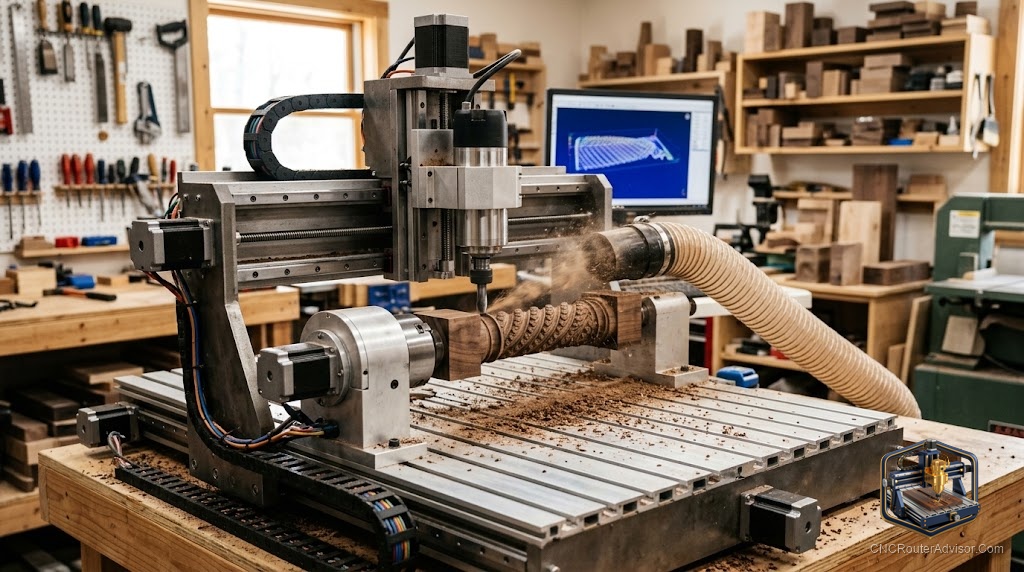
You have got a table leg to carve. Four flutes down the side, a gentle twist near the top, and it has to match three more legs exactly. On a flat-bed machine you would cut one face, unclamp, flip, re-zero, and pray the seams line up. This is the moment a 6090 4 axis cnc router earns its space in your shop. It spins the workpiece while the spindle cuts, so a round or square blank gets shaped on every side in one setup.
A 6090 is a Chinese-import machine with roughly a 900mm by 600mm work area, where the name comes from, and a water-cooled spindle on a steel or aluminum frame. The “4 axis” version adds a rotary attachment, usually a chuck and tailstock mounted along the X axis, that acts as a rotating A axis alongside the normal X, Y, and Z motion.
Here is the short answer if you are deciding right now: a 6090 4-axis router is a solid pick for cylindrical and columnar work like table legs, balusters, spindles, and relief-wrapped posts, plus flat sheet work when the rotary is off. The fourth axis mostly rotates parts to a position and holds them there, or wraps a toolpath around them. It does not tilt the cutter the way a true 5-axis machine does.
What the 4th axis actually adds to a 3 axis cnc router
A standard 3 axis cnc router moves the cutter in three straight lines: X (left to right), Y (front to back), and Z (up and down). That covers most flat carving, pocketing, and 2.5D relief work.
The rotary axis adds spin. The workpiece clamps into a chuck and turns on its own centerline while the spindle cuts. This can be indexing (rotate, lock, cut a face, rotate again) or continuous (rotate while cutting for spiral and full-round shapes). That single addition changes what you can make.
With a cnc router 3 axis setup, a barley-twist newel post means cutting, flipping, and hoping. With the rotary running, the blank turns under the bit and the twist wraps around cleanly. Same story for fluted legs, chess pieces, ring blanks, and carved rolling pins.
One honest catch: many hobby “4th axis” add-ons only rotate the part to line up with the X or Y centerline, then cut from the top. A genuine 6090 4-axis build treats the rotary as a real axis, which is what you want for smooth continuous carving.
3 axis vs 4 axis vs 5 axis cnc router: which one fits your work
The core difference is how many ways the tool and the part can move relative to each other. More motion means more complex shapes, and more cost and setup.
| Feature | 3 axis cnc router | 4 axis cnc router | 5 axis cnc router |
|---|---|---|---|
| Motion | X, Y, Z | X, Y, Z plus one rotation (A) | X, Y, Z plus two rotations |
| Best for | Flat signs, 2.5D relief, pockets | Legs, columns, cylinders, round carving | Turbine blades, aerospace, complex 3D |
| Setup difficulty | Low | Medium | High |
| Tool angle | Fixed vertical | Fixed vertical, part rotates | Tool tilts freely |
Most people shopping a 6090 do not need 5 axis. That capability lives in industrial mills for parts like camshafts and impellers, and it costs far more to buy and program. If your work is round or columnar, the 4 axis cnc router is the sweet spot. If it is flat, save the money and run 3 axis.
Work area, spindle, and frame: reading a 6090 spec sheet
The name tells you the footprint: about 900mm on the Y axis and 600mm on the X axis, with Z travel commonly around 140mm depending on the seller. That Z travel matters more than people expect once a rotary chuck is bolted down, because the chuck raises your part closer to the bit and eats into clearance.
Most 6090 machines ship with a water-cooled spindle spinning up to 24,000 RPM, often 1.5kW to 3kW. Water cooling runs quieter and holds concentricity better than air cooling, which helps surface finish on wood and soft metals like aluminum and brass.
Frame quality separates a machine that carves clean from one that chatters. Look for a one-piece welded steel or thick 6061 aluminum gantry. A flimsy gantry flexes under hardwood, and you will feel it as rough cuts and lost detail.
Drive mechanism and accuracy: ball screw, lead screw, rack and pinion
Most 6090 routers use ball screws on the axes, which is the reason to buy this class over cheaper hobby frames.
- Ball screw: low friction, tight backlash, best accuracy for this size. Standard on quality 6090 machines.
- Lead screw: cheaper, more friction, needs an anti-backlash nut to stay tight. Fine for light hobby work, not for repeatable production.
- Rack and pinion: used on much larger machines where long ball screws would whip. You will not usually see this on a 6090.
- Timing belt and V-wheels: common on entry hobby routers, not on a proper 6090.
Pair the ball screws with real linear rails and you get the rigidity that makes 4-axis work worthwhile. On the control side, you will set homing, soft limits, work coordinates, and steps per unit on the rotary so one commanded degree equals one real degree.
Adding or upgrading a rotary 4th axis
If you already own a 3-axis 6090, you can add a fourth axis. Two real, verified options sit on Amazon right now.
For a heavier 6090-size frame
The CNCTOPBAOS CNC Rotary Axis with K11-100mm 3-jaw chuck ships with a NEMA23 stepper, a 100mm three-jaw self-centering chuck, an MT2 tailstock, and a 6:1 belt reduction, at a 65mm center height. The external jaw range handles table-leg and post blanks.
The flaws are real. It is heavy (the rotary unit runs about 17 lb), so it steals bed space and Z clearance once mounted. It is a generic unit with no branded manual or support: you wire it to a spare driver yourself and set steps per unit by hand. If you are comfortable configuring your own controller, it is the right size for this machine.
For smaller desktop machines (not a native 6090 fit)
The Genmitsu 4th Axis Rotary Module is a cleaner, better-supported kit built around a NEMA17 planetary-geared stepper with a 4-jaw chuck and a 10:1 gear ratio. It is a near drop-in on SainSmart 4040 and 3030 machines and holds parts up to 200mm long.
Be clear-eyed about the flaws for a 6090 owner. This module is designed for Genmitsu smaller frames, not a 6090. Its clamped diameter tops out around 50mm, so fat columns are out. As a rotary for a small machine it is excellent; as a 6090 part it is the wrong size.
My verdict: if the rotary is going on the 6090 itself, the CNCTOPBAOS K11-100 is the match on size and chuck capacity. The Genmitsu wins on build polish and support, but only for the smaller machines it is actually made for.
Applications where a 6090 4-axis shines
Think in terms of round and columnar work:
- Table legs, balusters, and stair spindles with flutes, twists, or reeding
- Newel posts and decorative columns
- Chess pieces, pens, and turned handles
- Ring blanks and bracelet forms in wood or soft metal
- Cylindrical signage and wrapped text around a post
Turn the rotary off and the same machine goes back to flat work: signs, inlays, relief panels, and small aluminum parts.
Conclusion: is a 6090 4-axis router right for you?
A 6090 4-axis router is the machine to get when your work is cylindrical and you are tired of flipping parts and chasing seams. It will not tilt the cutter like a 5-axis mill, and it asks you to learn homing, work coordinates, and steps per unit before it runs clean. But for legs, posts, and round carving in a compact footprint, nothing at this size does it more directly.
Four takeaways:
- Buy the 4 axis only if your work is round or columnar. If it is flat, a 3 axis 6090 does the same cutting for less money and less setup.
- Prioritize ball screws, linear rails, and a welded or thick-aluminum frame.
- Watch Z travel once a chuck is mounted, since the rotary raises your part and shrinks your clearance.
- If you add a rotary later, match the chuck size and center height to your machine.
FAQ
What does “6090” mean on a CNC router? It refers to the work area, roughly 600mm by 900mm. Z travel is separate and usually sits near 140mm depending on the model.
What is the 4th axis on a CNC router? The 4th axis is a rotary attachment, a chuck and tailstock that spin the workpiece on its centerline while the spindle cuts. It lets you carve all the way around a cylinder or index a part to different faces in one setup.
Is a 4 axis cnc router better than a 3 axis? Only for round or columnar work. For flat signs and relief carving, a 3 axis cnc router does the identical job with simpler setup.
Can a 6090 4-axis router cut metal? It handles soft metals like aluminum, brass, and copper with the right bits, feeds, and a water-cooled spindle. It is not built for steel.
Do I need special software for the 4th axis? Yes. You need CAM software that generates rotary toolpaths, such as Fusion 360 or Vectric, and you will set the rotary steps per unit in your controller.
Can I add a rotary axis to a 3-axis 6090 I already own? Yes, if your controller has a spare axis output and driver. You mount the rotary, wire the stepper, and set homing, soft limits, and steps per unit.
References
- CloudNC, “What’s the difference between 3-axis, 4-axis and 5-axis milling?” https://cloudnc.com
- Datron, “Difference Between 3-axis, 4-axis, and 5-axis Milling” https://datron.com
- Carr Lane, “How a 4th Axis Works in Multi-Axis Milling” https://www.carrlane.com
- SainSmart, “What is a True 4th Axis on CNC” https://www.sainsmart.com