
6060 CNC Router Explained: Uses, Setup, and Key Considerations
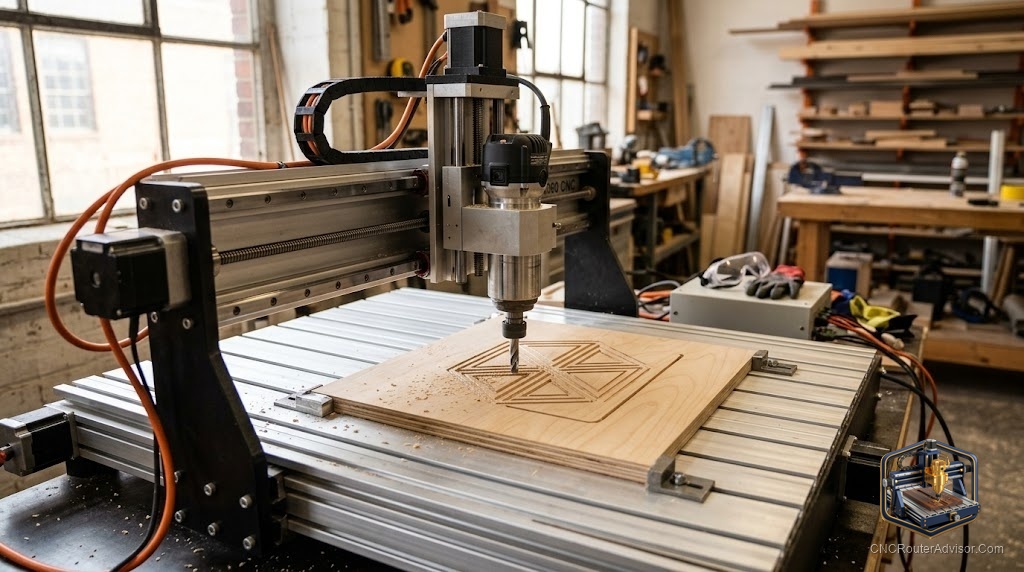
You clamp a sheet of walnut to the bed, hit start, and watch the spindle trace your design while you sip coffee three feet away. That is the pull of a 6060 CNC router. It is big enough to cut a real sign, a guitar body, or a batch of parts, yet small enough to live on a sturdy bench in your garage. If you have outgrown a tiny engraver but a full sheet machine will not fit your space, this size is the sweet spot most makers land on.
A 6060 CNC router is a desktop cnc router with roughly a 600mm by 600mm cutting area, named for those two numbers. It uses a spinning cutter, moved across three axes by motors, to carve wood, plastic, foam, and light metal from a digital file.
Here is the short answer if you are comparing options right now. A 6060 machine gives you a mid-size work area in a hobby cnc router footprint, and the two things that decide whether you will be happy are frame rigidity and motion system. A belt-driven aluminum machine is great for wood, plastic, and occasional light aluminum. A ball-screw machine on a heavier frame is what you want if aluminum is a regular job.
What does the “6060” number actually mean?
The 6060 label points to the work area, about 600mm by 600mm, or roughly 24 inches square. It is a class, not a single product, so a “6060” from one brand can cut very differently from another.
Watch the Z axis, because that number gets buried. Many machines in this size only give you 75mm to 110mm of Z travel, which caps how thick a workpiece you can clear. The Axiscreat A6060, for example, lists a 600 by 600 by 75mm active area, so tall stock and long bits eat into that height fast.
X and Y set how big your part can be. Z sets how thick, and how much room you have for workholding clamps under the gantry. Read all three before you fall for the headline size.
What can you cut with a 6060 CNC router?
Wood, MDF, plywood, acrylic, HDPE, foam, and soft materials are the daily bread of this class. These machines carve signs, inlays, phone stands, model parts, and small furniture panels without complaint.
Aluminum is the honest dividing line. A well-built 6060 can cut aluminum with shallow passes, the right single-flute bit, and patience. A lighter belt-driven machine will do it slowly and with care, but it is not built to hog through billet all day. Steel is out of range for a router of this type.
Frame and rigidity: the part that decides everything
Rigidity is the quiet hero. A cnc router fights cutting forces that try to flex the gantry and push the bit off line. The stiffer the structure, the cleaner your edges and the deeper you can cut without chatter.
Most machines in this class use aluminum extrusion for the frame, which is light, accurate to assemble, and plenty stiff for wood and plastic. A steel frame adds mass and stiffness for metal work, but it is heavier, pricier, and rare in the desktop size.
Vibration is the tell. If a machine walks or buzzes on hard cuts, edges come out rough and bits break early. Keep your cut settings conservative on any light frame.
Motion system: ball screw, lead screw, or timing belt
Timing belts are common on lower priced machines. They are quiet and fast, but belts can stretch and flex under load, which shows up as slight inaccuracy on heavy cuts. Lead screws use a threaded rod and nut, cheaper than ball screws, with more friction and some backlash. Ball screws use recirculating steel balls between the screw and nut to cut friction and backlash, which improves accuracy, speed, and lifespan.
Linear rails matter too. Hardened rails with recirculating blocks guide the axes far more precisely than wheels riding on extrusion. A 6060 with dual linear rails per axis will feel tighter and cut cleaner than one on V-wheels.
The practical read: belts for wood and plastic on a value machine, ball screws and linear rails if you care about aluminum and repeatable precision.
Spindle power: trim router vs VFD spindle
Many desktop 6060 machines ship with a trim router or a compact 710W spindle. These have enough power for wood, acrylic, and light aluminum, and they are simple to run.
A VFD spindle is a step up. It pairs a brushless spindle motor with a variable frequency drive that controls speed precisely, runs quieter, has lower runout, and can run for hours. If your machine supports a VFD spindle interface, you can start with the included router and upgrade later.
Controllers, G-code, and software
Almost every hobby 6060 runs on GRBL or a GRBL-style controller. GRBL is open-source firmware that reads G-code and turns it into precise motor pulses. G-code is the plain list of coordinates and commands your design software spits out.
Your workflow looks like this: draw in CAD or a design tool, generate toolpaths in CAM software (Carveco, Vectric, Fusion, or free options), export G-code, then send it to the machine with a sender like Candle, UGS, or a built-in touchscreen.
Setup and workholding basics
Modular 6060 machines often ship mostly assembled and go together in about 20 minutes, mostly bolting the gantry and plugging in axis motors. Budget an afternoon anyway, because squaring the frame and surfacing the spoilboard is what gives you accurate cuts.
Workholding is the step beginners skip and regret. Clamps, low-profile hold-downs, painter’s tape and superglue, or a vacuum setup keep your stock dead still. A cut part that shifts mid-job ruins the piece and can snap a bit.
Watch your power too. Some machines ship set for 110V and include a 110V-only spindle, so buyers on 220V mains need a step-down transformer. Sort that out before the first power-on.
Comparing real 6060-class machines
| Machine | Work area | Spindle | Control | Notable trade-off |
|---|---|---|---|---|
| Axiscreat A6060 | 600 x 600 x 75mm | 710W trim router | GRBL / FluidNC, touchscreen | Belt-driven X/Y and NEMA 17 motors; heavy aluminum is a stretch and Z clearance is shallow |
| TwoTrees TTC6050 | 600 x 500 x 100mm | 500W spindle | GRBL | Y travel is 500mm (a 6050, not a true 6060); smaller spindle limits harder cuts |
| Ball-screw desktop class (OMIO-type) | ~600mm class | 2.2kW spindle | GRBL or industrial control | Built for metal, but usually bought direct rather than on Amazon |
The Axiscreat A6060 is the most straightforward true 6060 on Amazon right now. It gives you the full 600 by 600 area, a 710W trim router, dual linear rails, and a touchscreen on an aluminum frame. Its honest limits are the belt-driven X and Y and the lighter NEMA 17 motors. The TwoTrees TTC6050 is worth naming because people cross-shop it, but it is a 600 by 500mm machine, not a real 6060.
If aluminum is your main material, the ball-screw class is the honest answer, and brands like OMIO build ball-screw desktop routers with 2.2kW spindles for exactly that. Those machines usually ship direct from the maker rather than through Amazon.
Who should buy a 6060, and who should not
Buy a 6060 if you want real project size without a full sheet machine, and you mostly cut wood, plastic, and occasional light metal. It fits sign makers, hobby furniture builders, model and prop makers, and small-batch sellers.
Skip it if your work is tiny PCBs or jewelry, where a smaller 3018 or 4040 is cheaper and just as capable. Skip it too if you cut aluminum plate all day.
Verdict
A 6060 CNC router is the size most serious hobbyists should have started with. It carves real parts, fits a bench, and runs on friendly GRBL software. The trick is matching the machine to your material instead of the headline number.
Concrete takeaways before you buy:
- Match motion system to material: belts for wood and plastic, ball screws and linear rails for regular aluminum.
- Check all three axes, especially Z travel, since a shallow Z limits thick stock and clamps.
- Start with the included trim router or compact spindle, and upgrade to a VFD spindle later if your controller supports it.
- Sort out voltage and workholding before your first cut.
For a straightforward, true-size machine that cuts wood and plastic well out of the box, the Axiscreat A6060 is the easy pick.
FAQ
What is a 6060 CNC router used for? It cuts and engraves wood, MDF, plywood, acrylic, plastics, foam, and light aluminum. Common projects include signs, inlays, furniture panels, model parts, and small production runs.
Can a 6060 CNC router cut aluminum? Yes, with limits. Light and belt-driven machines cut aluminum in shallow passes with a single-flute bit and slow feeds. For regular aluminum work, a ball-screw machine on a heavier frame gives cleaner results.
What does 6060 mean in CNC? It refers to the work area, roughly 600mm by 600mm. It is a size class, so machines with the same label can differ a lot in frame, motors, and motion system.
Is a trim router or a VFD spindle better on a 6060? A trim router is simpler and cheaper and handles wood, plastic, and light metal well. A VFD spindle runs quieter, has lower runout, and lasts longer under heavy use.
Do I need ball screws, or are belts fine? Belts are fine for wood, plastic, and occasional light aluminum, and they are quiet and fast. Ball screws reduce backlash and hold accuracy better under load.
What software does a 6060 CNC router use? Most run GRBL or a GRBL-style controller like FluidNC. You design in CAD or CAM software such as Vectric, Carveco, or Fusion, export G-code, then send it with Candle, UGS, or the built-in touchscreen.
How hard is a 6060 to set up? Modular models often assemble in about 20 minutes, but plan an afternoon to square the frame, surface the spoilboard, and check voltage.
How much space do I need? The footprint runs larger than the cutting area, often close to 90cm in each direction plus room for the gantry to move and dust collection.
References
- Thomson, “Ball Screws vs Lead Screws: What is the Difference?” https://www.thomsonlinear.com/en/support/tips/ball-screws-vs-lead-screws
- THK, “Accuracy of the Ball Screw” https://tech.thk.com/en/products/pdf/en_a15_011.pdf
- Carbide 3D, “CNC Spindle Comparison” https://shop.carbide3d.com/pages/spindle-comparison
- Sienci Labs, “Router vs Spindle” https://resources.sienci.com/view/cnc-router-vs-spindle
- grbl/grbl, GRBL controller firmware (GitHub) https://github.com/grbl/grbl
- OMIO CNC, X8-2200L desktop router specifications https://www.omiocnc.com/products/x8-2200l-usb-cnc-desktop-engraver.html