
6040z CNC Router Explained: Uses, Setup, and Key Considerations
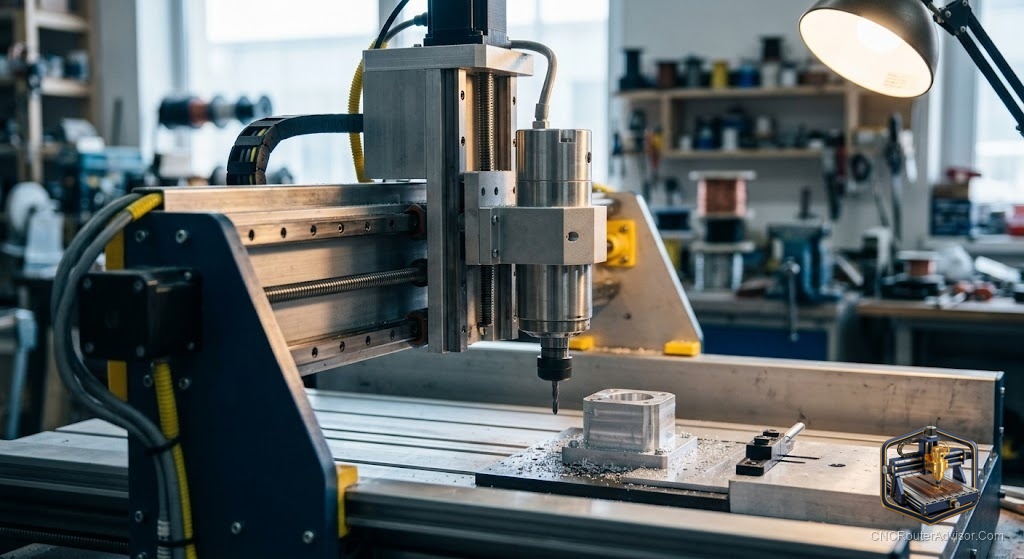
You cleared a spot on the workbench, and now the crate is sitting there, heavier than you expected, wrapped in foam and covered in shipping labels. A 6040z cnc router does that to people. You are a little excited and a little nervous. Will it cut aluminum? Will the software fight you all weekend? Did you buy a solid machine or a pile of parts pretending to be one?
The 6040z cnc router is a desktop cnc router built around a work area of roughly 600mm by 400mm. It is sold mostly by Chinese makers, often under model names like 6040Z-S65J from ChinaCNCzone, and it shows up on Amazon and other sites simply as “CNC 6040.” The “6040” tells you the bed footprint in millimeters. The “Z” is a model series label, and some builds in that line ship with extra Z-axis clearance for taller stock.
Short version: the 6040z is a heavy, ball-screw desktop CNC router aimed at engraving and light milling in wood, plastic, PCB, and soft metals like aluminum and brass. It is more rigid than most hobby cnc router kits built from aluminum extrusion, but it usually arrives with older control electronics and thin documentation. If you want a stiff frame and you do not mind some setup work, it is a strong pick.
What is a 6040z, really?
A 6040z is a cnc router machine that moves a spinning cutter across three axes (X, Y, and Z) to carve a design into a fixed workpiece. You give it a design as G-code, and it follows those coordinates.
What sets the 6040 class apart from lighter hobby machines is the build. Most units in this family ride on ground ball screws instead of belts, and they sit in a frame made of thick aluminum plate and profile, sometimes with steel reinforcement. That mass is the point. A heavier, stiffer machine flexes less under cutting force, which means cleaner cuts and less chatter in harder material.
The tradeoff is size and weight. A boxed 6040z can arrive well over 100kg. This is not a machine you toss on a folding table. Plan for a solid bench that does not walk across the floor when the spindle digs in.
What can a 6040z cut?
A 6040z handles wood, MDF, acrylic and other plastics, PCB blanks, and soft metals like aluminum and brass. That covers most of what a home shop or small maker actually makes.
Hardwood and plastic are easy territory. Aluminum is where the machine earns its keep, and also where beginners get humbled. You can cut aluminum on a 6040z, but you have to slow down, take shallow passes, use the right bit, and keep the cutter clear of chips. Steel and other hard metals are outside what this class is built for.
Think of it as an engraving and light milling machine with enough backbone to dip into metal, not a production mill.
Work area, the axes, and the “Z” question
The usable work area on a 6040 is close to 600mm in X and 400mm in Y, with Z travel that varies by build, often in the range that lets you clamp stock a few inches thick. Listings commonly quote an effective engraving area around 600 x 400 x 120mm, though the exact Z number shifts between sellers.
Here is the honest part about the “Z” in 6040z. It is mainly a model designation used by the maker and resellers, not a strict spec you can count on. Some 6040Z builds do add gantry height for taller workpieces, but you cannot assume extra clearance from the name alone. Read the actual Z travel number on the specific unit you are looking at.
The spindle and VFD
Most 6040 machines ship with a water-cooled spindle rather than a trim router, and this is a real advantage. Common spindle power ratings run from 800W up to 2200W. Water cooling keeps the spindle quiet and cool during long jobs, and a VFD (variable frequency drive) lets you dial spindle speed up and down.
Compare that to lighter hobby cnc router kits that bolt on a handheld trim router. A trim router is loud, screams at a fixed high RPM, and has a hard time running slow enough for metal. The water-cooled spindle and VFD combo on a 6040z is smoother, more controllable, and better suited to varied materials. You do have to plumb a small water pump and reservoir, which is one more thing to set up and one more thing that can leak if you rush it.
Motion system: what is under the covers
The motion system is the biggest reason to pick a 6040z over a cheaper machine.
- Ball screw: Most 6040 units use ball screws on the axes. Ball screws convert motor rotation into linear motion with little backlash and good repeatability. This beats a plain lead screw, which is cheaper but has more slop and wears faster. It also beats a timing belt, which is common on lighter routers and stretches under load.
- Rails vs rods: Many 6040 machines run on round rails (supported rods) rather than square profile linear rails. Round rails are fine for wood and plastic, but they flex more than boxed linear rails under side load. Some sellers offer linear-rail versions or upgrade paths, so check which one you are buying.
- Frame: The frame mixes thick aluminum extrusion and plate, and some builds add a steel base. More mass here is better, because it soaks up vibration.
If a listing is vague about screws and rails, treat that as a warning sign and ask before you buy.
Controller, software, and G-code
Older 6040 machines were built around parallel-port control and Mach3, driven by a TB6560-style stepper board. Newer units ship with a USB controller box that still leans on Mach3.
Everything runs on G-code. You design in CAD, generate toolpaths in CAM, and send the resulting G-code to the machine.
A lot of owners eventually swap the stock electronics for a GRBL controller. GRBL is free, open-source firmware that runs on an Arduino and turns G-code into motor steps. One well-known writeup by James Stanley details converting a 6040 to GRBL, including getting GRBL to control spindle speed through the VFD. If you want a modern, well-supported control setup, a GRBL conversion is a common and proven route, but it is a project, not a five-minute swap.
What to expect out of the crate
Assembly is usually light, since these ship mostly built. Owners report getting the mechanical side running fairly quickly. The real time sink is the electronics, software, and tuning: installing drivers, configuring Mach3 or flashing GRBL, squaring the axes, setting steps per millimeter, and learning your workflow.
Documentation is the weak spot across this whole class. Manuals are terse and translated, and support depends heavily on which seller you got. Budget a weekend to go from crate to first clean cut, and plan to lean on owner forums and videos.
6040z vs other desktop CNC routers
| Feature | 6040z class | Extrusion hobby router (belt driven) | 3018-class mini router |
|---|---|---|---|
| Work area | About 600 x 400mm | Often larger footprint, less rigid | Very small, about 300 x 180mm |
| Motion | Ball screw, round or linear rails | Belts or lead screws | Lead screws |
| Frame | Heavy aluminum plate, sometimes steel | Aluminum extrusion | Light frame or kit |
| Spindle | Water-cooled spindle with VFD | Usually a trim router | Small DC spindle |
| Metal ability | Aluminum and brass with care | Limited, light aluminum at best | Soft engraving only |
| Setup effort | Moderate to high | Moderate | Low |
The 6040z sits in the middle in size but ahead of both lighter machines in rigidity and spindle quality, which is why it keeps selling despite its rough edges.
Who should buy a 6040z, and who should not
Buy a 6040z if you want a stiff, ball-screw desktop cnc router that can carve wood and plastic cleanly and step into aluminum, and you are comfortable doing setup, tuning, and maybe a controller upgrade. It rewards people who like to tinker.
Skip it if you want a plug-and-play cnc router machine with polished software and hand-holding support, or if you have no space and no help moving a heavy crate.
My verdict: the 6040z is one of the better rigid desktop machines you can get in this size, as long as you go in knowing it is a capable base that expects some work from you, not a finished appliance.
Three concrete takeaways:
- Confirm the real specs (ball screw vs lead screw, round rod vs linear rail, actual Z travel) on the specific unit, because “6040z” alone does not promise any of them.
- Plan a weekend for setup and tuning, and treat a GRBL conversion as a likely future upgrade if you want modern software.
- Match the machine to your material: excellent for wood, plastic, and PCB, genuinely useful for small aluminum work, wrong tool for steel.
FAQ
Is a 6040z good for beginners? It can be, but it is not the gentlest starting point. The frame and spindle are beginner-friendly in quality, yet the older software and thin manuals mean you need patience.
Can a 6040z cut aluminum? Yes, within limits. It handles small aluminum and brass parts with shallow passes, slower feeds, and good chip clearing.
What is the work area of a 6040z? Around 600mm in X and 400mm in Y, with Z travel that changes by build. Listings often cite an effective area near 600 x 400 x 120mm.
Does the 6040z use ball screws or lead screws? Most 6040 machines use ball screws, which give low backlash and good repeatability. Confirm it in the listing before buying.
What software runs a 6040z? Stock units typically use Mach3 over a parallel port or a USB controller box, reading standard G-code. Many owners later convert to GRBL for modern, free control software.
Can I convert a 6040z to GRBL? Yes, and it is a common upgrade. You replace the stock control board with an Arduino running GRBL. The hardest part is spindle speed control through the VFD.
Does a 6040z come with a rotary axis? Some configurations include a 4th (rotary) axis and tailstock, and some do not. It depends on the exact package.
Do I need a separate computer to run it? Often yes. Older parallel-port machines want a dedicated desktop PC. USB and GRBL setups are more flexible.
References
- ChinaCNCzone, User Guide for CNC 6040 Series (manufacturer manual)
- GRBL open-source CNC firmware project (gnea/grbl): https://github.com/gnea/grbl
- James Stanley, “How to convert a 6040 CNC machine to Grbl”: https://incoherency.co.uk/blog/stories/6040-cnc-grbl-arduino.html