
600 x 900 CNC Router Guide: Work Area, Machine Size, and Buying Factors
You measure the cabinet panel sitting on your bench. It is 560mm wide and 860mm long. Your current machine hits 400mm in Y and the part does not fit. That specific frustration is the reason people search for a 600 x 900 cnc router. The size class is a direct answer to a real problem.
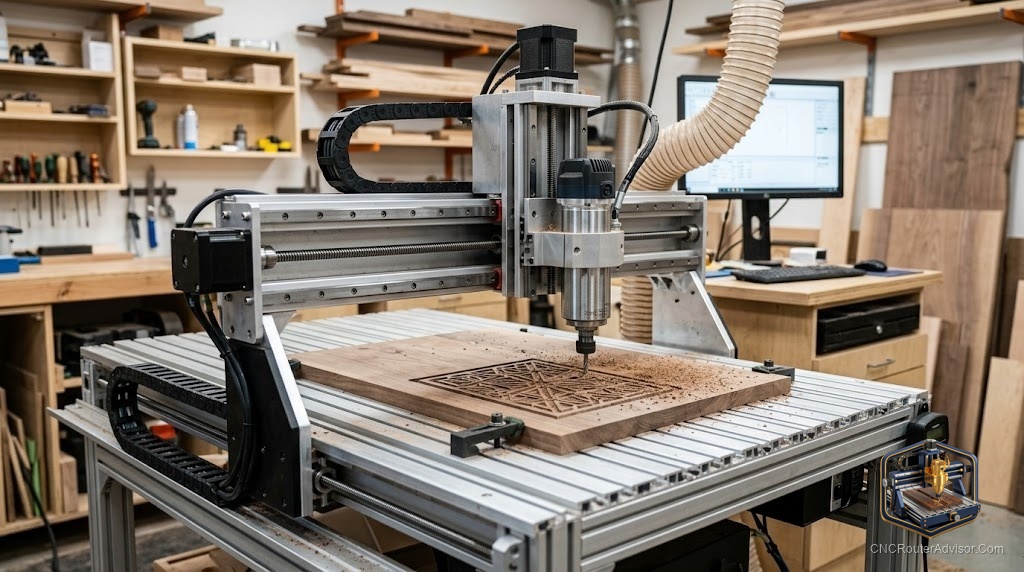
A 600 x 900 cnc router is a machine with roughly 600mm by 900mm of usable cutting travel, about 24 by 35 inches. The name comes from the work envelope, not a single brand. You will find it labeled as 6090, and machines in this class come from makers including OMIO, RATTMMOTOR, STYLECNC, and a range of unbranded Chinese imports. It sits one step above mid-size desktop routers and two steps below a full 4x8 sheet machine.
Here is the short answer if you are deciding right now: a 600 x 900 machine makes sense when your parts regularly exceed about 400mm in any direction, you want ball-screw accuracy rather than belt-drive performance, and you can supply 220V power and a sturdy bench. If those three conditions are true, this size is worth the step up.
What the 600 x 900 work area actually gives you
The 600 x 900 envelope covers one full cabinet door, one guitar body, most common sign blanks, and batches of smaller parts laid out side by side. It will not take a full 4x8 sheet of plywood, and it is not trying to.
The Z axis is the number people miss. Most 6090 machines give you 100mm to 150mm of vertical travel. That sets the maximum material thickness plus the height of your clamps. If you use tall workholding, your cuttable material thickness drops. Plan for this before you buy thick stock.
Outer machine footprint is always larger than the cutting area. The frame, motor mounts, and cable drag chains add roughly 200mm to 250mm on each side. Budget a floor or bench space close to 1150mm by 970mm, plus clearance behind the gantry so the Y axis can travel fully.
Frame and rigidity: the spec that shapes every cut
Rigidity determines whether your finish is clean or chattery, whether your dimensions drift or hold. This is the most important factor in the class and the one most affected by what you pay.
Two frame types appear on 6090 machines. Aluminum extrusion is lighter, easier to ship, and adequate for wood, MDF, and plastics. Welded steel is heavier, damps vibration better, and handles harder materials and higher feed rates without flex. If you plan to cut aluminum regularly, look for the welded steel option. For wood and sign work, quality aluminum extrusion is fine.
Gantry design is part of rigidity too. A short, stiff gantry flexes less under load than a tall one. On machines that add Z-axis clearance for thicker stock, the taller gantry can introduce wobble at speed. The tradeoff is real: more Z room costs you some rigidity.
Motion system: what drives accuracy and lifespan
The drive converts motor rotation into table movement. In this class you will run into three setups.
Ball screws use recirculating steel balls between the screw and nut. They deliver near-zero backlash, high efficiency, and good repeatability. Most quality 6090 machines use ball screws on all three axes, and that is the standard you want for anything beyond casual engraving.
Lead screws use a threaded rod and a nut that slides along it. More friction, more backlash than a ball screw, and faster wear. If a 6090 listing shows lead screws, that is a cost-saving measure, not an upgrade.
Linear rails carry the load. Square profile rails are the standard at this size. V-wheels on extrusion flex more under side load. When a listing says linear rails on all axes, that matters.
| Drive system | Backlash | Efficiency | Best use |
|---|---|---|---|
| Ball screw | Near zero | Above 90% | Precision, production, metal |
| Lead screw | Moderate | 50 to 70% | Light duty, wood, budget builds |
| Timing belt | Low initially, degrades | Variable | Engraving, low-force work |
Spindle: how much power and what kind
On this class of machine you will see 1.5kW and 2.2kW water-cooled spindles as the standard choices.
1.5kW handles wood, MDF, and acrylic reliably. 2.2kW gives you more headroom for harder materials, deeper passes, and longer production runs without the spindle bogging down.
Water cooling is the norm at this size. It runs quieter and holds temperature better through long jobs. A VFD (variable frequency drive) pairs with the spindle to control speed. Confirm it is included, and confirm the voltage matches your shop. Many 6090 machines expect 220V.
Controller and software
Most 6090 machines ship configured for MACH3, running on a Windows PC over USB. MACH3 is capable and well documented but asks for an older 32-bit Windows setup. If your only computer runs modern 64-bit Windows, either keep a dedicated older machine for the router or look for a unit with a standalone DSP handheld controller.
Everything runs on G-code. You design in CAD, generate toolpaths in CAM (Vectric, Fusion, or other), export G-code, and stream it to the controller.
Machines you can verify and order
The OCASAMI 2.2KW 4-axis 6090 and its 1.5KW sibling are the most straightforward Amazon options with a true 900mm by 600mm work envelope and ball screws on all three axes. The 2.2KW version carries an ER20 collet for larger bits.
| Machine | Spindle | Work area | Drive | Watch for |
|---|---|---|---|---|
| OCASAMI 2.2KW 6090 | 2.2kW water cooled | 900 x 600 x 140mm | Ball screws | MACH3 needs 32-bit Windows |
| OCASAMI 1.5KW 6090 | 1.5kW water cooled | 900 x 600 x 140mm | Ball screws | ER11 limits larger bit shanks |
If neither unit is in stock, verify any alternative listing shows a true 900mm axis, ball screws on all axes, and linear rails before buying.
Verdict: is the 600 x 900 size right for you
Buy the 600 x 900 cnc router if your work outgrows a 400mm to 500mm desktop machine and you want ball-screw accuracy, a real spindle, and a machine that runs production. Skip it if you only cut small items, since a desktop CNC router handles that more cheaply. Skip it too if you process full 4x8 sheets regularly.
Four things to confirm before you spend:
- Real work area in millimeters, not just the model name. Verify the Y axis is actually 900mm of travel.
- Ball screws on all axes, not lead screws.
- Voltage requirement, since most of these machines want 220V.
- Controller compatibility with your computer, or order a DSP standalone option.
FAQ
What does 600 x 900 mean on a CNC router? It describes the work area: 600mm wide and 900mm deep, roughly 24 by 35 inches. It is the usable cutting travel, not the machine’s outer footprint.
Is a 600 x 900 CNC router good for cabinet making? Yes, within limits. A single cabinet door fits easily, and batch parts from panels under 900mm in the long direction are practical. It will not take a full 4x8 sheet.
Can a 600 x 900 CNC router cut aluminum? A rigid 6090 with a 2.2kW spindle and ball screws can machine aluminum at conservative feeds and pass depths. Soft aluminum and brass are realistic. Steel is not within this class.
Ball screw or lead screw: which matters more? Ball screws. At this machine size, ball screws on all axes are the sign you are getting a real precision machine.
What spindle power do I need? 1.5kW for wood, MDF, plastics, and signs. 2.2kW when you cut hardwood, need deeper passes, or want headroom for light aluminum work.
How much space does a 600 x 900 CNC router need? Plan for a bench or floor area roughly 1150mm by 970mm, plus clearance behind the gantry and room for a water cooling reservoir.
References
- STYLECNC, 6090 CNC Router specifications: https://www.stylecnc.com/cnc-wood-router/6090-cnc-router.html
- AccTek CNC, “What Power CNC Router Spindle Should I Choose?”: https://acctekcnc.com/what-power-cnc-router-spindle-should-i-choose/
- cncrouterinfo.com, “How to Choose a CNC Router”: https://cncrouterinfo.com/guides/how-to-choose-a-cnc-router/