
3D Printer Head for CNC Router: What This Conversion Actually Involves
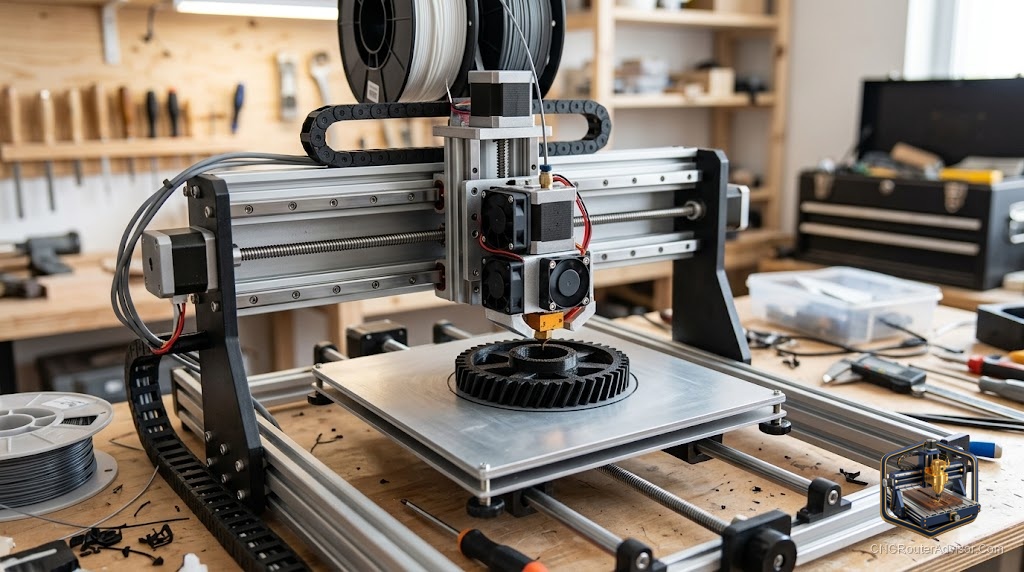
A machine that cuts and prints sounds ideal. One frame, two tools, infinite flexibility. The reality is more specific: the conversion works, but it turns a cutting machine into a printing machine or vice versa, not both simultaneously. The constraints of each process are different enough that the combination machine usually does both slightly worse than a dedicated tool. The use case that justifies it is budget and space: one frame instead of two.
A 3D printer head on a CNC router refers to mounting a hotend and extruder assembly to the spindle carriage of a CNC machine, effectively converting the router into an FDM 3D printer. The reverse configuration also exists: adding a spindle to a 3D printer. Both conversions work in principle, with trade-offs in both directions.
The direct answer: the most established platform for a combined printing/routing machine is the MPCNC (Mostly Printed CNC) from V1 Engineering, which is designed from the ground up to support quick tool swaps between a spindle and a print head. On a commercial CNC router, mounting a print head requires firmware changes, a new mount design, and usually a power upgrade for the heated bed.
The MPCNC as Dual-Use Machine
V1 Engineering designed the MPCNC with tool mounting that accommodates both a router and a print head. The machine uses Marlin or Jackpot (GRBL) firmware; switching between print mode and cut mode requires a firmware flash or a dual-profile configuration.
The print head mounts at the same position as the router spindle. Swap the tool, load the appropriate firmware profile, connect the heated bed, and the machine prints. Swap back, reload the CNC firmware, and it routes.
Concrete flaw: The MPCNC’s large working volume and EMT conduit frame make it a mediocre 3D printer. The long unsupported conduit spans introduce vibration and dimensional error in printed parts that a CoreXY or bed-slinger 3D printer at the same price point completely avoids. The machine is a very good router that can also print; it is not a competitive 3D printer.
Adding a Print Head to a Commercial CNC Router
For machines like the Shapeoko, LongMill, or Onefinity, mounting a print head is a user modification, not a supported configuration. It requires:
- A custom mount fitting the machine’s spindle carriage
- A hotend (E3D V6, Slice Mosquito, or similar)
- An extruder (Bowden or direct drive)
- A heated bed (requires additional power supply and controller output)
- Firmware support: GRBL does not natively handle temperature control; FluidNC or Klipper with additional hardware is needed for temperature management
Concrete flaw: Commercial CNC router frames are not designed for 3D printer motion dynamics. The heavy gantry designed for cutting force resistance introduces ringing artifacts in printed parts at typical print speeds. The result is printable but inferior to any purpose-built 3D printer in the same cost range.
When the Conversion Makes Sense
The combination makes practical sense when: space is genuinely a constraint (one machine, not two), the print quality requirements are modest (functional parts, not display models), and budget is a hard limit.
For users who can afford two machines or have the space, a dedicated CNC router and a dedicated 3D printer will both outperform a combination machine at their respective tasks.
Verdict
The MPCNC is the most sensible platform for a genuine dual CNC/3D printing machine. On commercial routers, the conversion is possible but produces a printer that performs noticeably worse than any purpose-built FDM machine. Buy the combination platform if space and budget are binding constraints; buy separate machines otherwise.
- MPCNC is the established dual-use CNC/print platform
- Commercial CNC routers can be converted but produce inferior print quality
- GRBL does not natively support temperature control; additional firmware/hardware required
- Dedicated machines outperform combination machines at their primary task
FAQ
Can I add a 3D print head to my CNC router? Yes, with the right mount and firmware changes. The MPCNC supports this natively; commercial machines require more work.
What firmware handles both CNC routing and 3D printing? V1 Engineering’s Jackpot controller supports tool switching. Marlin and Klipper handle print head control. Standard GRBL handles routing.
Does a CNC router with a print head print as well as a dedicated 3D printer? No. CNC router frames are optimized for cutting forces, not print dynamics. Print quality is functional but inferior to purpose-built printers.
What is the most useful dual-use CNC/3D printing machine? The V1 Engineering MPCNC Primo is the most established design for users who want both functions in one machine.
References
- V1 Engineering MPCNC: docs.v1e.com
- FluidNC firmware: github.com/bdring/FluidNC