
3D Laser Scanner for CNC Router: When Its Worth Adding One
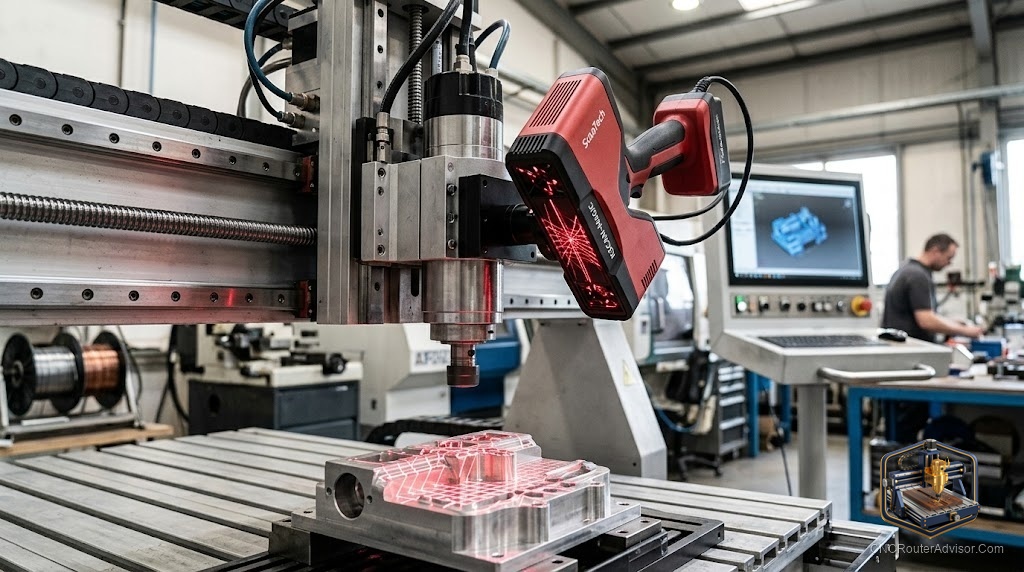
A customer brings a carved mantelpiece detail that’s been in their family for three generations. Half of it is gone from rot. They want it reproduced to match the original half exactly. Without a scanner, you’re eyeballing geometry and spending days modeling something you’ll never get quite right. With a scanner, you capture the surviving geometry in twenty minutes and cut the reproduction the next morning. That’s the real case for a 3D scanner alongside a CNC router.
A 3D laser scanner used with a CNC router captures the surface geometry of a physical object and converts it into a digital 3D file, typically STL or OBJ, that can be imported into CAM software for reproduction cutting. The scanner and the CNC router are entirely separate devices that work in sequence: scan first, cut second.
The direct answer: for CNC woodworking applications, the Revopoint RANGE 2 is the most widely used handheld structured light scanner in this community. It captures complex organic geometry in minutes and exports directly to STL for Aspire or Carveco import. Probe digitizers (stylus-based scanners that mount to the CNC itself) are an older alternative, slower and less capable for complex objects.
Scan-to-CNC Workflow
- Scan. Use the handheld scanner to capture the object from multiple angles, typically in several overlapping passes.
- Process. In the scanner’s software (RevoScan for Revopoint, Artec Studio for Artec scanners), merge scans, fill holes, and export as STL.
- Clean the mesh. In Meshmixer (free), repair non-manifold edges, reduce polygon count if needed, and check for undercuts.
- Import into CAM. Open in Aspire, Carveco, or Fusion 360. Scale to the correct output dimensions.
- Generate toolpaths and cut.
For a clean original without significant surface damage, this complete workflow runs in half a day or less.
Revopoint RANGE 2
The RANGE 2 uses structured light projection: dual infrared cameras capture depth information from a projected pattern, building a point cloud that RevoScan converts to a mesh. It handles objects from hand-size to room-size.
Concrete flaw: Dark, matte-dark, or highly reflective surfaces scan poorly. A dark walnut carving or a lacquered piece needs white scanning spray to create uniform reflectance. This is standard practice in scanning but adds a preparation step.
Who should buy it: Woodworking shops that regularly reproduce carved originals, repair damaged ornamental work, or reverse-engineer decorative elements.
Who should skip it: Users whose reproduction needs involve simple geometric profiles that can be measured and modeled in under 30 minutes. The scanner pays for itself in time savings only when the geometry is complex enough that manual modeling is significantly slower.
Probe Digitizers (CNC-Mounted)
Some CNC controllers support a touch probe that records XYZ coordinates as it contacts a surface. Moving the probe in a grid pattern over the object builds a point cloud. This approach works for shallow curved surfaces but is slow and misses fine surface texture on complex carved objects.
Concrete flaw: A probe touching a carved face in 1mm grid increments takes hours per surface. A handheld structured light scanner covers the same surface in minutes with higher fidelity.
Verdict
For serious reproduction and reverse-engineering work, a structured light scanner like the Revopoint RANGE 2 is a legitimate shop productivity tool. For occasional scanning, outsourcing to a 3D scanning service is more cost-effective than owning dedicated hardware. Probe digitizers remain useful for simple curved surfaces but are outpaced by handheld scanners for complex organic objects.
- Structured light scanners capture complex organic geometry in minutes
- Revopoint RANGE 2: most commonly used in CNC woodworking community
- Dark or shiny surfaces require white scanning spray for reliable capture
- Probe digitizers are slower and lower fidelity for complex shapes
FAQ
Can I scan a carved object and reproduce it on a CNC router? Yes. Scan to STL, import into Aspire or Fusion 360, generate toolpaths, cut.
What scanner integrates best with Vectric Aspire? Any scanner that exports STL works. The Revopoint RANGE series is widely used in the Aspire community.
How accurate is scan-to-CNC reproduction? Typically within 0.2 to 0.5mm for good scan conditions on a matte surface.
Do CNC routers have built-in scanning? Some support probe digitizers for surface capture, but these are slower and less capable than dedicated 3D scanners.
References
- Revopoint: revopoint3d.com
- Meshmixer: meshmixer.com
- Vectric Aspire STL import: vectric.com/support