
3018 3-Axis Mini DIY CNC Router Guide: Build Your Own Machine and What to Expect
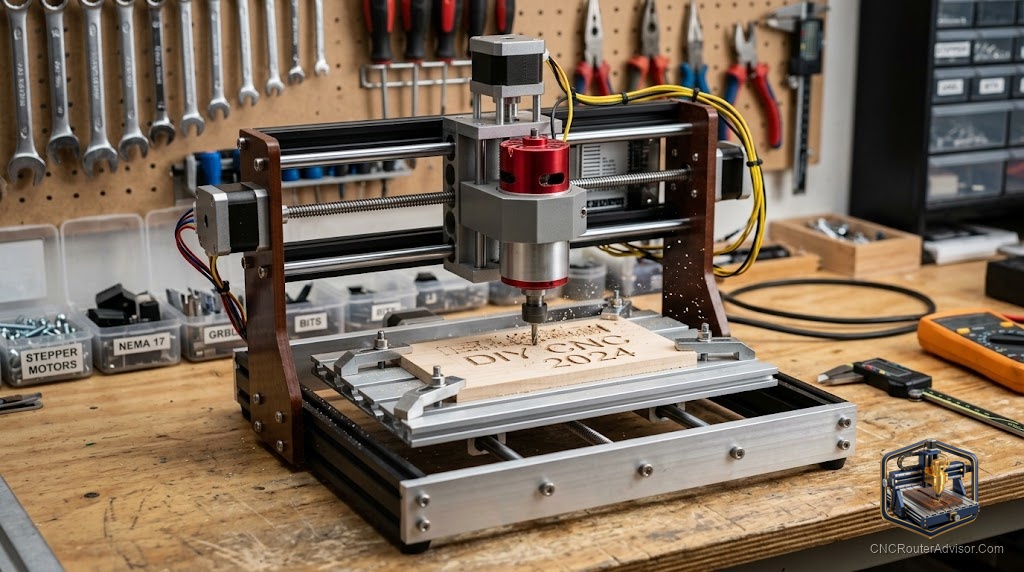
The 3018 kit has been the entry point for hundreds of thousands of CNC hobbyists, and the reason is as simple as the machine: it is cheap, it is mostly pre-assembled, and it works. It does not work like a $5,000 prosumer machine. It works like a $200 machine that you assembled yourself, which means its speeds are modest, its rigidity is limited, and its work area (300×180mm) will be the constraint you bump up against once you understand what CNC routing can do. But within those limits, the 3018 is a genuine tool: it cuts wood, engraves metal, routes PCBs, and carves foam with accuracy adequate for the projects beginners are making when they buy it. That is not faint praise. That is what most beginners need: a machine that works and teaches.
A 3018 3-axis mini DIY CNC router is a small three-axis CNC router with a 300×180mm (approximately 11.8×7 inch) work area, sold as a self-assembly kit or mostly pre-assembled kit, using GRBL-based control and typically a 20W to 300W spindle mounted on a V-slot extrusion frame with lead screw drive on all three axes. The 3018 designation encodes the approximate work area: 30 = 300mm (X), 18 = 180mm (Y). These machines are the most widely sold entry CNC router in the world and are the starting point for most CNC hobbyists.
The short guide: build the 3018 kit with patience and square the frame carefully during assembly. Run the included test program before attempting a real project. Set conservative speeds and depths for your first cuts. Accept that you will need to learn feeds, speeds, workholding, and CAM software through the machine’s trial-and-error process. That learning is the real product; the machine is the means of getting there.
The 3018 kit: what you actually get
A typical Genmitsu 3018-PRO or equivalent kit includes:
- 2020 V-slot aluminum extrusion frame (pre-cut, mostly pre-assembled in newer versions)
- Lead screw drive on X, Y, and Z axes with anti-backlash nuts
- NEMA 17 stepper motors (three)
- 32-bit GRBL-based control board (Genmitsu’s XCP board in newer versions)
- 24V power supply
- 300W DC spindle motor with ER11 collet (3.175mm / 1/8 inch standard, 6.35mm / 1/4 inch adapter included)
- Collet set: 3.175mm and 6.35mm
- USB connection for PC control
- Basic bit pack (a few end mills and a V-bit)
- Assembly documentation (increasingly in English on newer kits)
The Genmitsu 3018-PRO is the most widely sold version of this format. The Genmitsu 3018-PROVer V2 is an upgraded version with improved frame rigidity, limit switches, and a 32-bit control board.
Assembly: what matters most
The single most important thing to get right during assembly is frame squareness. The gantry uprights must be perpendicular to the Y-axis rails. The gantry crossbeam must be parallel to the spoilboard surface. Any deviation from square introduces persistent errors in the machine’s output that no CAM software adjustment can fully correct.
Use a precision square (a 6-inch machinist’s square is adequate) to check the frame during assembly. Take the time to get it right before tightening everything permanently. Recheck squareness after the first few hours of use, as V-slot hardware can settle slightly.
Software: the GRBL stack for 3018 machines
CAM software: Carbide Create (free, browser-based) and Easel (Inventables, free tier) are the most beginner-accessible options. VCarve Desktop (paid) is the upgrade when Carbide Create’s feature set becomes limiting.
Machine control software: Candle (free, Windows) is the most widely used 3018 machine controller. LaserGRBL (primarily for laser engraving), UGS Platform (Java-based, cross-platform), and the Genmitsu Candle fork are other options.
Workflow: Design in Carbide Create (or Inkscape + DXF import), export G-code, open in Candle, set X/Y/Z zero on the machine, run the program.
What the 3018 cuts well and what it struggles with
Cuts well: MDF (consistent and machines cleanly at conservative speeds), soft plywood up to 3 - 5mm in thickness with multiple passes, acrylic with correct settings, foam for prototypes and patterns, PCBs for hobbyist circuits.
Struggles with: Hardwood at production feed rates (the 300W spindle can do light hardwood work at very conservative settings but burns or chatters under higher loads), thick materials that require many passes, anything that needs more than 180mm in the Y dimension.
For a starter bit set, the SainSmart 5-piece upcut and compression kit provides the practical bits for wood and MDF work on a 3018-class machine.
For dust management (the 3018’s open frame sprays chips freely), the STARVAST dust shoe fits most 3018-class spindles.
Our guide on how to choose a CNC router covers the full machine class landscape from the 3018 through production floor machines.
The takeaway: the 3018 3-axis mini DIY CNC router is the entry that actually works for most of what beginners need. Build it carefully, learn the software, accept the limits, and use the experience to understand what you need in the machine you buy next. That is the 3018’s real job.
Frequently asked questions
What does 3018 mean in the machine name? 300mm × 180mm work area. The number encodes the approximate X and Y travel dimensions.
How long does the 3018 kit take to assemble? For a kit in the Genmitsu PRO class: 2 - 4 hours for a careful assembly with proper squaring. Newer kits with more pre-assembly take less time.
What software do I use with a 3018 CNC router? Carbide Create or Easel for CAM (design to G-code); Candle for machine control. All are free.
Can a 3018 cut hardwood? Yes, at conservative settings: 1mm depth per pass, slow feed rates. The 300W spindle handles light hardwood work but is not suitable for sustained hardwood production.
What is the difference between the 3018-PRO and the 3018-PROVer V2? The PROVer V2 has limit switches for homing, a 32-bit control board, and improved frame construction details. It is a meaningful upgrade for users who plan to use the machine regularly.
What is the first project I should cut on a 3018? A simple pocket or through-cut in MDF or soft plywood. Run a test with conservative settings (1mm depth, 300 mm/min feed) to verify the machine is working correctly before attempting a complex project.
References
- Genmitsu / SainSmart, 3018 documentation and software — https://www.sainsmart.com/
- Carbide 3D, Carbide Create documentation — https://docs.carbide3d.com/
- CNC Router Info, entry machine guide — https://cncrouterinfo.com/guides/how-to-choose-a-cnc-router/