
3-Axis CNC Router Machine Guide: Capabilities, How It Works, and How to Choose One
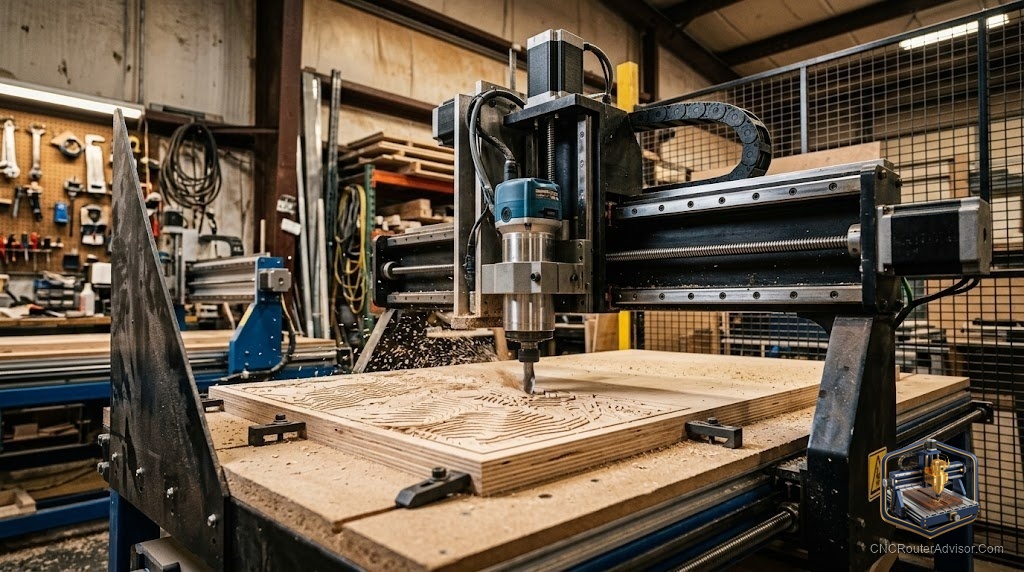
Three axes of motion. That is the technical definition of a 3-axis CNC router, and it is worth understanding exactly what it means before moving on to machine evaluation. X is left and right. Y is front to back (or gantry movement along the table). Z is up and down. The machine can move the cutting tool in any combination of these three directions under computer control, which means it can trace any 2D path while controlling depth, and it can follow any 3D surface where all three axes move simultaneously. The result is a machine that can cut flat profiles, 3D relief carvings, precise joinery, and engraving on the same hardware platform - the operations are defined by the software, not by separate machine configurations.
A 3-axis CNC router machine is a CNC routing machine with three independently controlled linear axes of motion (X, Y, and Z), capable of simultaneous multi-axis motion to follow programmed toolpaths in any combination of these three directions. This is the standard configuration for the overwhelming majority of CNC routers produced and sold worldwide, from hobby desktop to large-format commercial production. Three-axis covers all standard woodworking, sign-making, plastic cutting, and 3D relief carving applications. Machines with four or more axes add rotary or tilting capabilities for specialized applications.
The short guide: when selecting a 3-axis CNC router machine, the specifications that predict real-world performance are the drive system type, frame construction, spindle power and type, and the work area dimensions. Do not optimize exclusively for price; a machine with inadequate rigidity or a weak drive system limits your results at every level of skill and software quality. The machine is the floor on which everything else is built.
What a 3-axis machine can do
2D profiling and pocketing. Follow a flat vector path at controlled depth: outlines, pockets, text, decorative patterns. This is the majority of CNC woodworking and sign-making work.
Through-cuts and part profiling. Cut entirely through a material sheet to free a shaped part from the surrounding material. Combined with nesting software, this is the production workflow for cabinet parts, custom furniture components, and sign panels.
V-carving. A specialized engraving technique where a V-bit’s cutting depth responds to the vector path’s width, producing carved text and designs with visible V-shaped cross-sections. Widely used in personalized sign making.
3D relief carving. Simultaneous X, Y, Z motion follows a 3D mesh surface to produce carved portraits, landscapes, decorative panels, and organic sculptural forms. Requires 3D CAM software and a ball-nose bit.
Drilling and boring. Precise hole placement and sizing, including dowel holes, pocket holes for hardware, and decorative pattern drilling.
Drive systems: what each means for performance
Ball screw. The highest-accuracy drive option. A recirculating ball nut converts motor rotation to linear motion with minimal backlash. Best for precision joinery, tight-tolerance parts, and any application where positional accuracy is a primary requirement. Found on precision hobby machines (Onefinity, Nomad) and production machines (ShopSabre).
Rack-and-pinion. High speed, adequate accuracy for woodworking and sign work, and lower maintenance cost than ball screws at large scales. The dominant drive on production prosumer machines (Avid CNC) and large commercial machines. Best for high-throughput sign and panel production.
Belt drive. Lowest cost, highest compliance. Suitable for light hobby machines and occasional use. Belt stretch under load introduces positioning error that increases with machine size and cutting force. Found on Shapeoko and X-Carve class machines; adequate for the work these machines are sized for.
Lead screw. Between belt and ball screw in cost and accuracy. Common on entry hobby machines (3018 class). Adequate for light work; wear and backlash increase with use.
For a machine’s first production bit kit, the SainSmart/Genmitsu 5-piece upcut and compression kit covers the primary operations for wood and MDF work.
Our guide on how to choose a CNC router covers the complete machine evaluation framework.
The takeaway: a 3-axis CNC router is the standard platform for all common CNC woodworking, sign-making, and carving applications. Evaluate the drive system, spindle, and frame construction alongside work area dimensions, because the combination of these four variables determines the machine’s ceiling on cut quality and longevity.
Frequently asked questions
What are the three axes on a CNC router? X (left-right), Y (front-back or gantry travel), and Z (up-down / depth). Each moves independently under computer control.
Can a 3-axis CNC router do 3D carving? Yes. When all three axes move simultaneously under program control, the machine follows 3D surface paths for relief carving.
What is the difference between a 3-axis and 4-axis CNC router? A 4-axis machine adds a rotary A-axis (rotation around X), enabling machining of round stock, cylinder surfaces, and parts that require continuous rotation during cutting.
What materials can a 3-axis CNC router process? Wood, MDF, plywood, plastics (acrylic, HDPE, Delrin), foam, carbon fiber, fiberglass, and soft metals with appropriate tooling and settings.
What is the most important specification on a 3-axis CNC router? The drive system type most directly predicts long-term accuracy and maintenance costs. Frame construction is the close second.
What software does a 3-axis CNC router use? CAM software (VCarve, Carbide Create, Fusion 360) to generate toolpaths, a post-processor to generate machine-specific G-code, and a machine control program (Carbide Motion, Mach4, GRBL) to execute the code on the machine.
References
- Onefinity CNC, 3-axis machine specifications — https://www.onefinitycnc.com/
- Avid CNC, production 3-axis machines — https://www.avidcnc.com/
- CNC Router Info, machine guide — https://cncrouterinfo.com/guides/how-to-choose-a-cnc-router/