
Router Table CNC: How a CNC Router Compares to a Traditional Router Table
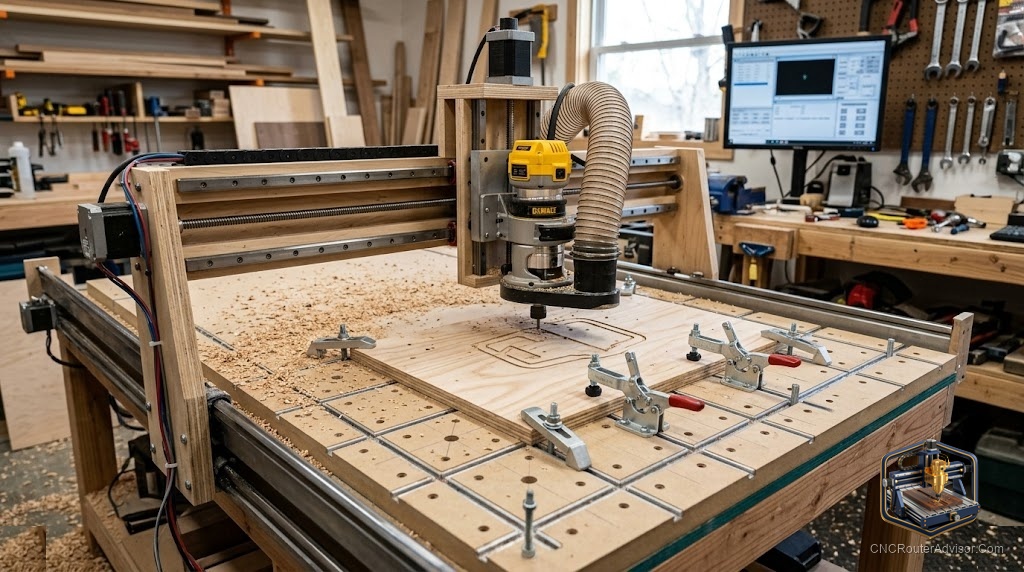
Every woodworker who owns a router table eventually wonders whether a CNC router makes it redundant. The answer is neither yes nor no, it is a question of what each machine is actually built for, and understanding the difference saves you from buying the wrong tool or from missing what a CNC router can do that a traditional router table cannot. The two machines share a cutter (a spinning bit) and some operations, but they are not substitutes for each other in most shops.
A traditional router table fixes a handheld router upside-down under a flat table, so you push material against a fence and over the spinning bit. A CNC router moves the bit over stationary (or clamped) material along programmed X, Y, and Z coordinates. One is a hand-fed joinery machine; the other is an automated fabrication machine. They overlap on some edge profiles and some shallow operations, but their strengths diverge sharply.
The short answer to “CNC router vs. router table”: use a traditional router table for hand-fed operations that need feel, continuous profiles on long edges, and repetitive joinery that does not require coordinates, like edge molding, raised panels, and mortise-and-tenon work. Use the CNC router for anything with a programmed shape, batch repeatability, pocketing, carving, and work where removing the operator’s hand from the process is the point.
What a router table does that a CNC router cannot replicate well
The router table’s superpower is feel. You feed material by hand, gauge resistance, adjust speed in real time, and make micro-corrections mid-pass. For continuous edge profiles (applied molding, panel raising, cope-and-stick joints), this hand-fed approach is fast, intuitive, and produces smooth results on long runs that a CNC router would need many more axis moves to replicate.
Router tables also handle curved freehand template routing, cope-and-stick joinery, and small operations (rounding an edge, cutting a chamfer) faster than setting up a CNC program would take. For a shop that does cabinet face frame assembly and edge profiles in high volume, a good router table is still faster per linear foot of edge profile than a CNC router is.
The honest limit of a router table: it cannot cut pockets, reliefs, or any shape that requires coordinated X and Y axis movement without the operator guiding it freehand, which introduces human variation. It also cannot produce batch parts to exact dimensions without skilled operators and good jigs.
What a CNC router does that a router table cannot
The CNC router’s advantage starts exactly where the router table’s ends. Any operation that requires a programmed shape, a pocket, a carving, a sign, a template, or a part that needs to be the same every single time belongs on the CNC router. The machine does not tire, does not drift, and runs the same G-code on the hundredth part that it ran on the first.
Pocketing, 3D carving, precise drilling patterns, batch joinery (like drill patterns for cabinet hardware), and complex contour cutting all belong on the CNC. So does any work that would require a jig on the router table, because the CNC’s program is a more precise version of that jig.
The CNC router’s work surface is also the setup. You clamp material flat, set your workholding, and run. The router table requires a fence setup, featherboards, push blocks, and operator skill for every profile. For one-off curved or carved parts, the CNC router wins on both setup time and quality.
When you genuinely want both
The honest truth for most small to mid-size woodshops is that both machines earn their place. A router table handles the high-volume joinery and edge profiling quickly, and a CNC router handles the batch fabrication, carving, and complex shapes. Many shops own both and route the work to whichever machine is faster for each operation.
If you are building out a shop and choosing between the two on a limited budget, the question is which operation dominates your work. Edge profiling and hand-fed joinery every day suggests the router table. Batch signs, cabinet doors, and custom parts suggest the CNC router. If you do roughly equal amounts of both, buy the CNC router first (it is harder to substitute) and add the router table when volume justifies it.
Setting up either machine well: the shared principles
Both machines share some fundamentals. A flat work surface (spoilboard for the CNC, table flatness for the router table) is the foundation of consistent work. Proper workholding is mandatory on both, since material that moves causes ruined parts on either machine. And dust extraction is a health requirement, not an option, for both, since both generate significant wood dust at production feeds.
For CNC router workholding and spoilboard setup specifically, our guide on how to choose a CNC router covers the setup accessories worth prioritizing for different work types.
The takeaway: a router table CNC setup is not a single thing, it is two different machines for two different sets of tasks. Know the difference, route your work to the right tool, and both machines pay for themselves in time and quality.
Frequently asked questions
Does a CNC router replace a traditional router table? Not fully. A CNC router excels at programmed, repeatable cutting; a router table excels at hand-fed edge profiles and joinery that benefit from operator feel. Many shops use both.
What operations are faster on a traditional router table? Continuous edge profiles, cope-and-stick joinery, panel raising, and freehand template routing on long runs of material.
What operations are faster on a CNC router? Pocketing, carving, batch parts to exact dimensions, any operation requiring programmed X/Y coordinates, and any work where repeatability matters more than feed rate.
Can a CNC router cut edge profiles? Yes, but it is slower per linear foot than a router table for long continuous edges. The CNC router shines on profiles that need to change direction, have variable geometry, or need to be placed within a larger toolpath.
What workholding is used for a CNC router? Clamps, double-sided tape with CA glue, through-screws into a spoilboard, or vacuum tables for production sheet work.
Which machine should a beginner buy first? Depends on the work: CNC routers are harder to substitute for (no manual equivalent for programmed carving), so for mixed work, the CNC router is usually the higher-priority buy.
References
- WorkshopCalc, “Best CNC Routers: Table and Workholding” — https://workshopcalc.com/guides/best-cnc-routers
- CNC Dad, “Router Table vs CNC Router” — https://www.cnc-dad.com/blog/best-cnc-router-for-beginners/
- Carbide 3D, “CNC Router Fundamentals” — https://docs.carbide3d.com/