
Laser Head for CNC Router: Choosing the Right Module by Power and Purpose
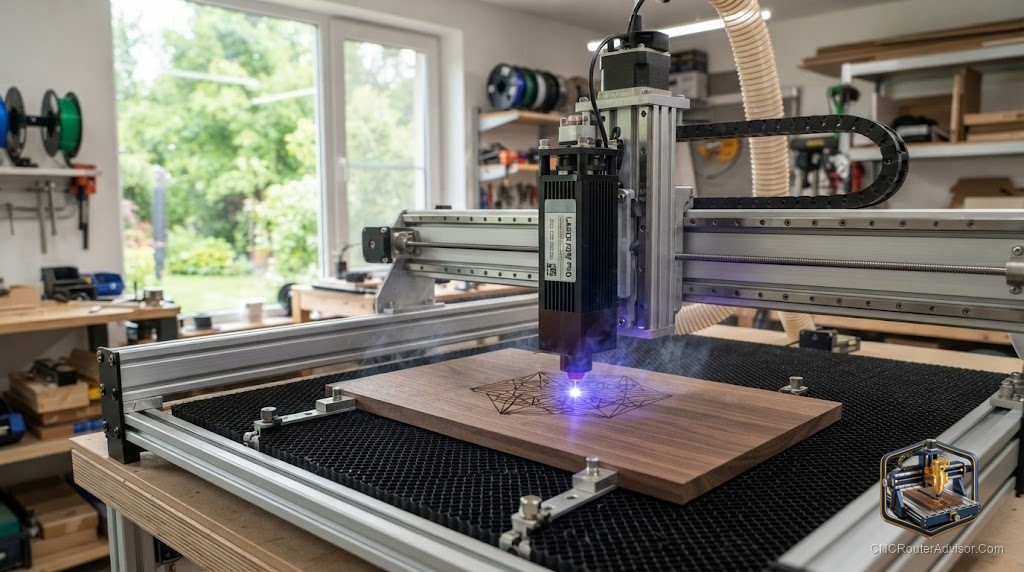
Ask ten CNC owners what a “laser head” is and you will get ten slightly different answers, which is the first problem to solve before you buy one. The laser head, also called the laser module, is the business end of adding laser capability to your router, and choosing it comes down to one honest question that most product pages dodge: how much optical power do you actually need? Get that number right and the head transforms your machine. Get it wrong and you either overpay for power you never use or underbuy and stare at a beam that will not cut what you promised yourself it would.
A laser head for a CNC router is the self-contained module, containing the laser diode, focusing optics, cooling, and driver, that mounts to your machine and does the engraving or cutting. It replaces or sits beside the spindle and rides the router’s existing motion system. The key spec is optical output power, measured in watts, which determines whether the head is suited to fine engraving, thin-material cutting, or thicker single-pass cuts.
The short answer: pick a laser head by optical output first (roughly 5 watts for engraving, about 10 watts for cutting thin wood and dark acrylic, and higher for thick single-pass cutting), then confirm it mounts to your machine and connects to your controller, then buy the safety gear before you buy anything else. Power and purpose are the whole decision, and the marketing wattage on the box is the number most likely to mislead you.
Optical output is the only power number that matters
Let us settle the spec confusion first, because it drives every other choice. Laser heads are advertised with a big “wattage” that usually refers to electrical input power, and a smaller, more honest figure called optical output power. Optical output is the light that actually reaches the material and does the work. A module boasting a large input number can have modest optical output, so a buyer who shops on the headline figure ends up disappointed. Always find the optical output rating, and compare heads on that.
Why it matters practically: optical output decides both what you can cut and how fast. More optical watts cut thicker material and cut faster, which on a production-minded shop translates directly into less time per part. For a hobbyist engraving coasters, that extra power is wasted. For someone cutting stacks of thin plywood, it is the difference between a pleasant workflow and a slow, scorchy one.
Matching the head to what you make
Think in three tiers, and be honest about which one your projects fall into.
Detail engraving (around 5 watts optical). If your work is names, logos, photo-style engraving, and marking wood, leather, slate, or anodized aluminum, a focused engraving head is ideal, and going bigger buys nothing but heat. The Genmitsu CFL55 5.5W laser module is built around a compressed spot for exactly this kind of fine detail, and it keeps things simple for engraving-first owners.
Cutting thin material (around 10 watts optical). If you want to cut thin plywood, cardstock, leather, and dark acrylic, and engrave faster, step up. The LASER TREE 10W optical module rates its output by real optical power, which is what you want when clean cutting, not just marking, is on the menu.
Thicker single-pass cutting (high output). If you routinely cut thicker stock and want fewer passes and higher speed, a high-output head like the FoxAlien 40W module earns its keep, cutting thicker material faster than lower-power heads. It runs hotter and costs more, so it is the right buy only when your material and volume justify it.
The honest flaw shared across all diode laser heads: none of them cut metal, and even high-output diodes slow down dramatically in thick hardwood compared to a CO2 laser. If thick or fast cutting is your core need, a diode head is a compromise, and you should weigh a dedicated laser machine instead.
Mounting and control: the fit check
A laser head only helps if it physically fits and electrically connects. On fit, modules ship with brackets for common spindle mount diameters, so confirm your carriage matches before ordering to avoid a fabrication detour. On control, most heads expect a PWM signal so the beam modulates with speed and shuts off during rapid moves, and your controller needs a spare output capable of that. Many GRBL-based boards manage this cleanly, but wiring varies, so read your controller’s documentation and the head’s connector spec together. Then enable laser mode in your control software, which is the setting that prevents scorch marks during travel moves.
Safety scales with power
This part is not negotiable and gets more serious as optical power climbs. A cutting-capable laser head can damage eyesight from a stray reflection instantly, so wavelength-matched laser safety glasses are mandatory whenever the head is powered. Add fume extraction, because engraving and cutting wood, leather, and acrylic release fumes you should not breathe, and never leave the head running unattended given the real fire risk. The more powerful the head, the more rigorously these rules apply.
Who should buy which head
Buy a 5 watt engraving head if you mostly personalize and mark and rarely cut. Buy a 10 watt head if you want a genuine do-both tool that engraves well and cuts thin material. Buy a high-output head only if thicker, faster cutting is a regular need and you accept the heat, cost, and safety demands. And skip the diode route entirely if your work is thick-material or metal cutting, where a dedicated machine wins.
If you are still selecting the router underneath the head, our guide on how to choose a CNC router helps pick a base that drives a laser cleanly.
The takeaway: a laser head is a purpose-bought part, not a one-size upgrade. Decide whether you are engraving or cutting, buy the optical output that matches, confirm it fits and connects, and protect your eyes and lungs. Do that and the right head makes your CNC router feel like two machines in one.
Frequently asked questions
What is a laser head for a CNC router? It is the self-contained laser module, with the diode, optics, cooling, and driver, that mounts to the machine and does the engraving or cutting using the router’s motion system.
What is the difference between input watts and optical output? Input watts is electrical power drawn, while optical output is the light that reaches the material and does the work. Always compare heads by optical output, since it decides what you can cut.
How many watts do I need to cut wood? Around 10 watts optical cuts thin plywood and dark acrylic well. Thicker single-pass cutting wants higher output, while roughly 5 watts is aimed at engraving rather than cutting.
Can a laser head cut metal? No. Diode laser heads engrave and mark coated or anodized metals but do not cut metal. That is outside what these modules do.
How does a laser head connect to my machine? Most expect a PWM signal from a spare controller output, plus a bracket sized to your spindle mount. Check both your controller’s documentation and the head’s connector before buying.
Is a laser head dangerous? Yes, if used carelessly. A cutting-capable head can damage eyesight instantly, so wavelength-matched safety glasses, fume extraction, and never leaving it unattended are required.
References
- OptLasers, “Laser Heads for CNC Engraving and Cutting” - https://optlasers.com/laser-heads-for-engraving
- Endurance Lasers, “Choosing the Right Laser Module Power” - https://endurancelasers.com/laser-power-guide/
- All3DP, “Diode Laser Power: Optical vs Input Watts Explained” - https://all3dp.com/2/diode-laser-power-explained/