
How to Make a CNC Router: A Step-by-Step Build Guide
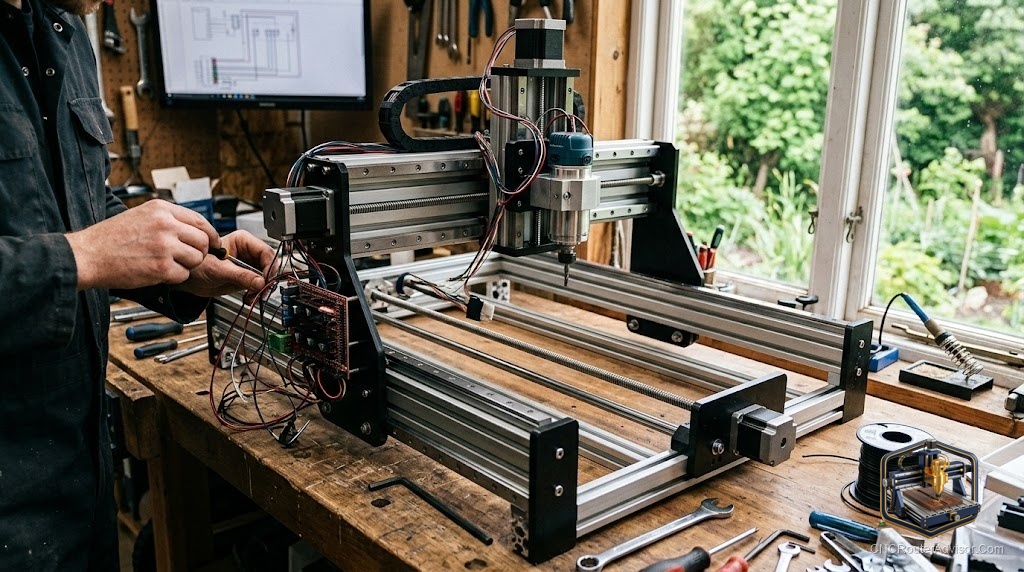
The cheapest CNC router you will ever own is the one you build yourself, and it is also the most expensive in hours. That trade is the whole story. A DIY CNC router can cost a fraction of a bought machine and teach you every system inside it, but it will ask for weekends, patience, and at least one part you order twice. If you go in knowing that, building your own is one of the most satisfying projects in a home shop. If you go in expecting a smooth afternoon, you will quit at the wiring.
Making a CNC router means assembling a rigid frame, a motion system that moves a cutting head along the X, Y, and Z axes, a spindle to spin the bit, and a controller that reads G-code and drives the motors. You can build every part from raw stock, or start from a kit that ships the tricky bits pre-made. Both count as “making” one, and the right choice depends on whether you want a machine or a project.
The short version: pick a size and drive system, build or buy a frame stiff enough to not flex, mount linear rails and either ball screws, lead screws, or timing belts, add stepper motors and a GRBL controller, bolt on a trim router or spindle, wire it, and dial it in. The order matters, because a mistake early (a frame that racks, a rail that is not square) haunts every cut afterward.
Step 1: Decide what you are really building
Before buying anything, answer one question: what is the largest part you want to cut? That sets your work area, and work area drives everything else. A small desktop CNC router for signs and inlays is a completely different build from a 4 by 8 foot sheet machine. Bigger is not better here. A larger frame is harder to keep rigid, costs far more, and eats shop space, so size to the job you actually have.
Then pick a drive system. Timing belts are cheap, forgiving, and fine for wood and plastic. Lead screws add precision for a modest jump in cost. Ball screws give the best accuracy and the least backlash, and they cost the most. Most first builds land on belts or lead screws, and that is a sensible place to start.
Step 2: Build a frame that refuses to move
The frame is where DIY machines are won or lost. Aluminum extrusion (the T-slot kind) is the popular choice because it is stiff, square, and easy to bolt together, and you can expand it later. Some builders weld a steel frame for maximum rigidity, which cuts beautifully but is heavy and unforgiving to modify.
Whatever you choose, obsess over squareness and bracing. A frame that flexes under cutting force will chatter, leave rough edges, and lose accuracy no matter how good your electronics are. Corner brackets, gussets, and a flat base are not optional details, they are the difference between a machine and a wobble.
Step 3: Add the motion system
Now you make it move. Mount linear rails (supported round rail or profile rail) so each axis glides without slop. Attach your drive mechanism to each axis: belts run on pulleys, lead screws and ball screws run through anti-backlash nuts. Getting the rails parallel and the screws aligned is fussy, slow work, and rushing it shows up as binding or lost steps.
Each axis gets a stepper motor, usually a NEMA 23 on the X and Y axes and sometimes a smaller NEMA on the Z. Match the motor size to the machine: too small and it stalls under load, needlessly large and you are paying for torque you cannot use.
Step 4: Mount the cutter
Most DIY builds start with a trim router as the cutter, because it is cheap, available, and plenty for wood. Bolt it into a spindle mount sized to its body. When you outgrow it, you can upgrade to a proper spindle with a VFD for quieter, longer-lasting, speed-controlled cutting. Starting with a trim router and upgrading later is a completely legitimate path, and it keeps the first build affordable.
Step 5: Wire the electronics and load a controller
The electronics are where beginners freeze, and it is more methodical than scary. You need a power supply, stepper drivers, and a control board. For most hobby builds that board runs GRBL, the open-source firmware that turns G-code into motor pulses. Wire the steppers to the drivers, the drivers to the board, the board to a computer over USB, and add an emergency stop you can actually reach. Label your wires. Future you will be grateful.
Step 6: Square it, test it, and cut air
Before cutting anything, jog each axis and confirm it moves the right direction and the right distance. Run a part with no bit (an “air cut”) to catch mistakes for free. Then cut a simple calibration square and measure it. If the machine commands 100 mm and cuts 98, you fix that in the settings, not by guessing. This tuning stage is what separates a machine that “works” from one you trust.
The honest alternative: start from a kit
Here is the advice most build guides skip. If your goal is to have a CNC router rather than to learn machine building, a ready-made kit will get you cutting this weekend instead of next month, often for less than the sum of parts you would buy piecemeal. A compact desktop kit like the Genmitsu 3018-PROVer V2 ships with limit switches, a Z-probe, and an emergency stop already sorted, which are exactly the details first-time builders forget. The plainer Genmitsu 3018-PRO strips it back further for pure learning.
The drawback of a small kit is honest too: the work area is tiny and the frame is light, so it is a teacher, not a production machine. But assembling one first teaches you how the axes, controller, and workholding fit together, and that knowledge makes a later scratch build far less intimidating. Skip the kit only if the building itself is the point.
For a fuller look at matching a machine to your projects before you commit to a build, our guide on how to choose a CNC router is worth a read.
The reward at the end is real. A machine you built is one you can repair, upgrade, and trust, because you know every bolt in it. Just size it honestly, spend your patience on the frame and the motion system, and cut air before you cut wood.
Frequently asked questions
Is it cheaper to build or buy a CNC router? For small machines, a ready-made kit is often as cheap as buying parts once you count shipping and the parts you order twice. For large machines, building can save real money, but only if you value your time lightly.
How long does it take to build a CNC router? A simple kit assembles in a few hours. A full scratch build of a mid-size machine realistically runs many weekends, especially the frame squaring and wiring.
What tools do I need to build one? Basic hand tools, a drill, taps for threading extrusion, calipers, and a reliable square. Precise measuring tools matter more than fancy power tools here.
Can a homemade CNC router cut aluminum? Yes, if the frame is rigid enough and you take light passes at the right speeds. Wood and plastic are far more forgiving for a first build.
What controller should a beginner use? A GRBL-based control board is the standard starting point because it is cheap, widely documented, and runs common free sender software.
Do I need limit switches and a Z-probe? They are not strictly required, but they prevent crashes and make setup far faster. Kits that include them save real frustration.
References
- Instructables, “DIY CNC Router” - https://www.instructables.com/DIY-CNC-Router/
- Instructables, “Building a CNC Router” - https://www.instructables.com/Building-a-CNC-router/
- All3DP, “DIY CNC Router: Which Parts Do You Need?” - https://all3dp.com/2/diy-cnc-router-parts-build-own-cnc-router/
- CNCCookbook, “Complete CNC Router Parts (DIY Guide)” - https://www.cnccookbook.com/cnc-router-parts/