
How Does a CNC Router Work? Process, Components, and Examples
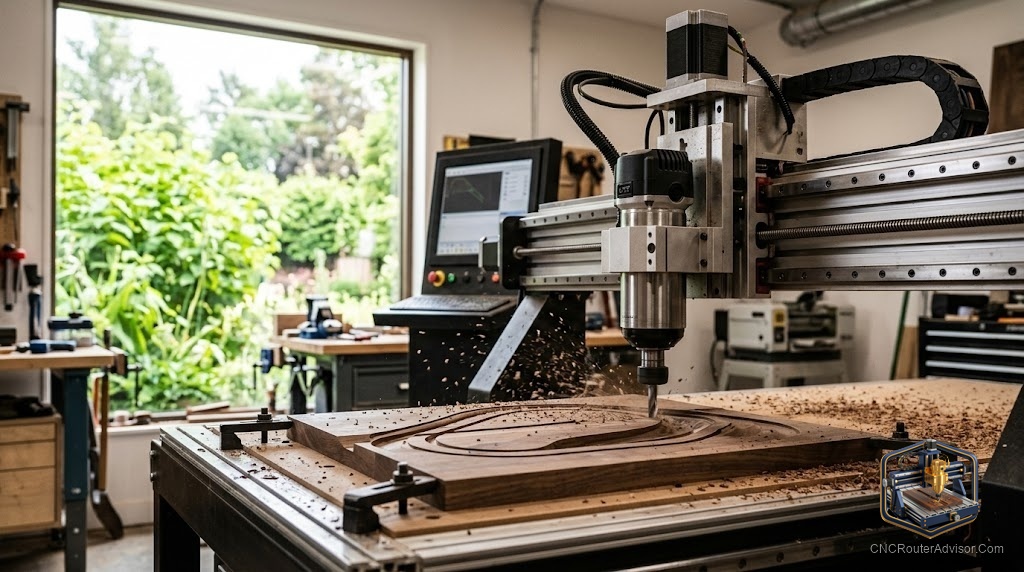
The first time you watch a CNC router cut, the strange part is how calm it looks. A bit spins, a gantry glides, and a flat sheet of plywood slowly becomes a sign, a guitar body, or forty identical cabinet parts, with nobody’s hands anywhere near the cutter. It looks like sorcery right up until you understand the handful of systems doing the work. Once you see those, the machine stops being mysterious and starts being a tool you can reason about, budget for, and fix.
A CNC router is a computer-controlled cutting machine that moves a spinning bit through wood, plastic, foam, or soft metal to carve shapes a design file describes. CNC stands for Computer Numerical Control, which is a fancy way of saying the machine reads coordinates instead of following your hands. The result is repeatable: cut one part or a hundred, and each one comes out the same.
Here is the short answer to how it works. You draw a part in CAD software, a CAM program converts that drawing into G-code (a list of coordinate moves and speeds), and the machine’s controller turns that code into electrical pulses that drive motors along the X, Y, and Z axes while the spindle spins the bit. The bit removes material along the programmed path, and what is left is your part.
The core components, and what each one actually does
Strip away the branding and every CNC router is the same six things working together.
The frame is the body. It might be aluminum extrusion on a hobby machine or a welded steel frame on a production one, and its only job is to not move. Frame rigidity is the single most underrated spec on the whole machine, because any flex in the frame shows up as a bad cut. A machine that looks identical to another on paper can cut far worse simply because it flexes under load.
The gantry is the bridge that carries the cutting head back and forth. It rides on the motion system: linear rails or wheels that guide movement, plus a drive mechanism (a ball screw, a lead screw, or a timing belt) that actually pushes the axis along. Ball screws are the most precise and the most expensive, timing belts are cheaper and common on lighter machines, and lead screws sit in between.
The spindle is the muscle. It holds and spins the bit, and spindle power decides how hard and how fast you can cut. Larger machines use a dedicated spindle with a VFD (variable frequency drive) that sets the speed electronically and runs quietly. Many hobby machines instead bolt on a trim router, the same handheld tool you would buy for edge work, which is louder and has fewer speed options but costs far less.
The controller is the brain. On smaller machines this is usually a GRBL controller, an open-source board that reads G-code and fires the motors. Bigger machines run dedicated industrial controls. Either way, the controller is what converts a text file into motion.
The process, start to finish
A finished part travels through four stages, and skipping any one of them ends badly.
- Design (CAD). You draw the part in a CAD program. This is where dimensions live, so mistakes here become mistakes in wood later.
- Toolpaths (CAM). CAM software decides how the bit moves: which areas to pocket out, how deep each pass goes, and how fast to feed. It then exports G-code.
- Setup. You clamp your material to the bed using workholding (clamps, tape and glue, or a vacuum table), load the correct bit, and set the origin so the machine knows where zero is.
- The cut. The controller runs the G-code. The spindle spins up, the axes move, and the bit removes material pass by pass until the part is free.
The part where beginners lose hours is setup, not cutting. Getting the material truly flat, the bit truly secure, and the origin truly correct is 90 percent of a clean result.
Why the same file can cut differently on two machines
Give the identical G-code to a lightweight desktop CNC router and a heavy steel-framed one and you will get two different parts. The heavy machine holds its line under cutting force, so edges come out crisp. The light one deflects a little, so you see chatter marks and slightly soft corners. This is why frame rigidity, the motion system, and spindle power matter more than the marketing photos. A desktop machine is not worse at everything, it is just honest about its limits: shallow passes, smaller bits, patience.
| System | Hobby / desktop CNC router | Production CNC router |
|---|---|---|
| Frame | Aluminum extrusion | Welded steel, sometimes cast bed |
| Drive | Timing belt or lead screw | Ball screw or rack and pinion |
| Cutter | Trim router | Spindle with VFD |
| Control | GRBL controller | Industrial CNC control |
| Best at | Signs, small parts, learning | Sheet goods, all-day production |
What people actually make with them
The honest range is wide. Hobbyists cut carved signs, layered wall art, cutting boards, and small furniture parts. Small businesses run cabinet doors, store fixtures, and inlays. Instrument builders cut guitar bodies and necks because the repeatability beats hand routing. Prototype shops mill soft aluminum brackets and jigs. The common thread is anything flat-ish that benefits from being cut the same way twice.
If you are still deciding which machine fits your work, our guide on how to choose a CNC router walks through matching work area and rigidity to the projects you actually plan to cut.
Here is the takeaway worth keeping. A CNC router is not one clever invention, it is six ordinary systems that only look impressive when they cooperate. Understand the frame, the motion system, the spindle, and the controller, and you can read any machine’s spec sheet and predict how it will cut before you spend a dollar. That is the difference between buying a photo and buying a tool.
Frequently asked questions
Is a CNC router the same as a CNC mill? No. A CNC router spins a smaller bit very fast and is built for wood, plastic, and soft metal over a large flat area. A CNC mill spins slower with far more rigidity and torque and is built for hard metal. Routers cover area, mills conquer hardness.
Do I need to know how to code to run one? Not really. You draw in CAD and let CAM generate the G-code for you. You should learn to read G-code eventually, because it helps you troubleshoot, but you do not write it by hand for normal work.
What is the difference between a spindle and a trim router? A spindle is a purpose-built motor, usually paired with a VFD for speed control, that runs quieter and lasts longer under load. A trim router is a repurposed handheld tool that is cheaper and louder with limited speed steps. Many good hobby machines start with a trim router.
What materials can a CNC router cut? Wood, plywood, MDF, acrylic and most plastics, foam, and soft metals like aluminum and brass with the right bit and slow passes. It is not the tool for steel.
How accurate is a CNC router? Accuracy depends on the motion system and frame. Belt-driven hobby machines land within a few tenths of a millimeter, while ball-screw machines on a rigid frame hold tighter and repeat better cut after cut.
What software do I need? One CAD program to draw and one CAM program to make toolpaths, though many beginner packages combine both. Your controller then runs the exported G-code.
References
- Xometry, “CNC Router: Definition and How It Works” - https://www.xometry.com/resources/machining/what-is-a-cnc-router/
- JLCCNC, “CNC Routing Explained: Machines, Process, and How It Works” - https://jlccnc.com/blog/what-is-cnc-routing
- Matt Ferraro, “Anatomy of a CNC Router” - https://mattferraro.dev/posts/cnc-router
- CNC Factory, “The Anatomy of a CNC Router” - https://cncfactory.com/the-anatomy-of-a-cnc-router/