
CNC Router Machine for Beginners: Features, Specifications, and Buying Considerations
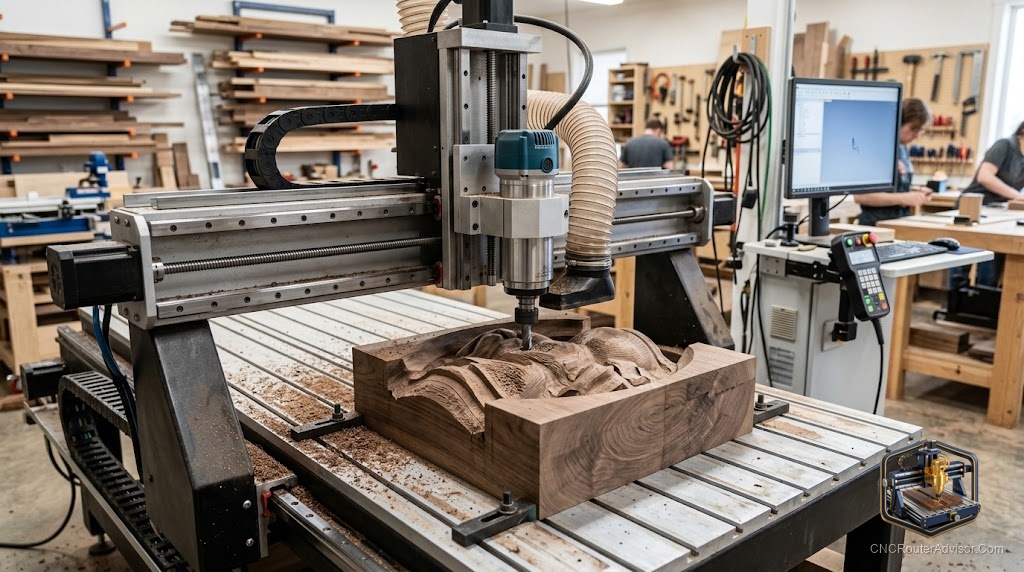
Every expert CNC operator made the same first mistake: buying either too much machine or too little. Too much, and they spent six months fighting software, calibration, and infrastructure before cutting anything useful. Too little, and they hit the ceiling in three months and bought a second machine anyway. For a beginner, the goal is not the most impressive machine on the market, it is the machine that teaches you the workflow, the tooling, the software, and the real-world craft as quickly and cheaply as possible, and then either grows with you or sells to fund the next step up. This guide is about choosing that machine.
A CNC router machine for beginners is a computer-controlled cutting machine sized and priced for people learning the full workflow: design, CAM, setup, fixturing, running a job, and troubleshooting. It is rigid enough to cut wood and light materials well, approachable enough not to require industrial infrastructure, and affordable enough that the barrier to entry is not the cost of the machine.
Short answer: start with a machine in the hobbyist-to-entry-prosumer range, prioritising rigidity and a supportive community over table size. Learn the workflow on the machine you have. The jump to a larger or more capable machine makes sense once you know what you actually need from it.
What a beginner actually needs from a machine
Not the biggest table. Not the most powerful spindle. Not an automatic tool changer. What a beginner needs is a machine that is:
Rigid enough to cut wood, MDF, and acrylic cleanly at normal feeds and speeds, so the cuts teach the right lessons rather than masking poor results in machine flex.
Well-supported with documentation, a community or forum, and a manufacturer who answers questions. The first six months of CNC involves a lot of questions, and knowing where to get answers is as important as the machine’s spec sheet.
Appropriately sized for the actual work. A 3018 desktop machine cuts small parts and teaches the workflow; a 4040 machine handles larger projects; a 4-by-4 or full-sheet machine is serious production capacity that a beginner rarely uses well at first.
Paired with real software without an enormous learning curve. Machines with a supported CAM workflow remove one barrier from the process.
Machines worth considering as a starting point
For absolute beginners wanting to learn the workflow on a small, low-risk machine, the Genmitsu 3018-PRO CNC router is a consistent starting recommendation. It is small, affordable, cuts wood and acrylic well within its limits, and has a large community of users whose tutorials and troubleshooting cover almost every beginner question. The honest flaw: the work area is small (roughly 300mm by 180mm) and the machine is genuinely limited. It is an excellent teacher and a capable hobbyist machine, not a production tool.
The step up, for beginners who want more work area from the start or who already know their projects are larger, is the Genmitsu PROVerXL 4030 CNC router. The 400mm by 300mm work area handles more useful project sizes, and the construction is more rigid than the entry-level 3018. It bridges the gap between hobbyist learning machine and serious small-shop tool without jumping to full prosumer cost.
For beginners who want to start at the prosumer level, the FoxAlien Masuter Pro CNC router machine provides a larger, more capable machine with an all-metal frame and a better spindle, at a price point that is still accessible. It costs more and has a steeper initial setup learning curve, but it also does not limit you as quickly as the entry-level alternatives.
Software: the real learning curve
Most beginners underestimate how much of CNC routing is software. The machine is the hardware; the design and CAM software is where you spend most of your early time. Machines that come with recommended software and tutorials for that software remove one barrier. Start with something you can actually learn on, not the most powerful CAM suite on the market, and move up when the basic software stops meeting your needs.
What to expect in the first three months
The first month is mostly setup, calibration, and learning the software. You will break bits, occasionally in the first week. The second month is running projects successfully and building intuition about feeds and speeds. By the third month, the workflow is becoming natural. This is the normal curve, not a sign that something is wrong, and the community of users on any popular beginner machine is full of people at every stage of it.
The verdict
For a beginner, the right machine is the one that teaches you the workflow without overwhelming you with complexity or limiting you so severely that you cannot do meaningful work. Start in the hobbyist-to-entry-prosumer range, pick a machine with a real community and good documentation, and invest as much attention in the software as the hardware. The upgrade path exists when you know what you need from the next machine.
Three things to remember:
- Rigidity, community support, and appropriate size matter more for a beginner than table size or spindle power.
- Breaking bits in the first weeks is normal; it is part of the learning process for every CNC operator.
- Invest in understanding the software as seriously as the machine; most of the early learning curve is CAM, not hardware.
FAQ
What is the best CNC router machine for a beginner? Depends on budget and project size. The Genmitsu 3018-PRO is a strong entry point for learning the workflow at low cost. The Genmitsu PROVerXL 4030 suits beginners who want more work area from the start. The FoxAlien Masuter Pro is a step up to prosumer for those who want to start with more capability.
How hard is it to learn CNC routing? The machine itself is straightforward to set up. The workflow, design, CAM, fixturing, and feeds and speeds, takes a few months to become natural. With a good community and documentation, most beginners are cutting useful parts within a month.
How much does a beginner CNC router cost? Entry-level machines start at a few hundred dollars for desktop hobby machines. Mid-range prosumer machines cost more. The right starting point depends on the scale of work you expect to do.
Do I need a powerful spindle to start? No. Most beginner machines use a trim router or a small spindle that is more than sufficient for wood, MDF, acrylic, and light plastics. A powerful spindle becomes relevant when you move to harder materials or production volumes.
What software do I need for a beginner CNC router? Design software (a CAD program or simpler design tool) and CAM software to generate toolpaths. Many beginner machines come with recommended software bundles. Start with the software the manufacturer supports to keep the learning curve manageable.
Why did my bit break on my first run? Common causes: too deep a cut, too slow a feed rate, wrong bit for the material, or workholding that let the part shift. Breaking bits is normal for beginners and teaches faster than anything else. Check the settings and workholding, then try again.
Should I start with a small or large machine? Start with a machine sized for your actual projects, not your aspirational ones. Beginners rarely need full-sheet capacity, and a smaller, simpler machine teaches the workflow more efficiently.
References
- 731 Woodworks, Best CNC Machines for Small Woodworking Shops (beginner picks): https://www.731woodworks.com/731-blog/best-cnc-machines-for-small-woodworking-shops-in-2025-beginner-to-pro-picks
- CNC Dad, Best CNC Router for Beginners: https://cnc-dad.com/blog/best-cnc-router-for-beginners/
- Genmitsu, CNC Router Machines for Hobbyists: https://www.genmitsu.com/